
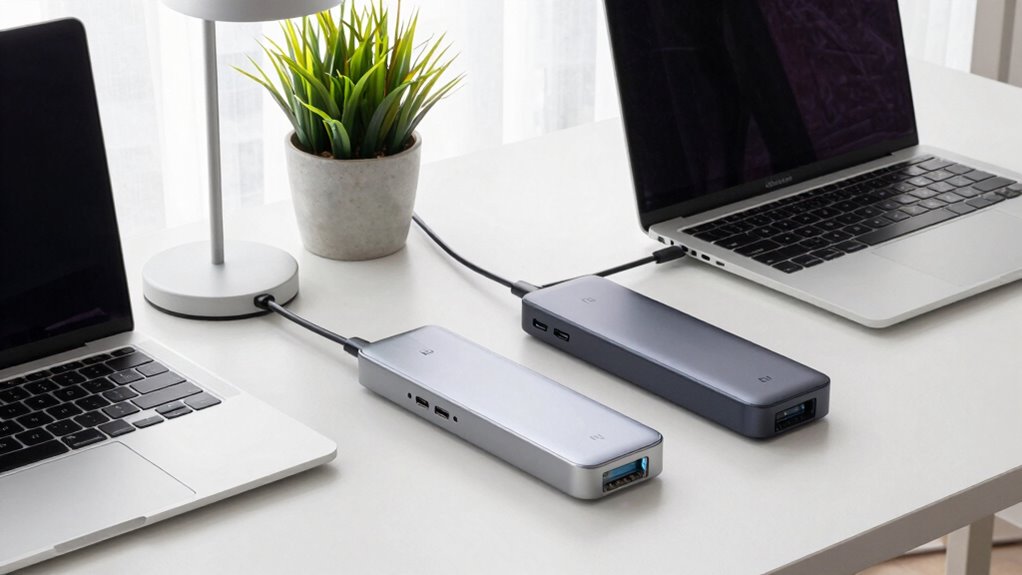

Finding the right USB C dock for a MacBook Air as a student involves balancing portability, versatility, and power. The best options provide multiple ports to connect your accessories, external displays, and charging needs without adding bulk. The VENTION 6-in-2 USB C Hub stands out as the overall best for its magnetic design and high-speed capabilities, while the Anker USB-C Hub offers a reliable, straightforward solution at a more affordable price. However, tradeoffs include limited port variety on some models and the need for compatibility checks. Continue reading for a detailed breakdown to help you pick the perfect dock for your studies.

Get business pricing on monitors, keyboards and dev gear
- Business-only prices and quantity discounts
- Tax-exempt purchasing
- Multiple users, one account, clear invoices
Key Takeaways
- The top-ranking docks balance port variety with compact design, essential for students on the go.
- Power delivery (PD) support varies; choosing a dock with at least 60W is key for charging your MacBook Air while using peripherals.
- High refresh rate HDMI outputs (up to 4K@240Hz) are rare but beneficial for certain external display needs.
- Build quality and ease of use differ significantly; magnetic or detachable designs add convenience but may increase cost.
- Compatibility with multiple MacBook Air models and future-proofing are important to avoid obsolescence.
| VENTION 6-in-2 USB C Hub for MacBook and iPad, 80Gbps Detachable Magnetic 8K USB-C Dock with 4K@240Hz HDMI, 140W PD Charging |  | Best for Ultra-High-Resolution Video and Flexibility | Ports: USB-C x2 (including magnetic detachable), HDMI, USB A 3.0 x2, USB 3.2 Gen 1 | Video Output: 8K@60Hz, 4K@240Hz | Charging Power: 140W MAX PD | VIEW ON AMAZON | See Our Full Breakdown |
| USB C Hub Adapter for MacBook Pro/Air M1-M5 (2018-2026), 8-in-2 Multiport Dock with HDMI 4K@60Hz, Thunderbolt, USB-C, USB 3.0, SD Card Reader |  | Best for Versatile Compatibility and Multi-Device Support | Compatibility: MacBook Pro/Air 2018-2026 | HDMI Output: 4K@60Hz | Thunderbolt Port: Supports 5K@60Hz, 40Gbps | VIEW ON AMAZON | See Our Full Breakdown |
| Hiearcool USB C Hub, USB C Dock, 4K@60Hz HDMI, 1Gbps Ethernet, Space Gray |  | Best for Reliable Networking and Productivity | HDMI Port: 4K@60Hz | Ethernet: 1Gbps | Power Delivery: Up to 100W | VIEW ON AMAZON | See Our Full Breakdown |
| Selore USB C Hub HDMI Adapter for MacBook Pro/Air and More |  | Best for Compact Multi-Functionality and Video Quality | HDMI Port: 4K@60Hz | USB Ports: 2 USB 3.0 | USB-C Data: 1 | VIEW ON AMAZON | See Our Full Breakdown |
| Anker USB-C Hub for MacBook, 7-in-2 Multi-Function Dock with 4K@60Hz HDMI |  | Best Compact Multi-Function Hub with High-Resolution Support | Ports: 1 multi-function USB-C, 1 USB-C data, 2 USB-A, 1 HDMI, 1 SD/microSD | Charging Power: Up to 100W | Video Output: 4K@60Hz, 5K multi-function port | VIEW ON AMAZON | See Our Full Breakdown |
| MacBook Pro Dual Monitor Docking Station with 4K@60Hz HDMI for M5/M4/M3 Pro & Max |  | Best for Dual 4K Display Enthusiasts and Power Users | Hardware Interface: HDMI, MicroSD, USB 2.0, USB 3.2 Gen 2×2 | Compatible Devices: MacBook Pro 14″/16″ (2021-2026), MacBook Air 13″/15″ (2025-2026), MacBook Pro 13″ (2016-2020), MacBook Pro 15″/16″ (2016-2019), MacBook Air (2018-2020) | Total USB Ports: 4 | VIEW ON AMAZON | See Our Full Breakdown |
| MOKiN MacBook Pro Docking Station Dual Monitor HDMI Adapter |  | Best for Multi-Peripherals and Creative Professionals | Ports: 2 HDMI, 2 USB 3.0, 1 USB 2.0, SD/TF Card Reader, Ethernet, Thunderbolt 3, USB-C Power Delivery | Resolution: Up to 4K@60Hz (single HDMI), 4K@30Hz (dual HDMI) | Power Delivery: 100W | VIEW ON AMAZON | See Our Full Breakdown |
| MOKiN USB C Hub HDMI Adapter, 7-in-1 Dongle with SD/TF Card Reader, 100W Power Delivery, 2 USB 3.0 Ports |  | Best for Versatile Connectivity and On-the-Go Use | HDMI Output: 4K@60Hz | USB C Data Ports: 2 | USB 3.0 Ports: 2 | VIEW ON AMAZON | See Our Full Breakdown |
| UGREEN USB C Hub 5-in-1 Multiport USB Adapter with 4K HDMI and 100W Power Delivery |  | Best for Budget-Friendly Versatility and Compatibility | Ports: 4K HDMI, USB C PD, USB A 3.0, USB A 2.0 x2 | Power Delivery: 100W | HDMI Resolution: 4K 30Hz | VIEW ON AMAZON | See Our Full Breakdown |
| usb c dock for macbook air student | Compatibility | Power Delivery |
|---|---|---|
| VENTION 6-in-2 USB C Hub for M | MacBook, iPad, Windows, Android, Linux | — |
| USB C Hub Adapter for MacBook | MacBook Pro/Air 2018-2026 | Supports 100W input, 85W output |
| Hiearcool USB C Hub | MacBook Pro/Air, Dell XPS, HP, Lenovo | Up to 100W |
| Selore USB C Hub HDMI Adapter | MacBook Pro/Air, MacBook M1/M2 | Up to 87W |
| Anker USB-C Hub for MacBook | Latest MacBook Air and Pro | — |
| MacBook Pro Dual Monitor Docki | — | — |
| MOKiN MacBook Pro Docking Stat | MacBook Pro/Air 13, 15, 16 inch 2017-2021 | 100W |
| MOKiN USB C Hub HDMI Adapter | — | 87W safe charging |
| UGREEN USB C Hub 5-in-1 Multip | Windows, MacOS, Linux, USB-C devices | 100W |
More Details on Our Top Picks
VENTION 6-in-2 USB C Hub for MacBook and iPad, 80Gbps Detachable Magnetic 8K USB-C Dock with 4K@240Hz HDMI, 140W PD Charging
This hub stands out for supporting 8K@60Hz video output with an impressive 80Gbps data transfer rate, making it ideal for users who need cutting-edge display clarity. Its detachable magnetic USB-C connector offers quick attachment and compatibility, especially for those frequently switching devices. Unlike other options like the USB C Hub Adapter for MacBook Pro/Air, which max out at 4K, this model emphasizes high refresh rates and ultra-high-definition output. However, the 8K output is limited to Thunderbolt-enabled devices, and the design may be less stable with certain cases, which could pose stability concerns for portable use. It excels for users demanding top-tier video quality and versatile connectivity but might be less suitable for those with thicker MacBook cases or less compatible devices.
Pros:- Supports 8K@60Hz ultra-high-definition video output
- Detachable magnetic connector for easy use and compatibility
- Multiple ports including HDMI, USB-A, and high-power PD charging
Cons:- Limited to Thunderbolt-enabled devices for 8K output
- Design may be unstable with some MacBook cases
Best for: Students or creators who require the highest resolution and flexible connection options for external displays and peripherals.
Not ideal for: Students with protective cases that cover the bottom of their MacBook or those seeking a budget-friendly, simple hub without ultra-high-res video support.
- Ports:USB-C x2 (including magnetic detachable), HDMI, USB A 3.0 x2, USB 3.2 Gen 1
- Video Output:8K@60Hz, 4K@240Hz
- Charging Power:140W MAX PD
- Material:Aluminum alloy
- Compatibility:MacBook, iPad, Windows, Android, Linux
- Dimensions:Not specified
Our verdict“This hub is best suited for users who prioritize maximum video quality and flexible connectivity, accepting some stability tradeoffs.”
USB C Hub Adapter for MacBook Pro/Air M1-M5 (2018-2026), 8-in-2 Multiport Dock with HDMI 4K@60Hz, Thunderbolt, USB-C, USB 3.0, SD Card Reader
This dock is well-suited for users with a range of MacBook models from 2018 to 2026, offering multiple ports including HDMI, Thunderbolt, and SD card reader. Compared to the Hiearcool USB C Hub, which emphasizes Ethernet and USB-A ports, this model prioritizes comprehensive device compatibility and high-speed data transfer, supporting up to 40Gbps via Thunderbolt. While it provides 4K@60Hz video output, dual monitor support is limited on M1 MacBooks, and it may not fit with some MacBook cases at the bottom. This makes it a great choice for students needing broad device support, but less ideal for those requiring dual external displays on M1 chips or case compatibility with thicker MacBooks.
Pros:- Supports 4K@60Hz video output for clear visuals
- High-speed data transfer up to 40Gbps via Thunderbolt
- Includes SD card reader for quick media access
- Supports 100W power delivery
Cons:- Limited dual monitor support on M1 Macs
- Potential fit issues with some MacBook cases
Best for: Students who use a mix of peripherals, need SD card access, and own MacBook models from 2018 to 2026 seeking reliable multi-device support.
Not ideal for: Students with M1 MacBooks aiming for dual external display support, or those with thick protective cases incompatible with this dock’s form factor.
- Compatibility:MacBook Pro/Air 2018-2026
- HDMI Output:4K@60Hz
- Thunderbolt Port:Supports 5K@60Hz, 40Gbps
- USB Ports:2x USB 3.0, USB-C, USB 2.0
- SD Card Reader:Supports SD and Micro SD up to 104MB/s
- Power Delivery:Supports 100W input, 85W output
Our verdict“This dock is tailored for students needing broad connectivity and fast data transfer, with some limitations on dual external displays for M1 models.”
Hiearcool USB C Hub, USB C Dock, 4K@60Hz HDMI, 1Gbps Ethernet, Space Gray
This hub is designed for users seeking a balance of video output and network connectivity, featuring 4K@60Hz HDMI and 1Gbps Ethernet. Compared to the Selore USB C Hub, which also offers SD card readers, the Hiearcool emphasizes Ethernet stability, making it suitable for students needing reliable internet during remote work or media transfer. Its pass-through 100W charging ensures devices stay powered during intensive tasks, but the hub’s design can be bulky for portability, and it’s limited to USB-C compatible devices. The absence of additional video outputs beyond HDMI simplifies connection but restricts multi-monitor setups, making it better suited for single-display needs.
Pros:- Supports 4K@60Hz video output for crisp visuals
- Reliable 1Gbps Ethernet connection for steady internet
- Pass-through 100W charging keeps devices charged
- Multiple USB-A ports for peripherals
Cons:- Bulky design impacts portability
- Limited to single external display support
Best for: Students who prioritize stable internet and want a reliable dock for media and productivity tasks with minimal fuss.
Not ideal for: Students aiming for multi-monitor setups or those needing extensive USB-A port options beyond three.
- HDMI Port:4K@60Hz
- Ethernet:1Gbps
- Power Delivery:Up to 100W
- USB Ports:3 USB-A 3.0
- Compatibility:MacBook Pro/Air, Dell XPS, HP, Lenovo
- Material:Space Gray
Our verdict“This hub is ideal for students seeking dependable internet and straightforward connection options without extensive multi-monitor support.”
Selore USB C Hub HDMI Adapter for MacBook Pro/Air and More
This 7-in-1 hub combines a compact form factor with solid video and data transfer capabilities, supporting 4K@60Hz HDMI and multiple USB ports, including USB 3.0 and SD card readers. Compared to the larger Ventoin 6-in-2 USB C Hub, which offers higher data transfer speeds and ultra-high-definition video, this model emphasizes portability and ease of use. Its support for 87W charging makes it suitable for daily use, but the limited power output can restrict high-power peripherals. The no-frills design suits students with minimal space or those who prefer a lightweight hub for everyday tasks, but it’s less suitable for demanding media workflows or dual-display setups on M1 MacBooks.
Pros:- Supports 4K@60Hz HDMI for clear visuals
- Compact and lightweight for portability
- Supports 87W charging for daily use
- Includes SD/microSD card readers
Cons:- Limited power output for high-power peripherals
- No support for dual external monitors on M1 Macs
Best for: Students who want a compact, all-in-one hub for video, data, and charging with easy portability.
Not ideal for: Students needing dual external displays or high-power peripherals that exceed 87W charging capacity.
- HDMI Port:4K@60Hz
- USB Ports:2 USB 3.0
- USB-C Data:1
- Power Delivery:Up to 87W
- Card Reader:microSD/SD
- Compatibility:MacBook Pro/Air, MacBook M1/M2
Our verdict“This hub suits students seeking a portable, all-in-one solution for video, data, and charging needs with straightforward functionality.”
Anker USB-C Hub for MacBook, 7-in-2 Multi-Function Dock with 4K@60Hz HDMI
This compact dock emphasizes simplicity and high-resolution output, supporting 4K@60Hz HDMI along with SD/microSD slots, USB-A, and USB-C ports. Compared to the VENTION 6-in-2 USB C Hub, which offers ultra-high data speeds and 8K support, this model focuses on a balanced set of features suitable for everyday use. Its up to 100W charging capacity and support for 5K video on the multi-function port make it appealing for students wanting reliable performance without extra bulk. However, it doesn’t support dual external displays, limiting multi-monitor setups, and it’s incompatible with some MacBook models like the MacBook Neo. This makes it a good choice for students who prioritize compactness and high-res video over multi-monitor capabilities.
Pros:- Supports 4K@60Hz HDMI for sharp visuals
- High charging power up to 100W
- Compact design avoids obstructing MagSafe port
- Supports 5K on multi-function port
Cons:- Does not support dual external displays
- Incompatible with MacBook Neo
Best for: Students seeking a small, high-res video-capable hub that can handle daily peripherals and charging without bulk.
Not ideal for: Students requiring dual external displays or advanced USB-C data transfer speeds over 40Gbps.
- Ports:1 multi-function USB-C, 1 USB-C data, 2 USB-A, 1 HDMI, 1 SD/microSD
- Charging Power:Up to 100W
- Video Output:4K@60Hz, 5K multi-function port
- Compatibility:Latest MacBook Air and Pro
- Dimensions:Compact
Our verdict“This hub is ideal for students wanting a compact, high-resolution video solution with reliable charging and minimal obstruction.”
MacBook Pro Dual Monitor Docking Station with 4K@60Hz HDMI for M5/M4/M3 Pro & Max
This docking station stands out for its ability to support dual 4K@60Hz HDMI outputs, making it an excellent choice for creative professionals and students who need crisp, high-resolution screens. Compared with the MOKiN MacBook Pro Docking Station, it offers a more streamlined setup with fewer ports but maintains high-quality output, though it sacrifices versatility in peripheral connectivity. The absence of a power adapter means you must supply your own 65W+ charger, which could be inconvenient for some users. Its compact size and fast data transfer up to 10Gbps make it ideal for multitasking, but it’s limited to specific MacBook models and doesn’t support M1/M2/M3 Macs for dual display, which may restrict some users.
Pros:- Supports dual 4K@60Hz HDMI output for crisp visuals
- Multiple USB ports including USB-C and USB-A for versatile connectivity
- Fast data transfer speeds up to 10Gbps and gigabit Ethernet
- Provides 100W power delivery for rapid charging
Cons:- Power adapter not included, requiring an external 65W+ charger
- Limited compatibility to some MacBook models, excluding M1/M2/M3 for dual display
Best for: MacBook Air students who prioritize high-quality dual monitor setups for creative work or multitasking
Not ideal for: Students with M1 or M2 MacBooks seeking native dual display support, as this dock isn’t compatible without adapters
- Hardware Interface:HDMI, MicroSD, USB 2.0, USB 3.2 Gen 2×2
- Compatible Devices:MacBook Pro 14″/16″ (2021-2026), MacBook Air 13″/15″ (2025-2026), MacBook Pro 13″ (2016-2020), MacBook Pro 15″/16″ (2016-2019), MacBook Air (2018-2020)
- Total USB Ports:4
- Number of HDMI Ports:2
- Wattage:1W
- Item Dimensions:5.34″ L x 2.28″ W x 0.7″ H
Our verdict“This dock is best suited for users who need high-quality dual 4K displays with fast data transfer and are willing to supply their own power source.”
MOKiN MacBook Pro Docking Station Dual Monitor HDMI Adapter
The MOKiN MacBook Pro Docking Station excels at expanding your workspace with 9 ports, including dual HDMI outputs supporting 4K resolution, which makes it ideal for photographers and video editors needing multiple monitors. It offers a broader array of ports than the UGREEN USB C Hub, including SD/TF card readers and Ethernet, making it more versatile for professional workflows. However, the dual HDMI support varies between 4K@60Hz and 4K@30Hz depending on the mode, which could impact high-refresh-rate workflows. Its sleek aluminum design ensures good heat dissipation, but users with a single Thunderbolt 3 port might face compatibility issues, and it does not support Apple USB SuperDrive, limiting compatibility with certain media devices.
Pros:- Supports dual 4K monitors with mirror and extend modes
- Multiple ports for peripherals and fast data transfer
- Sleek aluminum design for heat dissipation and portability
- Power delivery ensures continuous charging
Cons:- Does not support Apple USB SuperDrive
- Compatibility issues if only one Thunderbolt 3 port available
Best for: Creative students and professionals who need multiple peripherals and dual 4K monitors for editing or content creation
Not ideal for: Students with limited port options or those seeking a simple, lightweight dock for basic tasks, as this unit is more feature-rich and bulkier
- Ports:2 HDMI, 2 USB 3.0, 1 USB 2.0, SD/TF Card Reader, Ethernet, Thunderbolt 3, USB-C Power Delivery
- Resolution:Up to 4K@60Hz (single HDMI), 4K@30Hz (dual HDMI)
- Power Delivery:100W
- Data Transfer Speed:Up to 5Gbps
- Material:Aluminum
- Compatibility:MacBook Pro/Air 13, 15, 16 inch 2017-2021
Our verdict“Ideal for users who need comprehensive peripheral support and dual 4K display capability without sacrificing style or portability.”
MOKiN USB C Hub HDMI Adapter, 7-in-1 Dongle with SD/TF Card Reader, 100W Power Delivery, 2 USB 3.0 Ports
The MOKiN USB C Hub HDMI Adapter offers a compact, 7-in-1 setup that makes it easy for students to connect a range of devices. Its support for 4K@60Hz HDMI output provides sharp visuals for presentations or streaming, while the SD/TF card readers appeal to media students and photographers. Compared to larger docks like the MacBook Pro Dual Monitor Dock, it sacrifices multiple monitor support but compensates with portability and a straightforward design. The 87W charging limit makes it suitable for everyday use but may fall short during intensive tasks or with power-hungry devices. It’s not compatible with Apple’s USB SuperDrive, which could be a drawback for media users relying on DVD/Blu-ray drives.
Pros:- Supports 4K@60Hz high-resolution video output
- Includes SD/TF card readers for media access
- Multiple USB 3.0 ports for fast data transfer
- Provides 87W safe charging for everyday use
Cons:- Limited to one HDMI port, not supporting dual monitors
- Charging capacity limited to 87W, which may be insufficient for demanding tasks
Best for: Students who need a compact, all-in-one hub for media transfer, casual presentations, and everyday connectivity
Not ideal for: Power users or those requiring dual monitor support, as this hub is limited to a single HDMI output and fewer ports
- HDMI Output:4K@60Hz
- USB C Data Ports:2
- USB 3.0 Ports:2
- SD Card Reader:Yes
- TF Card Reader:Yes
- Power Delivery:87W safe charging
Our verdict“Best suited for students seeking a portable, multi-purpose hub for media, data, and casual display needs without complex setup.”
UGREEN USB C Hub 5-in-1 Multiport USB Adapter with 4K HDMI and 100W Power Delivery
The UGREEN USB C Hub delivers essential expansion with 4K HDMI output, multiple USB ports, and 100W charging, making it a reliable choice for everyday tasks. Compared with the MOKiN USB C Hub, it offers a slightly simpler setup but supports a broader range of operating systems including Windows and Linux, appealing to students using different devices. Its 4K@30Hz HDMI output is a step down from higher refresh rates but still suitable for most media consumption and presentations. The limited data transfer speed of 5Gbps and the charging port’s unsuitability for data transfer are notable tradeoffs, but its broad compatibility and affordability make it appealing for general use.
Pros:- Supports 4K@30Hz HDMI output for good visual quality
- Multiple USB ports for peripherals
- Provides 100W pass-through charging to keep devices powered
- Compatible with a wide range of operating systems
Cons:- HDMI output limited to 30Hz refresh rate, not ideal for fast-paced visuals
- Charging port not recommended for data transfer
Best for: Students seeking a straightforward, budget-conscious hub that works across various systems and supports high-resolution video
Not ideal for: Power users requiring fast data transfer or dual monitor support, as this hub is more limited in performance and features
- Ports:4K HDMI, USB C PD, USB A 3.0, USB A 2.0 x2
- Power Delivery:100W
- HDMI Resolution:4K 30Hz
- Data Transfer Speed:5 Gbps
- Compatibility:Windows, MacOS, Linux, USB-C devices
Our verdict“Perfect for students needing a simple, affordable hub with broad device compatibility and basic display support.”

How We Picked
These products were evaluated based on their port selection, power delivery capacity, build quality, ease of use, and compatibility with the latest MacBook Air models. Priority was given to docks that combined versatility with portability, ensuring they cater to the needs of students who require reliable connectivity without carrying excess weight. We also considered user reviews and brand reputation to gauge durability and customer satisfaction. The ranking reflects a balance between performance, value, and practical features specifically relevant to students in 2026.Factors to Consider When Choosing Usb C Dock For Macbook Air Students
Choosing the right USB C dock for a MacBook Air as a student requires understanding key factors that influence usability, longevity, and value. Not all docks are created equal, and some tradeoffs are unavoidable if you’re balancing cost against features. To make an informed decision, consider what ports you need most, how much power delivery your MacBook requires, and whether portability or expandability matters most for your daily routine.Port Selection and Versatility
Think about which ports are essential for your studies. Most students benefit from HDMI or DisplayPort outputs for external monitors, USB-A ports for peripherals, and SD card readers for media transfer. Avoid docks with limited port options if you frequently connect multiple devices, but be cautious of overloading with unnecessary ports that add bulk. A balanced port selection that matches your typical usage creates a more streamlined experience.
Power Delivery Support
Power delivery (PD) is critical for keeping your MacBook Air charged during use. Look for docks with at least 60W PD support, as lower wattage may result in slower charging or a drained battery when connected to multiple peripherals. Keep in mind that higher wattage docks often cost more but provide greater flexibility, especially if you plan to connect multiple accessories that draw power.
Build Quality and Portability
The best docks for students are those that combine durability with a compact footprint. Aluminum or sturdy plastic casings protect internal components and withstand daily use. Features like magnetic detachment or foldable designs enhance portability, making it easier to carry your dock in a backpack or laptop sleeve. However, these features often come at a higher price, so balance your need for durability against budget constraints.
Compatibility and Future-Proofing
Ensure the dock explicitly supports your MacBook Air model, especially if you own the latest M2 versions. Compatibility issues can cause frustration, and some docks may lack support for future updates or newer ports. Investing in a slightly more advanced model can offer better longevity, saving you from needing to upgrade prematurely as your device or peripherals evolve.
Price and Value
While premium docks offer more features and better build quality, they come with a higher price tag. Students should weigh the cost against their specific needs—if you only need basic connections, a budget model might suffice. Conversely, if you rely heavily on multiple external devices or external displays, investing in a more capable dock can improve your workflow and reduce frustration over connectivity issues.
Frequently Asked Questions
Will a cheaper dock limit my MacBook Air’s performance?
Not necessarily. Cheaper docks can handle basic connectivity, but they might lack sufficient power delivery or display support, which can affect performance during intensive tasks. If you plan to connect multiple high-resolution displays or require fast data transfer, investing in a higher-quality dock ensures stable performance and prevents potential bottlenecks.
Can I use a USB C dock with my iPad or other devices?
Many USB C docks are compatible with other USB-C devices like iPads or smartphones, but it’s important to verify compatibility. Features like charging and data transfer may vary based on device specifications. Docks with full PD support and multiple media ports tend to work more seamlessly across different devices, providing added value for students who multitask.
Do I need a dock with Ethernet for my studies?
If your campus Wi-Fi is unreliable or you require a stable, fast internet connection for video calls or online exams, a dock with Ethernet can be very beneficial. However, for most casual use, Wi-Fi is sufficient, and including Ethernet may increase the dock’s size and cost without adding much value for everyday students.
Is it worth paying extra for a magnetic or detachable dock?
Magnetic or detachable docks simplify portability and reduce wear and tear, making them appealing for students on the move. However, they often cost more and may introduce complexity or potential connection issues over time. If you frequently carry your MacBook and need quick setup, these features can be worth the investment; otherwise, simpler docks might suffice.
How do I know if a dock is future-proof?
Look for docks supporting the latest USB-C standards, high wattage PD, and multiple video output options. Brands that regularly update firmware and support new peripherals also tend to be more future-proof. While no dock can cover all future needs, selecting one with robust specifications and good reviews can extend its usefulness as technology progresses.
Conclusion
For most students seeking an all-around reliable solution, the VENTION 6-in-2 USB C Hub offers a great blend of port variety, build quality, and innovative design. If budget is a priority, the UGREEN USB C Hub provides solid performance at a lower cost. The Anker USB-C Hub is ideal for those wanting straightforward functionality without extra bells and whistles. For users with specific needs like dual monitors or gigabit Ethernet, higher-end options such as the MacBook Pro Dual Monitor Docking Station become more suitable. Ultimately, your choice depends on your typical device setup, portability needs, and budget constraints.