

TL;DR

Get business pricing on monitors, keyboards and dev gear
- Business-only prices and quantity discounts
- Tax-exempt purchasing
- Multiple users, one account, clear invoices
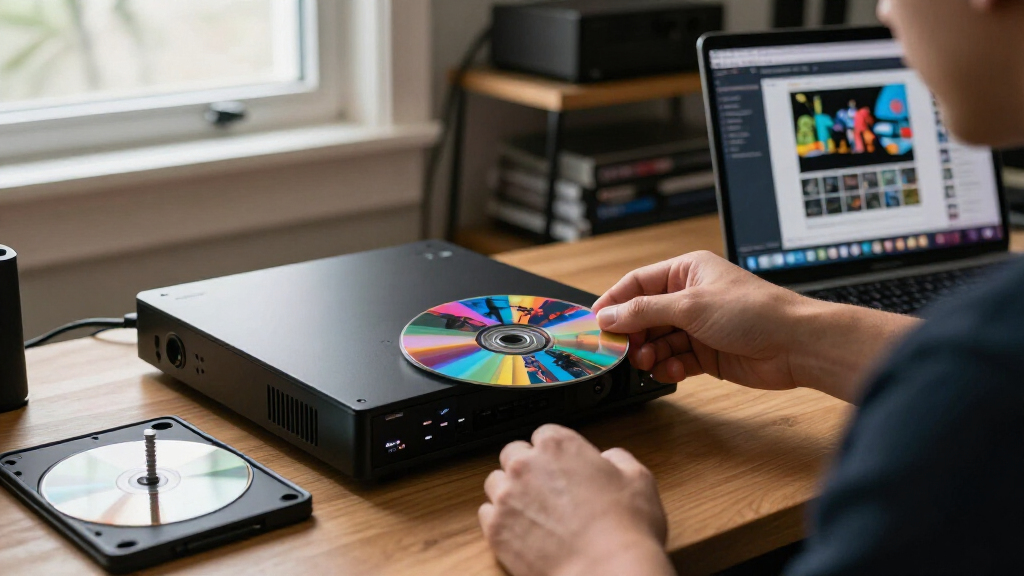
Disc Image Studio is a GitHub-hosted, open-source tool that turns images into data designed to create visible patterns on CD, DVD and single-layer BD-R discs. It can export files for separate burning software or write directly to blank discs on supported Windows systems; the project labels direct burning experimental and advises using disposable test media.
Disc Image Studio is a multi-platform project for converting pictures into data that can produce visible patterns on CDs, DVDs and single-layer 25 GB BD-R discs. Its GitHub documentation describes image design and export tools, alongside direct writing to blank discs, which the project warns is experimental and should be tested only on media users can afford to lose.
The software maps an image to disc data within the physical constraints of the selected format. Users can import an image, arrange it using layers and adjust dithering, gamma, brightness and grayscale levels, then inspect a projection preview before exporting. The project says the visible result varies with the disc, burner, firmware and writing strategy; it does not promise a consistent appearance across hardware.
Output options depend on the medium. For CDs, it can generate a WAV audio track with a matching CUE file or a RAW track; the documentation lists compatibility with burning programs such as cdrecord and ImgBurn. For DVDs, it can produce an ISO image. Its Blu-ray support is for single-layer BD-R only, with options for artwork-only discs or a UDF 2.01 file system. Dual-layer Blu-ray is not supported.
Users can either export an image and burn it with appropriate software or try the built-in streaming burn function, which writes as data is generated rather than saving a complete image first. According to the project, direct burning requires a Windows-recognized CD, DVD or BD burner and blank media; the Windows application requires Windows 10 version 2004 or later, or Windows 11. Linux and macOS users are directed to experimental command-line packages that generate images locally, leaving the actual writing to compatible software.
Artwork at the Disc Data Layer
The project offers a way to create visible disc-side designs without relying on a printed label or a separate labeling surface: the pattern is produced through the data written to the disc. That makes the tool relevant to people experimenting with physical media, archival projects or custom discs, though the documentation does not establish how readable, durable or visually consistent the results are across different equipment.
Its support for image files alongside optional disc data is another practical distinction. The project says users can place folders within a disc design and preview the file area, allowing a disc to carry data as well as an image pattern. This could suit users who want a personalized physical disc, but it also adds a need to verify both the image and file layout before writing.
The main caveat is the experimental status of direct burning. Disc Image Studio says validation across devices, media and burning methods remains limited. An interrupted burn, power loss or generation that cannot keep pace with writing may ruin a disc. For BD-R, the documentation says sequential writing has no spare-area remapping and an interrupted disc usually cannot be continued. Users should treat the feature as a test workflow rather than dependable production software.
Popular right now

Dreame G10 Pro Wet and Dry Vacuum Mop

Ninja Flip Toaster Oven & Air Fryer, Large Capacity, Stainless, SP151
Vitamix 5200 Professional-Grade Blender, 64 oz. Container, Black
As an affiliate, we earn on qualifying purchases.
Formats, Platforms and Project Status
The repository describes Disc Image Studio as a multi-platform project, but the interface and direct-burn support are not equally available everywhere. Its desktop graphical application is for Windows; Linux and macOS support is through command-line tools, which generate images locally. The Windows release executable includes its .NET runtime, while building from source requires the .NET 10 SDK, according to the project documentation.
The project says its implementation draws on published optical-disc standards, including specifications for recordable CDs, DVDs and Blu-ray discs. It also credits the CDImage project for work that informed its CD interleaving implementation and the broader idea of making visible images through generated CD audio tracks. Disc Image Studio is distributed under GPL-3.0-or-later, with additional licensing details for incorporated code and third-party components described in the repository.
The supplied material does not identify a release number, publication date, independent review or formal product launch. The GitHub documentation is therefore the basis for this report; claims about features and operation are project statements, not independent test results.
““Instant burning is an experimental feature; please use disposable test media only.””
— Disc Image Studio project documentation
Burn Reliability and Image Quality
The repository does not provide independent testing results or broad compatibility figures for particular burner models, disc brands or firmware versions. It says direct burning has received some real-disc feedback, while stressing that test coverage remains limited. The documentation also gives no standardized measure for image clarity or contrast, so the quality users can expect is not established.
It is also unclear from the supplied material which release is current, when the project was first published or whether a specific update is planned. The tool’s listed capabilities should be understood as claims in its project documentation, not confirmation that every format and device combination has been independently verified.
Test Before Burning Valuable Discs
Anyone trying the software should first check the repository’s release and format-specific instructions for their operating system and chosen disc type. The project recommends blank, disposable test media for direct burns. Users who prefer a more cautious workflow can export an ISO or audio-track files and use separate burning software that supports the relevant format.
Further confidence will depend on additional testing across burners and media, as well as any future project releases or documentation updates. The repository invites issue reports and code contributions, but the supplied information does not specify a timetable for new features or broader validation.
Key Questions
What does Disc Image Studio do?
It converts an image into data intended to create a visible pattern on a CD, DVD or single-layer BD-R. It also supports adding files to a disc design, according to the project documentation.
Can it burn a disc directly?
Yes, the project describes an experimental streaming-burn option for CD, DVD and BD-R. Direct burning requires a Windows-recognized compatible burner and blank media; the project recommends using disposable test discs.
Does it support dual-layer Blu-ray?
No. The listed Blu-ray support is for single-layer 25 GB BD-R; the documentation says dual-layer media is not currently supported.
Can Linux and macOS users use the tool?
The project provides experimental command-line packages for Linux and macOS. These can generate disc images locally, while users must use compatible burning software to write them to a disc.
Will the artwork look the same on every disc?
The project says visible results depend on the disc, burner, firmware and writing strategy. It does not provide a guarantee of consistent appearance across hardware.
Source: github.com