

This checklist is for developers, QA teams, and anyone managing a desk full of cables for computers and peripherals. It helps you think through a setup one cable-management job at a time.

Get business pricing on monitors, keyboards and dev gear
- Business-only prices and quantity discounts
- Tax-exempt purchasing
- Multiple users, one account, clear invoices
The sections are organized by the role each item can play: routing cables under a desk, containing extras, bundling, guiding, covering, and providing power. Each pick is listed under its matching category, so you can focus on the parts your workspace needs.
Use the checklist to map your setup before choosing what to add. Check desk dimensions, cable paths, device connections, and where power needs to reach; then compare those needs with each item’s fit and compatibility details.
Under-Desk Cable Tray
An under-desk tray can help gather cables and related gear below the work surface, keeping the route from desk to floor easier to manage. For a developer setup, first trace the cables from your computer, monitors, and peripherals, then identify where they need to cross or descend. A tray matters most when you have a clear mounting area and a plan for which cables belong there. Map the path before mounting, including slack for moving or adjusting connected devices.
A common mistake is choosing a tray by its listed length alone. The Ascrono Original is 40.6 inches long, so compare that dimension with the usable span beneath your desk and check the product’s mounting requirements. Also consider desk structure, underside obstructions, and whether the cable bundle needs to exit at one end or several points. Avoid forcing every cable into one route if that creates tight bends or makes frequently changed connections hard to reach. Leave room for access where you plug and unplug equipment.
What to look for:
- Compare the 40.6-inch length with available desk space
- Check mounting method and desk compatibility
- Plan cable entry and exit points
- Leave slack for adjustable devices
- Keep frequently changed connections reachable
Ascrono Original Under Desk Cable Management Tray, Black, 40.6 inches

This under desk cable management tray conceals cords, power strips, and adapters, keeping your workspace tidy and organized. Made from fire-retardant fabric, it supports up to 66 lbs and offers versatile mounting options for various desk setups.
Pros:
- Conceals cords and power strips for a tidy workspace
- Supports a large capacity for multiple devices
- Easy to install with versatile mounting options
Cons:
- Limited to a length of 40.6 inches, may not fit larger desks
- Fabric material may wear over time with heavy use
Best for: Desks with enough underside span for a 40.6-inch tray
Not ideal for: Workspaces without a compatible mounting area
Bottom line: Measure the underside and sketch cable paths before deciding whether this tray fits your desk.
Cable Management Box
A cable management box can gather excess cable and power-related clutter in one contained area, which can make a workspace feel more orderly. The extra-large wooden box with a magnetic lid is a candidate when the amount of gear or cable slack calls for a larger enclosure. Before placing it, identify what you want inside and where the connected cables need to enter and leave. Plan around cable access, since containment is useful only when you can still reach the connections you need.
Do not assume “extra-large” means it will fit your desk or the equipment you intend to store. Check the listed dimensions, opening arrangement, and clearance around the magnetic lid, then compare them with your available surface or floor space. Make sure the cables can route without being pinched when the lid closes, and keep anything that needs frequent adjustment easy to reach. A frequent mistake is hiding a tangle without sorting it first; label or group cables before putting them away so troubleshooting remains straightforward. Check fit and access together before settling on a location.
What to look for:
- Confirm the box’s dimensions against available space
- Check lid clearance and opening access
- Plan cable entry and exit routes
- Avoid pinching cables under the lid
- Group or label cables before storing them
Extra-Large Wooden Cable Management Box with Magnetic Lid

This freestanding cable management box hides power strips and cords in home offices or living spaces. Made from solid acacia or beech wood, it has a magnetic lid and includes cable sleeves and clips.
Pros:
- Fits chargers of different heights, including standing MacBook chargers
- Solid wood construction offers a plastic-free option
- Includes cable sleeves and clips
- Magnetic lid helps keep the box securely closed
Cons:
- Listed for indoor use only
- Dimensions provided do not include the box height
Best for: Setups needing a larger enclosure for cable clutter
Not ideal for: Small desks or connections needing constant access
Bottom line: Verify dimensions and cable routing before using the box to contain your setup.
Reusable Cable Ties
Reusable ties help bundle cables while keeping the bundle easy to open when a device or connection changes. That flexibility can be handy at a development or QA desk, where peripherals and test equipment may be rearranged. The listed VELCRO Brand ONE-WRAP ties are 8 inches long and 1/2 inch wide, with 100 in the pack. Choose a tie length for the bundle, not simply because it is available in bulk.
Measure the cable group loosely and account for the bundle’s thickest point. An 8-inch tie may leave excess material on a small bundle, while several cables together may need a longer option; check the product details and avoid pulling any tie so tight that it compresses cables or makes later changes awkward. Another common mistake is bundling unrelated connections together, which makes tracing and troubleshooting slower. Group cables by device or destination and leave slack where equipment moves. Keep bundles easy to reopen and connections easy to identify.
What to look for:
- Match the 8-inch length to your bundle size
- Check the 1/2-inch width against how you plan to wrap
- Group cables by device or destination
- Leave slack for equipment that moves
- Avoid tight bundles that hinder access
VELCRO Brand ONE-WRAP Cable Ties, 8in x 1/2in, Black, 100 Pack

These reusable VELCRO cable ties are designed for easy cord management, allowing you to bundle and organize wires quickly and securely. Suitable for indoor and outdoor use, they help eliminate clutter and tripping hazards while providing a damage-free, adjustable solution for home, office, or professional setups.
Pros:
- Reusable and adjustable for versatile use
- Easy to secure with pre-cut, slotted design
- Suitable for indoor and outdoor applications
- Effective for organizing multiple types of cables
Cons:
- May not be suitable for very heavy or large cables
- Limited to 8-inch length, less ideal for very long cords
Best for: People who regularly adjust desk cable groups
Not ideal for: Very small bundles where excess tie length gets in the way
Bottom line: Use the listed dimensions to match tie length to each cable bundle.
Adhesive Cable Clips
Adhesive cable clips can guide individual cables along a desk edge or another smooth surface, keeping a route visible and easier to follow. The listed XHF mounts are 3/4-inch self-adhesive black cable zip tie mounts and include 8-inch zip ties. Choose the route before sticking: trace where each cable should travel and check that the clips will not obstruct controls, ports, or moving parts.
A common mistake is applying adhesive before checking the surface and placement. Review the product instructions for surface preparation and compatibility, and make sure each intended location is clean, dry, and accessible. Consider cable thickness and the bend needed at corners; a clip positioned too close to a connector can put strain on the cable, while too few guides can leave a route loose. The included zip ties may bundle cables at a mount, so consider whether you want a fixed group or need to adjust individual lines later. Test the path and spacing before committing to multiple adhesive mounts.
What to look for:
- Check adhesive compatibility with the mounting surface
- Plan clip spacing along the cable route
- Confirm cable thickness fits the intended mount
- Keep bends gentle near connectors
- Decide whether included zip ties suit the bundle
XHF 3/4" Self-Adhesive Black Cable Zip Tie Mounts, 100 pcs with 8" Zip Ties, Scr
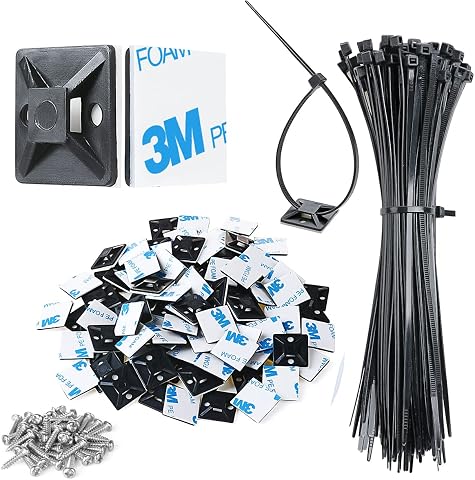
These high-quality adhesive zip tie mounts are made from durable PA66 nylon and 3M strong adhesive, suitable for outdoor use. They are ideal for managing various cables such as computer, TV, and holiday lights, providing a secure and organized solution without tools.
Pros:
- Durable and weather-resistant for outdoor use
- Easy to install with adhesive backing and screws
- Includes comprehensive set of mounts, ties, and screws
Cons:
- Adhesive may require 24 hours to fully cure
- Not reusable once adhered
- Surface must be clean for optimal adhesion
Best for: Routing cables along compatible surfaces
Not ideal for: Surfaces or routes where adhesive placement is unsuitable
Bottom line: Check the surface and cable path before applying the adhesive mounts.
Braided Cable Sleeves
A braided sleeve can gather cables into a covered run, making a multi-cable route look more consolidated. The provided pick is named “Braided Thunderbolt 5 Cable 3.3FT 2-Pack” and includes specifications in its title for 8K@165Hz, 4K@540Hz, and 80Gbps. Because the name describes a cable rather than clearly identifying a sleeve, verify the actual item type before treating it as a cable-covering solution.
For any sleeve or cable, compatibility depends on the devices, ports, and route in your setup. Confirm connector types, required cable length, and the specifications your devices support; the numbers in a product name do not by themselves establish compatibility with every system. If you intended a braided covering sleeve, check the product listing for its inner diameter, usable length, opening style, and how it fits around the number of cables you plan to group. Avoid ordering based on the category heading alone. Match the product to the job by checking the full listing and your device requirements.
What to look for:
- Verify whether the listing is a sleeve or a cable
- Check connector types against your devices
- Confirm cable length suits the planned route
- Compare device requirements with listed specifications
- If a sleeve, check inner diameter and opening style
Braided Thunderbolt 5 Cable 3.3FT 2-Pack, 8K@165Hz, 4K@540Hz, 80Gbps, 120Gbps Ba
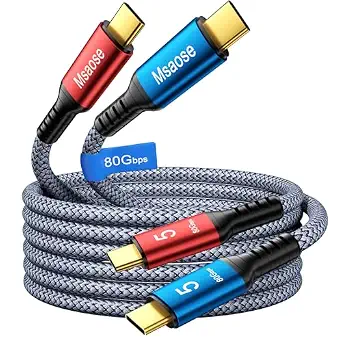
This 2-pack of braided Thunderbolt 5 cables supports high-speed data transfer up to 80Gbps and 8K video output at 165Hz. Designed for durability with nylon braiding, they also deliver fast 240W charging and are compatible with a range of devices including MacBook Pro, iPhone 17, and SSDs.
Pros:
- Supports ultra-fast data transfer and high-resolution video output
- Durable braided nylon construction resists tangling and lasts longer
- Fast charging with 240W power delivery
- Compatible with a wide range of devices including MacBook Pro and iPhone 17
Cons:
- Requires compatible devices to achieve maximum transfer speeds
- Premium build may be more expensive than standard cables
- Some features may not be supported by older devices
Best for: Buyers whose intended need matches the verified listing
Not ideal for: Anyone seeking a sleeve without confirming this item is one
Bottom line: The listed name reads as a cable, so confirm the product type before selecting it as a sleeve.
Surge Protector Power Strip
A power strip can bring several powered devices to a shared location, while a surge protector adds a protection feature described in its product name. The GE pick also lists two tethered USB ports. For a developer workspace, begin by listing what needs power and where each device sits; then check whether the strip’s outlets, USB ports, and cord arrangement suit that layout. Plan power placement alongside cable routing so cords can reach without crossing walkways or pulling on plugs.
Do not assume the two USB ports replace every charger or provide the connection your devices need. Check the product details for outlet count, USB specifications, cord length, and the surge protection information, then compare them with your equipment and local requirements. Also verify that the strip can be placed or mounted where its switches and connections remain accessible. A common mistake is filling every outlet without considering plug size or leaving enough room to disconnect equipment. Keep power connections reachable and avoid routing cords where they can be tugged or pinched.
What to look for:
- Check outlet count and plug spacing
- Review specifications for the two tethered USB ports
- Confirm cord length reaches the planned location
- Read surge protection details in the listing
- Keep switches and connections accessible
GE Surge Protector Power Strip with 2 Tethered USB Ports
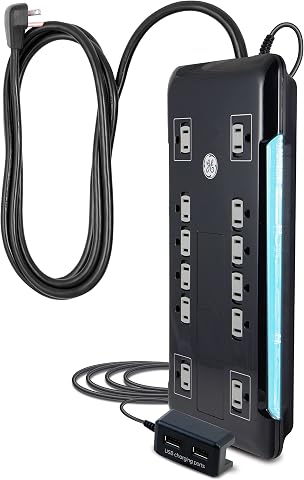
This surge protector features 12 outlets, including two USB ports for charging devices. It has an 8-foot extension cord, space-saving design, and surge protection with a 4320 joule rating, ensuring safety and reliability for home or office use.
Pros:
- Multiple outlets and USB ports for versatile charging
- Long extension cord for flexible placement
- High surge protection rating for safety
Cons:
- Limited to 120V electrical system
- No mention of smart or energy-saving features
Best for: Desks needing a power strip with two tethered USB ports
Not ideal for: Setups whose device or cord requirements do not match the listing
Bottom line: Compare the strip’s outlet, USB, and cord details with the devices you plan to connect.
Start with the constraints that affect every other choice: measure the desk, locate power, and map the cable routes. Next, choose the items that solve the biggest fit problems in your workspace, such as an under-desk path or a place to contain excess cables. Then add ties or clips where they make bundles and routes easier to manage. Let measurements guide the order so each addition works with the setup you already have.
Check product details against your actual desk, devices, and cable paths before buying, especially where the product name leaves the item type or compatibility unclear. You can build the system in stages and adjust it as your workspace changes. A clear plan makes cable management easier; start with one route, keep connections accessible, and refine the rest as needed.
Fall Picks
fall essentials
As an affiliate, we earn on qualifying purchases.