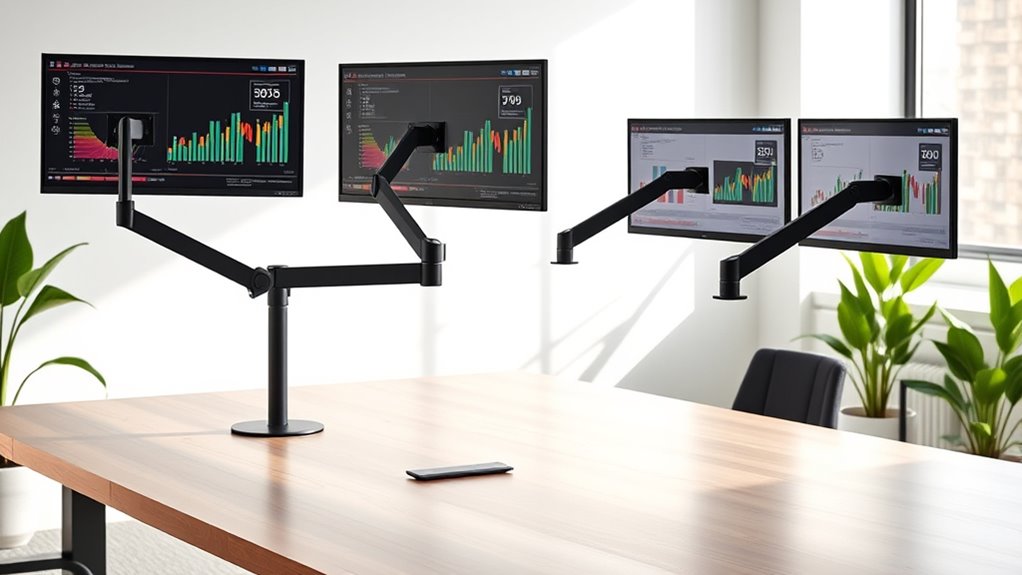

Monitor arms are essential for creating an ergonomic, clutter-free workspace, especially if you use multiple screens or want adjustable positioning. The best monitor arms combine stability, ease of adjustment, and build quality, but they vary significantly in price and features. The top pick for overall performance is the HUANUO FlowLift Dual Monitor Stand, known for its full adjustability and sturdy design. For those prioritizing value, the WALI Dual Monitor Stand offers reliable features at a lower price point. The main tradeoffs in this category often involve balancing cost against build quality, adjustability, and compatibility. Continue reading for a detailed breakdown of the top options and what to consider before buying.

Get business pricing on monitors, keyboards and dev gear
- Business-only prices and quantity discounts
- Tax-exempt purchasing
- Multiple users, one account, clear invoices
Complete the kit



Key Takeaways
- Flexible adjustability and sturdy build quality distinguished the best monitor arms from lower-priced alternatives.
- Dual monitor setups generally require larger, more versatile mounts, but single arms can be sufficient for simple configurations.
- Gas spring mechanisms tend to provide smoother, easier adjustments but often come at a higher cost.
- VESA compatibility and weight capacity are critical to ensure the arm fits your monitors without risk of damage.
- Most high-end options include cable management features, but budget models often lack this convenience.


| monitor arm | Mounting Options | VESA Compatibility |
|---|---|---|
| HUANUO FlowLift Dual Monitor S | — | — |
| HUANUO Dual Monitor Stand | C-clamp or grommet base | — |
| ErGear Dual Monitor Stand | — | 75×75 mm or 100×100 mm |
| HUANUO Dual Monitor Mount for | C-clamp, Grommet | 75x75mm, 100x100mm |
| HUANUO FlowLift™ Pro Monitor A | — | 75×75mm, 100×100mm |
| EVEO Premium Dual Monitor Moun | Desk clamp, Grommet mount | 75×75 mm, 100×100 mm |
| SmooVex™ Monitor Mount for 32 | C-clamp, Grommet | 75x75mm, 100x100mm |
| Acer Single Monitor Mount Full | — | — |
| VIVO Dual Monitor Stand | — | — |
| ErGear Single Monitor Arm | — | — |
| MOUNTUP Dual Monitor Stand for | C-clamp, Grommet | 75×75 mm, 100×100 mm |
| WALI Dual Monitor Stand for 13 | C-clamp or grommet | — |
| WALI Single Monitor Mount for | C-clamp or Grommet | 75x75mm & 100x100mm |
| VIVO Dual Monitor Desk Mount f | C-clamp, Grommet | 75x75mm, 100x100mm |
| HUANUO FlowLift™ Single Monito | C-clamp or Grommet | — |
More Details on Our Top Picks
HUANUO FlowLift Dual Monitor Stand, Fully Adjustable Desk Mount for 13–32″ Screens
This model stands out for its comprehensive range of motion, including tilt, swivel, and rotation, making it highly adaptable for ergonomic setups. Compared with the HUANUO Dual Monitor Mount (B0CMT59SX2), it offers similar adjustability but adds the option of a fully adjustable stand with a sturdy alloy steel build, providing a more stable foundation. Its dual C-clamp and grommet mounting options help organize space effectively, but it requires specific desk thicknesses and isn’t compatible with glass or plastic desks, which can limit flexibility. This pick is ideal for users who want a fully customizable dual monitor arrangement with solid construction and workspace organization benefits.
Pros:- Fully adjustable for optimal ergonomic positioning
- Sturdy dual mounting options with alloy steel construction
- Helps free up desk space and manages cables effectively
Cons:- Requires desks with specific thickness without cross beams
- Limited compatibility to monitors with VESA 75×75 or 100×100 mounts
Best for: Professionals seeking a highly adjustable dual monitor setup for ergonomic comfort and workspace efficiency
Not ideal for: Users with glass or plastic desks, or those with desks that have thick cross beams, as compatibility is limited
- Mounting Type:C-clamp or Grommet
- Movement Type:Tilt, Swivel, Rotate, Height Adjustment
- Compatible Devices:Monitors 13-32 inches
- Maximum Tilt Angle:85 degrees
- Enclosure Material:Alloy Steel
- Color:Black
Our verdict“This is a top choice for users who need a versatile, sturdy dual monitor arm with comprehensive adjustability.”
HUANUO Dual Monitor Stand – Adjustable Desk Mount with Swivel VESA Bracket for 13-32 Inch Screens
This stand makes a strong case for those needing flexible movement, supporting swivel, tilt, and rotation, and accommodating a broad range of monitor sizes. Unlike the ErGear Dual Monitor Stand (B082MLVXRR), which emphasizes ergonomic adjustments, this model emphasizes ease of movement with full motion capabilities, supported by stable C-clamp or grommet mounting. However, assembly may be complex for some users, and it requires monitors to have VESA mounting holes, which can exclude certain older or non-standard models. It suits users who prioritize flexible positioning and a wide compatibility range, especially in shared workspaces.
Pros:- Full motion adjustment for ergonomic comfort
- Supports a wide range of monitor sizes and weights
- Stable mounting options with cable management
Cons:- Assembly can be complex and time-consuming
- Requires monitors with VESA mounting holes
Best for: Tech-savvy professionals or home office users who need maximum adjustability and monitor compatibility
Not ideal for: Users with monitors lacking VESA mounts or those who prefer simple, tool-free setup without complex assembly
- Compatibility:13-32 inch monitors, VESA 75x75mm or 100x100mm
- Weight Capacity:4.4 to 19.8 lbs per arm
- Mounting Options:C-clamp or grommet base
- Adjustment:Swivel, tilt, rotate, height adjustable
- Material:Metal
Our verdict“This stand is ideal for those who need maximum flexibility and support for a variety of monitor sizes and configurations.”
ErGear Dual Monitor Stand, Heavy Duty Adjustable Desk Mount for 2 Screens up to 32 Inches
This stand shines when supporting larger monitors up to 32 inches with a weight limit of 17.6 lbs per arm, making it suitable for more substantial screens. Compared to the HUANUO FlowLift (B07T5SY43L), which emphasizes full ergonomic adjustability, the ErGear model leans into durability and stability for heavier monitors. Its design is best suited for wooden desks, and installation can be tricky on desks with beams. While it offers good tilt, swivel, and rotation, its compatibility with non-wooden tables is limited, and setup might be more challenging for those unfamiliar with installation procedures.
Pros:- Supports large monitors up to 32 inches and 17.6 lbs per arm
- Provides ergonomic adjustments like tilt, swivel, and rotation
- Helps organize workspace with cable management
Cons:- Best suited for wooden desks; less compatible with other surfaces
- Installation may be complex on desks with beams or panels
Best for: Users with larger, heavier monitors who need a robust and stable mount
Not ideal for: Those with glass or plastic desks or with monitors that don’t meet the weight or VESA size requirements
- Monitor Size Range:13 to 32 inches
- Weight Limit:17.6 lbs per monitor
- VESA Compatibility:75×75 mm or 100×100 mm
- Material:Primarily recommended for wood desks
- Table Thickness:0.39 to 3 inches (C clamp), 0.39 to 2.36 inches (grommet mount)
Our verdict“This model is perfect for users with heavier monitors requiring a sturdy, supportive mount for stable, ergonomic positioning.”
HUANUO Dual Monitor Mount for 2 Monitors up to 32 inches, Adjustable Height, Tilt, Swivel, Rotate, VESA Compatible
This stand supports large screens up to 32 inches and 22 lbs per arm, with a versatile range of motion including height adjustment, tilt, swivel, and rotation. Compared with the VIVO Dual Monitor Desk Mount (STAND-V002O), which also offers full adjustability, the HUANUO mount emphasizes easy installation with a tool-free VESA plate and a durable aluminum build. Its maximum tilt of 85 degrees provides ample ergonomic flexibility, but it’s primarily designed for wood desks, possibly limiting use on non-traditional surfaces. It’s best suited for users needing a large, adjustable setup with quick installation.
Pros:- Supports large monitors up to 32 inches and 22 lbs
- Durable aluminum construction with tool-free VESA mount
- Adjustable tilt, swivel, rotation, and height for ergonomic comfort
Cons:- Primarily compatible with wood desks
- Maximum tilt angle may not meet all positioning needs
Best for: Power users with large monitors seeking maximum adjustability and ease of setup
Not ideal for: Users with non-wood desks or monitors with non-standard mounting needs
- Weight Capacity:22 lbs per arm
- Monitor Size Range:17-32 inches
- VESA Compatibility:75x75mm, 100x100mm
- Maximum Extension:17.5 inches
- Height Adjustment:Up to 17.5 inches
- Mounting Options:C-clamp, Grommet
Our verdict“This mount is well-suited for users who want a large, flexible, and easy-to-install dual monitor setup with high weight capacity.”
HUANUO FlowLift™ Pro Monitor Arm for 13–32″ Screens, Fully-Adjustable with Tilt, Swivel, Rotation, Tool-Free VESA Mount, C-Clamp/Grommet Base
This premium pick features a durable MechaSpring arm that provides smooth, steady support for monitors up to 19.8 lbs, with a tool-free VESA mount that simplifies installation. Compared with the ErGear Dual Stand (B082MLVXRR), which emphasizes heavy-duty support, the FlowLift™ Pro offers a more refined design with easy adjustments like tilt, swivel, and rotation, making it ideal for demanding ergonomic needs. Its compatibility with wood desks of various thicknesses adds to its versatility, though it may not fit non-traditional desks. This model is best for users seeking a high-quality, easy-to-adjust arm that enhances ergonomics without complex setup.
Pros:- Supports monitors up to 32 inches and 19.8 lbs
- Durable MechaSpring arm offers steady, long-lasting support
- Easy tool-free installation with quick-release VESA plate
Cons:- Designed primarily for wood desks, limiting compatibility
- Maximum tilt is 85 degrees, which may restrict some positioning
Best for: Professionals and enthusiasts who prioritize ergonomic comfort and quick, tool-free installation
Not ideal for: Users with non-wood desks or those needing support for monitors over 19.8 lbs
- Screen Size Range:13–32 inches
- Max Load:19.8 lbs
- VESA Compatibility:75×75mm, 100×100mm
- Tilt:85 degrees
- Material:Aluminum
- Color:Black
Our verdict“This is an excellent choice for users seeking a premium, easy-to-assemble monitor arm with strong ergonomic features and durable support.”
EVEO Premium Dual Monitor Mount 14-32″ Dual Monitor Arm VESA Bracket Adjustable Height Gas Spring
This dual monitor mount stands out for its impressive support for a wide range of sizes, from 14 to 32 inches, and its full motion flexibility, including 360° rotation and ±90° swivel. Compared with the VIVO Dual Monitor Stand, it offers smoother gas spring adjustments, making fine-tuning monitor position easier. Its multiple mounting options—clamp and grommet—provide versatility for different desk setups. However, its size and full motion range require more desk space, which can be a drawback on smaller desks. The high-quality construction ensures durability, making it suitable for intensive daily use. This makes it a solid choice for multi-monitor setups where flexibility and stability are priorities, but less ideal for tight workspaces.
Pros:- Supports a wide range of monitor sizes (14-32 inches)
- Full motion adjustment including rotation, swivel, and height
- Easy to install with multiple mounting options
- Durable construction for long-term use
Cons:- Requires ample desk space for full movement
- May be overkill for simple single-monitor setups
Best for: Users with larger desks who need flexible, full-motion dual monitor support for up to 32 inches.
Not ideal for: Those with very small desks or limited space, as the full range of motion may be cumbersome in tight environments.
- Supported Screen Size:14-32 inches
- VESA Compatibility:75×75 mm, 100×100 mm
- Mounting Options:Desk clamp, Grommet mount
- Rotation:360°
- Swivel:+90° to -90°
- Material:High-quality materials
Our verdict“This is best suited for users who want a robust, flexible dual monitor solution and have adequate desk space.”
SmooVex™ Monitor Mount for 32 Inch Monitors, Mechanical Spring, VESA 75/100mm, Model-A5 (Black)
The SmooVex mount offers a notable advantage over traditional gas spring arms like the Acer Gas Spring Mount thanks to its mechanical spring system, which provides smoother and more predictable movement. It supports monitors up to 32 inches and offers a ±90° rotation, -25° to 90° tilt, and 230mm height adjustment. Its mechanical spring design avoids the tension inconsistencies sometimes found in gas springs, making adjustments more reliable. However, it has limited color options and isn’t suited for monitors larger than 32 inches. Installation is straightforward, and its ergonomic features promote better posture and workspace organization. This pick makes the most sense for users who prioritize stability and smooth motion over aesthetic variation or larger size support.
Pros:- Smooth, stable mechanical spring system
- Supports monitors up to 32 inches
- Easy to install with multiple mounting options
- Ergonomic adjustments improve workspace comfort
Cons:- Limited to monitors no larger than 32 inches
- Only available in black
Best for: Professionals who need precise, stable monitor positioning for monitors up to 32 inches, especially in ergonomic-focused workstations.
Not ideal for: Users with monitors larger than 32 inches or those seeking a wide variety of colors and finishes.
- Supports Monitors Up To:32 inches
- VESA Compatibility:75x75mm, 100x100mm
- Adjustment Range:±90° rotation, -25° to 90° tilt, 230mm height
- Mounting Options:C-clamp, Grommet
- Material:High-quality metal
Our verdict“Ideal for users seeking precise, stable monitor positioning with smooth mechanical spring adjustments within 32 inches.”
Acer Single Monitor Mount Fully Adjustable Monitor Arm Fits 17-34″ Screens with Gas Spring VESA Mount
The Acer mount supports a broad range of screens from 17 to 34 inches, making it versatile for various setups. Its gas spring provides smooth, effortless adjustments, similar to the ErGear Single Monitor Arm, but with a slightly larger supported size range. The full motion abilities—including tilt, swivel, and rotation—allow for ergonomic customization, though it’s worth noting that the clamp is less compatible with curved or thick desks beyond 3.15 inches. Compared with the EVEO Dual Mount, this single arm simplifies setup but sacrifices the multi-monitor flexibility. Its sturdy aluminum build offers durability, making it suitable for intensive use, but the size and weight limits mean it isn’t ideal for very heavy or larger monitors.
Pros:- Supports a wide monitor size range (17-34 inches)
- Full motion adjustability including tilt, swivel, and rotation
- Sturdy aluminum construction
- Easy to install with quick setup
Cons:- Limited to desks with thickness up to 3.15 inches
- Less suitable for dual monitor setups
Best for: Professionals needing a sturdy, fully adjustable arm for larger monitors up to 34 inches, especially in single-monitor setups.
Not ideal for: Users with very thick or curved desks, or those wanting a dual monitor solution, as this is designed for single screens.
- Supported Screen Size:17-34 inches
- Supported Monitor Weight:up to 19.8 lbs (9 kg)
- Movement:Tilt -60° to +90°, Swivel ±90°, Rotate 360°
- Max Arm Height:18.1 inches
- Material:Aluminum
Our verdict“Best for users needing a durable, adjustable arm for larger monitors within a single-screen configuration on standard desks.”
VIVO Dual Monitor Stand, Fully Adjustable Arms for 17 to 32 inch Screens, Mechanical Articulating Desk Mount, VESA 75×75, 100×100, Max 19.8 lbs, Black, STAND-V002O
The VIVO dual monitor stand offers impressive flexibility and space-saving features, supporting screens from 17 to 32 inches with a maximum weight of 19.8 lbs per monitor. Its tool-less adjustment—tilt, swivel, and rotation—makes ergonomic positioning quick and easy, similar to the WALI Dual Monitor Arms, but with a more robust clamp and grommet options. Its maximum extension might cause monitor arms to extend past the desk edge, which could be a concern in tight spaces. The dual support maximizes desk real estate, but the weight limit may restrict some heavier screens. Overall, this stand is excellent for multitasking environments where desk space and easy adjustability are priorities.
Pros:- Supports dual monitors up to 32 inches
- Adjustable tilt, swivel, and rotation
- Supports multiple mounting options with heavy-duty clamps
- Maximizes desk space
Cons:- Monitor arms may extend past desk edge
- Limited to 19.8 lbs per monitor
Best for: Professionals who want to maximize workspace with dual monitors and flexible positioning in a clutter-free setup.
Not ideal for: Users with very heavy monitors exceeding 19.8 lbs or those with limited desk space where arms might extend too far outward.
- Screen Size Compatibility:17-32 inches
- Weight Capacity:19.8 lbs per monitor
- Tilt Range:+90° to -90°
- Swivel Range:180°
- Rotation:360°
Our verdict“Best suited for users seeking a sturdy, space-efficient dual monitor setup with easy ergonomic adjustments.”
ErGear Single Monitor Arm, Fully Adjustable for 13–34 Inch Screens with VESA Mount and Cable Management
The ErGear single monitor arm offers broad compatibility with screens from 13 to 34 inches and up to 19.8 lbs, providing full ergonomic flexibility similar to the Acer Gas Spring Mount. Its tool-free VESA mounting and integrated cable management simplify setup and help maintain a clean workspace. Compared with dual-arm options, this solution is more compact and less demanding on desk space, making it ideal for smaller work areas. However, it’s limited to monitors under 19.8 lbs, which may exclude some heavier models, and its maximum height adjustment of 17.5 inches may not suit very tall desks or users needing extensive elevation. Overall, this arm offers a balanced mix of flexibility and convenience for individual monitors.
Pros:- Supports a wide range of monitor sizes (13-34 inches)
- Full motion adjustments including height, tilt, swivel, and rotation
- Easy, tool-free VESA mounting
- Cable management included
Cons:- Limited to monitors weighing up to 19.8 lbs
- Maximum height adjustment may be insufficient for very tall desks
Best for: Home office users or professionals with limited space who need a versatile, fully adjustable single monitor arm.
Not ideal for: Users with very heavy monitors exceeding 19.8 lbs or those requiring extremely high elevation adjustments.
- Compatibility:13–34 inch monitors
- Max Weight:19.8 lbs
- Max Height Adjustment:17.5 inches
- Tilt:+80°/-50°
- Swivel:±90°
- Rotation:360°
Our verdict“Best for users needing a flexible, space-saving single monitor arm with easy setup and cable management.”
MOUNTUP Dual Monitor Stand for Desk, Adjustable Double Monitor Mount for 17-32 inch Screens
This model stands out for its versatile full-motion adjustments and wide support for monitor sizes up to 32 inches, making it an excellent choice for users seeking ergonomic flexibility. Compared with the VIVO Dual Monitor Stand, the MOUNTUP offers a slightly greater height adjustment range and a more refined cable management system, but it requires careful tension tuning to maintain stability, especially with heavier monitors. Its sturdy aluminum construction and dual mounting options (C-clamp or grommet) make it suitable for various desk setups, though it may feel bulky on smaller surfaces. The support for a broad weight range ensures compatibility with most monitors, but users must ensure proper tension for safety. Overall, it’s a strong all-rounder for those who value adjustability and space efficiency.Pros:- Flexible full-motion adjustments for ergonomic viewing
- Supports a wide range of monitor sizes and weights
- Easy to install with multiple mounting options
- Cable management system keeps desk tidy
Cons:- Requires proper tension adjustment for stability
- May be bulky for tight or small desks
Best for: Professionals with multiple monitors who need flexible, ergonomic positioning and a tidy workspace.
Not ideal for: Users with very small desks or minimal space, as it can be somewhat bulky and requires proper tension adjustment.
- Maximum Screen Size:32 inches
- Minimum Screen Size:17 inches
- Weight Capacity:4.4-17.6 lbs
- VESA Compatibility:75×75 mm, 100×100 mm
- Mounting Options:C-clamp, Grommet
- Arm Extension:17.3 inches
Our verdict“Ideal for users seeking a durable, highly adjustable dual monitor solution with comprehensive cable management.”
WALI Dual Monitor Stand for 13-32 inch Screens, Adjustable Dual Monitor Arms, VESA 75×75/100x100mm, Black
This stand offers excellent value for users who want to elevate and adjust two monitors up to 32 inches, with strong full-motion capabilities. When compared to the HUANUO Dual Monitor Mount, the WALI provides a similar range of motion but tends to be more budget-friendly, though its maximum height adjustment might fall short for very tall desks or users requiring elevated setups. Its sturdy build and straightforward installation make it suitable for most wooden desks, but compatibility with all desk types isn’t guaranteed, especially those with crossbeams. The 22-pound per arm load capacity supports most monitors comfortably, and the cable management system keeps cords organized. While it doesn’t have the same premium feel as some higher-end mounts, it delivers reliable performance at a competitive price.Pros:- Supports monitors up to 32 inches and 22 lbs per arm
- Full motion adjustments for ergonomic comfort
- Easy to install with multiple mounting options
- Built-in cable management keeps workspace organized
Cons:- Limited maximum height adjustment for very tall desks
- Best suited for wooden desks without crossbeams
Best for: Budget-conscious professionals or students needing a reliable dual monitor setup without sacrificing adjustability.
Not ideal for: Users with very thick or complex desks, or those requiring very high elevation adjustments beyond 17 inches.
- Compatibility:13-32 inch monitors
- Max Load Capacity:22 lbs per arm
- VESA Pattern:75x75mm and 100x100mm
- Height Adjustment:Up to 17.3 inches
- Extension:Up to 19.3 inches
- Mounting Options:C-clamp or grommet
Our verdict“Best suited for users seeking a cost-effective, flexible dual monitor mount for standard desks.”
WALI Single Monitor Mount for 13-34 inch Screens, Adjustable Arm, VESA 75/100mm, Black
This mount makes a compelling case for users with larger screens, supporting up to 34 inches and a hefty 26.4 lbs capacity. Unlike smaller mounts, it emphasizes high weight capacity and full motion flexibility, including a rotation range that benefits creative or detailed work. Compared to the HUANUO FlowLift, this model offers a broader tilt and swivel range, but its design is more suited to wooden desks and may require careful VESA compatibility checks. The robust build and extensive adjustment options deliver a comfortable, ergonomic setup, though its installation may be less straightforward on non-standard desk surfaces. For those with large, heavy monitors, it provides a dependable, versatile mounting solution.Pros:- Supports large screens up to 34 inches and 26.4 lbs
- Full motion adjustments for ergonomic positioning
- Easy to install with multiple mounting options
- Supports rotation for versatile viewing angles
Cons:- Designed primarily for wooden desks; may not suit all surfaces
- Requires careful VESA compatibility and weight verification
Best for: Professionals or gamers needing support for large, heavy monitors with maximum ergonomic adjustability.
Not ideal for: Users with glass or non-wooden desks, as installation and stability might be compromised.
- Maximum Screen Size:34 inches
- Maximum Load:26.4 lbs
- VESA Compatibility:75x75mm & 100x100mm
- Tilt Range:-50° to +85°
- Swivel Range:±90°
- Mounting Options:C-clamp or Grommet
Our verdict“Perfect for users with large, heavy monitors needing maximum flexibility and sturdy support.”
VIVO Dual Monitor Desk Mount for 13-30 inch Screens, Heavy Duty Fully Adjustable Steel Stand with C-Clamp and Grommet Mount, Black
This steel mount emphasizes durability and heavy-duty support for dual monitors up to 30 inches, each weighing 22 lbs. Its steel construction and 3-year warranty highlight its robustness, making it suitable for demanding professional environments. Compared to the HUANUO Dual Mount, it offers a more straightforward, sturdy design but may be less sleek. Its fully adjustable features—including tilt, swivel, rotation, and height—allow for personalized ergonomic setups, though it requires a desk thickness less than 3.25 inches for optimal fit. The simplicity of its installation and its steel build make it a reliable choice for intensive daily use, but it may be overkill for lighter, smaller monitors or less demanding users.Pros:- Supports monitors up to 30 inches and 22 lbs each
- Sturdy steel construction with 3-year warranty
- Fully adjustable for ergonomic positioning
- Easy to install with comprehensive hardware
Cons:- Requires desk thickness less than 3.25 inches for best fit
- Some users may find the arm range limited for very large monitors
Best for: Professionals requiring a sturdy, heavy-duty dual monitor mount for large, high-weight screens in busy workspaces.
Not ideal for: Users with very thin or non-traditional desks, as the mount needs certain thicknesses for proper installation.
- Screen Size Range:13-30 inches
- Weight Capacity:22 lbs per monitor
- Mounting Options:C-clamp, Grommet
- VESA Compatibility:75x75mm, 100x100mm
- Tilt:+90° to -90°
- Material:Steel
Our verdict“A reliable, heavy-duty choice for users with demanding monitor setups and sturdy desk surfaces.”
HUANUO FlowLift™ Single Monitor Mount, 13 to 32 Inch Adjustable VESA Arm with Clamp or Grommet Base
This mount excels in providing a highly adaptable workspace solution, supporting monitors from 13 to 32 inches and up to 19.8 lbs. Its full range of tilt, swivel, and rotation, along with a height adjustment of nearly 40 cm, makes it ideal for users prioritizing ergonomic comfort. Compared with the WALI single mount, the HUANUO FlowLift offers slightly more sophisticated adjustability and a more refined design, but it is primarily suited for wooden desks and may have specific installation requirements. Its automotive-grade components and extensive testing ensure long-term durability, though the need for specific table thicknesses can limit versatility. This pick makes sense for those who want a flexible, durable mount with quick setup.Pros:- Supports a wide range of monitor sizes up to 32 inches
- Full adjustability with tilt, swivel, rotation, and height
- Easy to install in just 3 minutes
- Automotive-grade components tested for over 20,000 motions
Cons:- Requires specific table thickness and structural compatibility
- Primarily designed for wood desks, limiting use on other surfaces
Best for: Home office users and professionals needing a versatile, easy-to-install monitor arm with maximum adjustability.
Not ideal for: Users with very thick or non-wooden desks, or those seeking a minimal or budget setup.
- Monitor Size Range:13-32 inches
- Weight Capacity:4.4-19.8 lbs
- Tilt Range:-50° to +85°
- Swivel:±90°
- Rotation:360°
- Mounting Options:C-clamp or Grommet
Our verdict“A highly flexible and durable monitor arm ideal for users who want quick setup and extensive adjustment options.”

How We Picked
This lineup was evaluated based on performance, build quality, ease of installation, adjustability, compatibility, and value. I considered how well each monitor arm supports different sizes and weights, as well as the range of motion and stability during use. Ease of installation and maintenance were also key factors, especially for home office setups or non-technical users. The ranking reflects a balance of these criteria, highlighting products that deliver reliable performance for their price while also considering long-term durability and user convenience.| monitor arm | Mounting Options |
|---|---|
| HUANUO FlowLift Dual Monitor S | — |
| HUANUO Dual Monitor Stand | C-clamp or grommet base |
| ErGear Dual Monitor Stand | — |
| HUANUO Dual Monitor Mount for | C-clamp, Grommet |
| HUANUO FlowLift™ Pro Monitor A | — |
| EVEO Premium Dual Monitor Moun | Desk clamp, Grommet mount |
| SmooVex™ Monitor Mount for 32 | C-clamp, Grommet |
| Acer Single Monitor Mount Full | — |
| VIVO Dual Monitor Stand | — |
| ErGear Single Monitor Arm | — |
| MOUNTUP Dual Monitor Stand for | C-clamp, Grommet |
| WALI Dual Monitor Stand for 13 | C-clamp or grommet |
| WALI Single Monitor Mount for | C-clamp or Grommet |
| VIVO Dual Monitor Desk Mount f | C-clamp, Grommet |
| HUANUO FlowLift™ Single Monito | C-clamp or Grommet |
Factors to Consider When Choosing Monitor Arms
Choosing the right monitor arm involves more than just picking a model at random. It’s important to consider your workspace layout, monitor size, and how much adjustability you need. Features like tilt, swivel, and rotation can significantly impact usability, especially for ergonomic comfort. Additionally, compatibility with VESA mounts, weight capacity, and installation options should guide your decision. Avoid common mistakes such as underestimating monitor weight or size, which can lead to instability or damage. Balancing your budget with the features that matter most to your daily workflow will help you select a monitor arm that truly enhances your setup.Adjustability and Range of Motion
Look for monitor arms that offer a full range of tilt, swivel, and rotation. This ensures you can position your screens for optimal comfort, reducing strain on your neck and eyes. Gas spring mechanisms generally provide smoother, effortless adjustments compared to mechanical arms, but they come at a higher cost. Keep in mind that more adjustable arms tend to be bulkier and may require more space behind your desk, so consider your workspace constraints.
Compatibility and Weight Capacity
Ensure the arm you choose is compatible with your monitor’s VESA pattern and weight. Most monitors use 75x75mm or 100x100mm VESA mounts, but double-check your monitor’s specs before purchasing. Exceeding the weight limit can cause the arm to sag or become unstable, risking damage to your screens. For larger or heavier monitors, opt for models with higher weight capacities and robust mounting options such as clamp or grommet bases.
Installation and Space Requirements
Some monitor arms are easier to install than others, especially for non-technical users. Clamp bases are generally simpler and less invasive, making them suitable for most desks. Grommet mounts offer a more permanent solution but may require drilling. Also, consider the space behind your desk; arms with extended reach can improve positioning but might interfere with other desk accessories or wall space.
Build Quality and Durability
Investing in a sturdy, well-constructed monitor arm pays off in the long run. Look for high-quality materials like steel and durable joints, especially if you plan to adjust your setup frequently. Cheaper models may wobble or sag over time, leading to frustration or potential monitor damage. Consider user reviews and warranty offerings as indicators of long-term reliability.
Price and Value
While high-end monitor arms often include premium features like gas springs and extensive adjustability, they come at a higher price. Budget models can be suitable for light use or smaller monitors but may lack durability or smooth movement. Comparing features relative to cost helps find a model that offers the most value for your specific needs, whether you prioritize price, features, or build quality.
Frequently Asked Questions
Can I use a monitor arm with any monitor?
Most monitor arms are compatible with monitors that have a VESA mount pattern of 75x75mm or 100x100mm. Check your monitor’s VESA specifications before purchasing. If your monitor doesn’t have a VESA mount, you may need an adapter or a different mounting solution. Also, ensure the monitor’s weight does not exceed the arm’s maximum capacity to avoid stability issues or damage.
Are gas spring monitor arms worth the extra cost?
Gas spring monitor arms typically provide smoother, easier adjustments and hold screens in position more reliably than mechanical arms. They are especially beneficial if you frequently change your monitor’s position or need precise adjustments. However, they tend to be more expensive and may require more careful handling during installation. If your workspace demands frequent repositioning and budget allows, gas spring models can be a worthwhile investment.
Should I get a dual or single monitor arm?
Dual monitor arms are ideal if you use multiple screens regularly, helping to reduce clutter and improve ergonomic positioning. They often come with larger or more versatile mounting options. Single monitor arms can be sufficient if you only work with one screen or have limited space, but keep in mind that they may require additional accessories for multiple monitors. Consider your workflow and space constraints when choosing between the two.
What’s the best way to install a monitor arm?
Most monitor arms are designed for straightforward installation using either a clamp or grommet mount. Clamp bases are generally easier and require no drilling, making them suitable for most desks. Grommet mounts provide a more secure, permanent attachment but involve drilling into your desk. Always follow the manufacturer’s instructions carefully, and ensure your desk can support the mounting method you choose.
How do I know if a monitor arm will fit my workspace?
Measure your desk space, especially behind the area where you plan to mount the arm, to ensure it can accommodate the arm’s reach and mounting base. Check the arm’s specifications for maximum extension and clearance. Also, consider the height of your desk and whether the arm’s adjustment range will allow comfortable positioning without interfering with other desk accessories or wall space. Planning ahead prevents compatibility issues later.
Conclusion
For most users, the HUANUO FlowLift Dual Monitor Stand offers the best balance of adjustability, durability, and ease of use, making it the top overall choice. Those on a budget or with lighter needs should consider the WALI Dual Monitor Stand for reliable performance at a lower price. If you want a premium, feature-rich option, the EVEO Gas Spring Dual Mount provides smooth adjustments and high build quality. Beginners or those with simple setups will appreciate the straightforward installation of clamp models, while professionals with larger, heavier monitors may need more robust, high-capacity arms. Tailor your choice to your specific workspace, monitor size, and ergonomic preferences for the best results.