In 2026, I recommend the iodd MINI Pro 1TB and Kingston IronKey Vault Privacy 80 960GB for external SSDs with hardware encryption. Both offer top-level security with AES-256 encryption and support virtual disks, making them versatile for different workflows. They’re compatible with common interfaces like USB-C and USB 3.1, ensuring fast, reliable performance. Keep exploring to discover more ways these drives can protect your data effectively.
Key Takeaways
- Prioritize SSDs with AES-256-XTS hardware encryption and FIPS certification for maximum security in 2026.
- Ensure compatibility with USB-C and USB 3.1 for seamless performance and virtualization support.
- Choose drives offering advanced security features like biometric access and dual read-only modes.
- Opt for models with capacities of 960GB or 1TB to meet growing data storage needs.
- Select rugged, durable enclosures with water/dust resistance and user-friendly security management interfaces.
| iodd MINI Pro 1TB Encrypted External SSD |  | Secure Data Mobility | Storage Capacity: 1TB | Encryption Method: AES256-XTS hardware encryption | Security Interface: Hardware encryption + write-blocker | VIEW LATEST PRICE | See Our Full Breakdown |
| Kingston IronKey Vault Privacy 80 960GB External SSD | 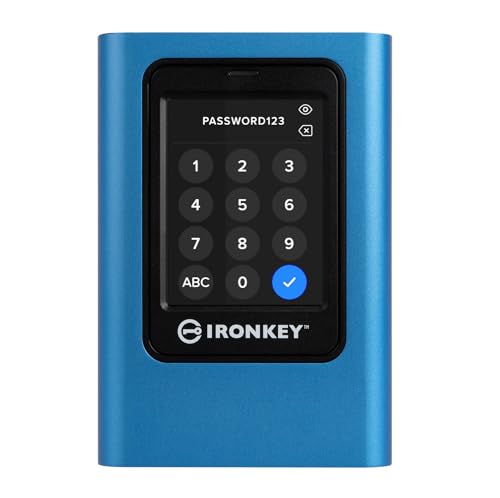 | Enterprise-Grade Security | Storage Capacity: 960GB | Encryption Method: XTS-AES 256-bit encryption | Security Interface: Touch-screen PIN + multi-password options | VIEW LATEST PRICE | See Our Full Breakdown |
More Details on Our Top Picks
-
B0B1W6LTWF
Amazon Product B0B1W6LTWF
As an affiliate, we earn on qualifying purchases.
iodd MINI Pro 1TB Encrypted External SSD
If you’re looking for a secure external SSD that’s both compact and versatile, the iodd MINI Pro 1TB is an excellent choice. It offers a solid 1TB of storage with a USB-C 3.1 Gen 1 interface, making it fast and easy to connect. What sets it apart is its AES256-XTS hardware encryption, which protects your data with up to 76-digit passwords. Plus, it includes a hardware write-blocker to prevent unauthorized modifications. It also supports virtual drives, including ISO files and VHD images, and is compatible with bootable media creation tools like Ventoy. Overall, it’s a portable, secure solution for data protection and flexibility.
- Storage Capacity:1TB
- Encryption Method:AES256-XTS hardware encryption
- Security Interface:Hardware encryption + write-blocker
- Compatibility:Virtual disk support (ISO, VHD, VMDK)
- Physical Connectivity:USB-C 3.1 Gen 1
- Certification:Not specified
- Additional Feature:Virtual disk support (ISO/VHD)
- Additional Feature:Bootable virtual drive functionality
- Additional Feature:Hardware write-blocker security
Kingston IronKey Vault Privacy 80 960GB External SSD
The Kingston IronKey Vault Privacy 80 960GB External SSD stands out as an excellent choice for security-conscious professionals who need robust data protection on the go. It features FIPS 197 certification, ensuring compliance with federal security standards, and uses XTS-AES 256-bit encryption for top-tier security. The device’s unique touch-screen interface makes managing access simple and secure, supporting multi-password options, admin and user profiles, PIN, and passphrases. It also offers dual read-only modes to prevent malware and unauthorized modifications. With a 960GB capacity and user-friendly security features, this drive combines high performance with reliable, military-grade protection.
- Storage Capacity:960GB
- Encryption Method:XTS-AES 256-bit encryption
- Security Interface:Touch-screen PIN + multi-password options
- Compatibility:Supports secure access and malware prevention
- Physical Connectivity:USB-C (implied, standard for external SSDs)
- Certification:FIPS 197 certification
- Additional Feature:Touch-screen PIN management
- Additional Feature:Dual read-only modes
- Additional Feature:Multi-password profiles
Factors to Consider When Choosing External SSD With Hardware Encryption

When choosing an external SSD with hardware encryption, I focus on key factors like encryption standards, storage capacity, and connection compatibility to guarantee my data stays safe and the device fits my needs. Durability and user interface simplicity also matter because they affect everyday use and long-term reliability. Considering these points helps me pick a device that balances security, performance, and convenience.
Encryption Standards
Choosing an external SSD with hardware encryption requires paying close attention to the encryption standards it supports, as these determine the level of data security and compliance with regulations. Standards like AES-256, FIPS 140-2, and FIPS 197 are widely recognized for their strong security. Hardware encryption, such as AES-XTS, offers faster, more secure protection than software solutions, especially when it supports secure key management. These standards ensure that even if the device is physically compromised, data remains protected against unauthorized access. Compatibility with established encryption standards also guarantees interoperability across different systems and applications, making your data security both reliable and scalable. Prioritizing these standards helps you choose a device that meets regulatory requirements and provides peace of mind.
Storage Capacity
Selecting the right storage capacity for an external SSD with hardware encryption is vital to ensuring it meets your data management needs. The capacity determines how much data you can securely store and access at once, directly impacting your workflow. Larger capacities, like 960GB or 1TB, are ideal for extensive data sets, multimedia files, or backups. When choosing, consider your current data storage requirements and anticipate future needs, so you don’t have to upgrade frequently. Higher capacity drives tend to cost more but give you more room for encrypted data without sacrificing security. Balancing capacity with portability and budget is fundamental. A larger drive offers more flexibility but might be less portable and more expensive, so weigh these factors carefully to find the best fit.
Connection Compatibility
Ensuring your external SSD with hardware encryption connects seamlessly to your devices starts with verifying its supported interface. You need to confirm the drive supports the connection type your devices use, like USB-C or USB 3.1 Gen 1, to avoid needing adapters. Check if the port matches your computer or mobile device’s available ports, simplifying setup and reducing compatibility issues. It’s also important to see if the SSD offers backward compatibility with older USB standards, especially if you plan to use it across various devices. Additionally, confirm the connection interface can deliver enough power and data transfer speeds to meet your performance needs. Finally, consider the physical compatibility of the ports, such as whether your device supports USB-C, USB-A, or other connectors, to ensure a smooth, hassle-free connection.
Physical Durability
When evaluating external SSDs with hardware encryption, prioritizing physical durability is essential because these drives often travel with us into unpredictable environments. A rugged, shock-resistant casing is vital to withstand impacts and accidental drops. Water and dust resistance ratings, like IP67, provide extra protection against harsh conditions, safeguarding internal components. The build quality and choice of materials also influence how well the drive resists damage over time. While a compact, lightweight design improves portability, it shouldn’t compromise protection. Reinforced connectors and secure port covers are valuable features, preventing damage from bumps or debris. Ultimately, selecting an SSD with solid construction and protective features guarantees your data stays safe, no matter where your journey takes you.
User Interface Ease
A user-friendly interface is essential when choosing an external SSD with hardware encryption because it makes managing security features straightforward, even for those without technical expertise. An intuitive design allows me to easily configure and monitor encryption settings without hassle. Touchscreen-based interfaces offer quick access to security options and show real-time status updates, increasing convenience. Clear visual indicators and prompts help me understand encryption status and alert me to any required actions, reducing confusion. Simplified navigation within security management tools minimizes errors and enhances overall data protection. A well-designed interface also speeds up setup and ongoing management, making secure data handling much more accessible. Ultimately, a straightforward interface ensures I can confidently manage my device’s security without frustration or advanced technical knowledge.
Additional Security Features
Beyond a user-friendly interface, considering additional security features can substantially strengthen your data protection. Hardware write-blockers and dual read-only modes help prevent unauthorized modifications and malware infections, adding a critical security layer. Touch-screen PIN interfaces offer an intuitive, secure way to manage access, reducing the risk of password leaks. Multi-password options with customizable profiles give you granular control over who can access your data and under what conditions. Compliance with standards like FIPS 197 ensures the encryption methods meet rigorous security requirements, offering peace of mind. Features like virtual drive support and bootable virtual disks create isolated environments for sensitive data, further safeguarding your information from threats. These enhancements are essential in selecting a reliable, secure external SSD.
Virtual Disk Support
Virtual disk support is an essential feature to take into account because it greatly enhances the versatility of an external SSD with hardware encryption. It allows me to mount ISO files as physical disks, making it easy to create bootable media for system recovery or installations. Compatibility with virtual hard disk (VHD) formats means I can run virtual drives directly from the SSD, streamlining my virtualization workflows. Support for formats like VMDK adds even more flexibility, especially when managing multiple virtual environments. This feature also enables the SSD to serve as a portable, bootable drive for various operating systems. However, I need to guarantee that the security features don’t interfere with virtual disk functionality, maintaining both data protection and usability.
Price and Value
When choosing an external SSD with hardware encryption, price and value become key factors to weigh. Costs can vary widely, often reflecting the level of security features and storage capacity. Higher-priced models typically include advanced encryption standards like AES-256 and added security options such as biometric access or dual read-only modes. As I evaluate options, I consider whether these encryption features justify the price difference compared to non-encrypted or software-encrypted drives. Investing in a more expensive encrypted SSD might offer better long-term value, especially through stronger data protection and compliance with industry standards. Comparing prices alongside security features helps me find the best balance between affordability and robust protection. Ultimately, a higher price can be justified if it markedly enhances data security.
Frequently Asked Questions
How Long Does Hardware Encryption Typically Last Before Needing Replacement?
Hardware encryption usually lasts for the lifetime of the device, often around 5 to 10 years, depending on usage and build quality. I recommend checking the manufacturer’s warranty and specifications, as they often specify the encryption’s durability. Keep in mind that physical wear and technological advances might require replacements sooner, but generally, if the device remains functional, its encryption should stay secure for many years.
Are There Any Compatibility Issues With Older Operating Systems?
Imagine trying to open a vault with a key that no longer fits—compatibility issues with older operating systems can be just as frustrating. I’ve found that some SSDs with hardware encryption might not seamlessly work with outdated OS versions, requiring updates or specific drivers. Before buying, I always double-check the manufacturer’s compatibility list to make certain of smooth sailing, especially if you’re running legacy systems.
Can Hardware Encryption Be Bypassed by Physical Damage?
Yes, hardware encryption can be bypassed if the device sustains physical damage. When the SSD is physically compromised, attackers might access the storage chips directly or use advanced techniques to extract data. That’s why I always recommend handling your external drive carefully and considering additional security measures, like regular backups and physical protection, to minimize risks. Remember, no security system is completely foolproof if the hardware itself is damaged.
What Is the Average Lifespan of an Encrypted External SSD?
Imagine a fortress built to withstand storms—that’s how I see the lifespan of an encrypted external SSD. Typically, I find that these drives last around 5 to 10 years, depending on usage and quality. High-end models with robust hardware encryption tend to endure longer, often exceeding a decade. Regular backups and careful handling are essential, as even the strongest defenses can falter without proper maintenance.
Are Firmware Updates Necessary for Maintaining Encryption Security?
Yes, firmware updates are essential for maintaining encryption security. I always stay up-to-date with my SSD’s firmware because updates often include security patches that fix vulnerabilities. Ignoring these updates can leave your data exposed to hackers. I recommend regularly checking the manufacturer’s website or enabling automatic updates to guarantee your device’s encryption stays robust and your data remains protected against emerging threats.
Conclusion
Choosing the right external SSD with hardware encryption is like picking the perfect lock for your digital treasure chest. The iodd MINI Pro and Kingston IronKey Vault Privacy stand out as reliable guardians in 2026. They’re your digital knights, protecting your data with unbreakable armor. Remember, it’s not just about capacity or price, but the peace of mind that comes with knowing your secrets are securely locked away. Trust these champions to keep your data safe and sound.