If you’re looking for the best Casio calculators for college in 2026, I recommend the fx-991CW for its high-res display and vast function set of over 540 tools, perfect for complex problems. The fx-115ES Plus offers great value with 280 functions, while the fx-9750GIII with Python adds scripting capabilities. For color lovers, the PRIZM FX-CG50 combines vivid visuals with advanced features. Keep exploring to find out which model fits your needs best.
Key Takeaways
- Focus on models with high-resolution displays and natural textbook viewing for clear equation and graph visualization.
- Prioritize calculators with advanced functions, programming capabilities, and compatibility with college-level math tasks.
- Ensure selected models meet exam regulations like SAT, AP, IB, and ACT to avoid disqualification.
- Opt for portable, durable designs with long-lasting batteries suitable for on-the-go study and testing environments.
- Choose calculators offering comprehensive features to enhance learning, problem-solving, and coursework efficiency in college.
| Casio fx-991CW Scientific Calculator with 540+ Functions |  | Advanced Engineering Tool | Display Type: Natural textbook display with high-resolution quad-tone shading | Graphing Capability: QR functionality for graph results on ClassPad.net | Programming/Advanced Math: Math Catalog with advanced functions, no programming | VIEW LATEST PRICE | See Our Full Breakdown |
| Casio fx-115ES Plus Scientific Calculator (280+ Functions) |  | Student-Friendly Science | Display Type: Natural Textbook Display℠ with 16-digit, 4-line LCD | Graphing Capability: No graphing feature | Programming/Advanced Math: No programming, extensive scientific functions | VIEW LATEST PRICE | See Our Full Breakdown |
| Casio fx-9750GIII Graphing Calculator with Python |  | Programming Powerhouse | Display Type: Natural Textbook Display℠ with expressions and results as in textbooks | Graphing Capability: Supports graph plotting | Programming/Advanced Math: Includes Python via MicroPython, programming supported | VIEW LATEST PRICE | See Our Full Breakdown |
| CASIO PRIZM FX-CG50 Color Graphing Calculator | 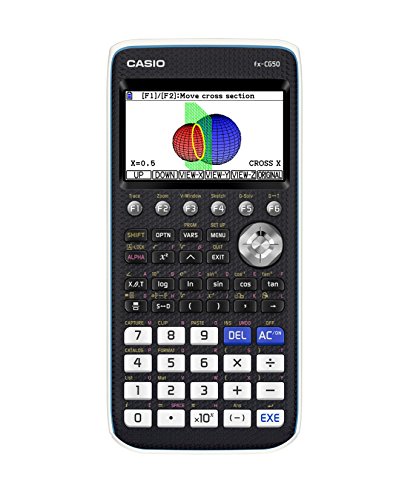 | Visual Learning Leader | Display Type: Natural Textbook Display℠ with high-resolution LCD | Graphing Capability: Supports 2D and 3D graphing | Programming/Advanced Math: MicroPython programming included | VIEW LATEST PRICE | See Our Full Breakdown |
More Details on Our Top Picks
-
Casio fx-115ES Plus 2nd Edition – Advanced Scientific Calculator | 252+ Functions, Natural Textbook Display℠ | Ideal for Math, Science, Engineering & Statistics
- Display Type: 16-digit, 4-line LCD
As an affiliate, we earn on qualifying purchases.
Casio fx-991CW Scientific Calculator with 540+ Functions
The Casio fx-991CW Scientific Calculator stands out for its extensive 540+ functions, making it a top choice for students who need versatile tools for complex calculations. Its natural textbook display shows equations, fractions, and symbols just like in textbooks, which helps me understand and reduce errors. The high-resolution, quad-tone shading display makes it easy to see and edit expressions. With over 540 functions—like matrix operations, derivatives, and constants—I can handle advanced math effortlessly. Plus, it stores up to nine variables and connects via QR codes for graphing. Its durable design and user-friendly interface make it perfect for exams and daily study.
- Display Type:Natural textbook display with high-resolution quad-tone shading
- Graphing Capability:QR functionality for graph results on ClassPad.net
- Programming/Advanced Math:Math Catalog with advanced functions, no programming
- Connectivity:QR code scanning, supports graph sharing
- Exam Compatibility:Suitable for exams, classroom use
- Power Source:Not specified, likely battery
- Additional Feature:Natural textbook equation display
- Additional Feature:QR code graphing functionality
- Additional Feature:Stores 9 variables permanently
-
B086Z7Q7G7
Casio fx-115ES Plus Scientific Calculator (280+ Functions)
If you’re looking for a versatile scientific calculator that can handle a wide range of college-level math and science courses, the Casio fx-115ES Plus stands out. It features a 16-digit, 4-line LCD with Natural Textbook Display℠, making it easy to view fractions, equations, and results just like in textbooks. With over 280 functions, it supports complex calculations, linear regression, summation, integration, permutations, and matrix operations. The multi-replay function helps you backtrack and edit calculations easily. Powered by Solar Plus technology and a battery backup, it’s reliable and energy-efficient—perfect for courses in math, physics, engineering, and statistics.
- Display Type:Natural Textbook Display℠ with 16-digit, 4-line LCD
- Graphing Capability:No graphing feature
- Programming/Advanced Math:No programming, extensive scientific functions
- Connectivity:USB port for file transfer
- Exam Compatibility:Supports college-level exams, physics, statistics
- Power Source:Solar Plus with battery backup
- Additional Feature:Multi-replay calculation feature
- Additional Feature:Solar Plus energy technology
- Additional Feature:Supports complex number calculations
-
B0711D5RNZ
Casio fx-9750GIII Graphing Calculator with Python
For college students diving into STEM or advanced math courses, the Casio fx-9750GIII Graphing Calculator with Python stands out thanks to its integrated programming capabilities. Its Natural Textbook Display℠ makes complex expressions and results easy to read, mimicking textbook notation. This calculator supports graphing, vectors, probability, spreadsheets, and integrals, making it versatile for courses from Pre-Algebra to AP Statistics. With MicroPython integration, you can program directly on the device or transfer files via USB. Approved for exams like AP, SAT, and IB, it’s portable, reliable, and perfect for students needing advanced features in a compact design.
- Display Type:Natural Textbook Display℠ with expressions and results as in textbooks
- Graphing Capability:Supports graph plotting
- Programming/Advanced Math:Includes Python via MicroPython, programming supported
- Connectivity:USB connectivity for program transfer
- Exam Compatibility:Approved for AP, SAT, ACT, IB
- Power Source:Not specified, likely battery
- Additional Feature:Python programming capability
- Additional Feature:USB file transfer support
- Additional Feature:Suitable for advanced math courses
CASIO PRIZM FX-CG50 Color Graphing Calculator
With its large high-resolution LCD supporting over 65,000 colors, the CASIO PRIZM FX-CG50 makes complex graphing and calculations much clearer, especially for visual learners. The display supports 3D graphing of spheres, cylinders, and planes, bringing advanced math to life. Its Natural Textbook Display℠ shows expressions and results as they appear in textbooks, making interpretation straightforward. This calculator handles everything from basic arithmetic to complex numbers, polar and rectilinear graphing, and statistics. Approved for exams like the SAT and AP, it’s reliable for assessments. Plus, with MicroPython programming and PC connectivity, it’s versatile for coding and sharing projects.
- Display Type:Natural Textbook Display℠ with high-resolution LCD
- Graphing Capability:Supports 2D and 3D graphing
- Programming/Advanced Math:MicroPython programming included
- Connectivity:USB connection for transfer and sharing
- Exam Compatibility:Approved for AP, SAT, ACT, IB
- Power Source:Not specified, likely battery or solar
- Additional Feature:3D graphing support
- Additional Feature:MicroPython programming built-in
- Additional Feature:Large high-resolution color display
Factors to Consider When Choosing a Casio Graphing Calculator for College Students
When choosing a Casio graphing calculator, I consider factors like display clarity and size to guarantee easy readability. I also look at functionality range and programming capabilities to match my coursework needs, while exam compatibility is essential for test situations. Finally, portability and design matter so I can carry it comfortably without sacrificing durability or style.
Display Clarity and Size
A clear and appropriately sized display is crucial because it directly impacts how easily I can read equations and interpret graphs during study sessions. Larger screens with higher resolution make complex equations and detailed graphs easier to see, reducing eye strain over long periods. Natural textbook display features show fractions and equations as they appear in textbooks, making it simpler to verify calculations without confusion. A bigger screen allows me to view multiple functions or detailed graphs simultaneously, minimizing the need to scroll or zoom constantly. High-resolution displays with multi-line viewing enable me to access more information at once, speeding up problem-solving. Additionally, clear, well-lit screens ensure visibility in various lighting conditions, essential for studying in different environments and during exams.
Functionality Range
The range of functions a Casio calculator offers directly impacts how well it can handle the diverse math and science coursework I encounter in college. A wider selection of features, like matrix calculations, graphing, and programming, makes it easier to solve complex problems efficiently. Some models support over 540 functions, providing extensive versatility for advanced courses, while others have around 280, enough for basic to intermediate work. Advanced models often include tools for integration, differentiation, and statistical analysis, which are essential for higher-level math and science classes. The more all-encompassing the functionality, the better I can tackle a variety of assignments without constantly switching tools or software. Ultimately, choosing a calculator with a broad functionality range improves my productivity and confidence in handling complex coursework.
Exam Compatibility
Ever wonder if your Casio graphing calculator is allowed in the exams you’re planning to take? It’s essential to check official exam regulations to confirm if your model is permitted, especially for tests like the SAT, ACT, AP, or IB. Some calculators are explicitly restricted, often due to features like programming abilities or color screens. Make sure your calculator is recognized and accepted by your school and exam administrators to avoid disqualification. Additionally, verify whether the device’s memory or stored data could be accessed during the exam, which might be prohibited. Choosing a model that aligns with exam rules ensures smooth testing without unexpected issues. Always review the latest guidelines before your test day to stay compliant and focus on performing your best.
Programming Capabilities
When selecting a Casio graphing calculator for college, considering its programming capabilities is essential because these features can greatly enhance your productivity and learning experience. Programmable functions allow you to customize calculations and automate complex tasks, saving valuable time during exams and coursework. Support for languages like Python or MicroPython opens doors to advanced coding projects right on the device, boosting STEM skills. Built-in programming features enable you to develop personalized tools, such as formula libraries or data analysis scripts, tailored to your coursework. Connectivity options like USB or wireless transfer make it easy to upload, share, and update programs across devices, streamlining workflow. Additionally, a calculator with ample memory can store multiple user-created programs, enhancing efficiency and flexibility in your studies.
Portability and Design
Choosing a portable Casio graphing calculator starts with prioritizing a lightweight and compact design that fits easily into your bag or pocket. A slim profile and ergonomic layout make handling comfortable and reduce fatigue during long study sessions. Durability is vital, so look for models with shock-resistant features that can withstand everyday impacts and accidental drops. A long-lasting or rechargeable battery is essential for reliable use on the go, eliminating the need for frequent replacements. Additionally, a sleek, modern look not only boosts your professional appearance but also encourages consistent use. Ultimately, a well-designed calculator that combines portability with durability and style ensures you stay prepared, whether in class, during exams, or while studying wherever you go.
Frequently Asked Questions
Are Casio Graphing Calculators Allowed on All College Exams?
Yes, Casio graphing calculators are generally allowed on college exams, but it depends on the specific test and institution. I always check the exam guidelines beforehand since some tests restrict calculator models or functions. For example, certain exams disallow calculators with computer algebra systems or communication capabilities. It’s best to confirm with your professor or exam instructions to avoid any surprises on test day.
How Long Do Casio Graphing Calculators Typically Last With Regular Use?
Casio graphing calculators typically last around 3 to 5 years with regular use, but this depends on how often and intensely you use them. I’ve found that with proper care—like replacing batteries when needed and keeping them clean—they can even last longer. If you’re gentle and avoid dropping them, your calculator could serve you well throughout your college years and beyond.
Can Casio Calculators Be Updated With New Software or Features?
Yes, Casio calculators can often be updated with new software or features, but it depends on the model. I recommend checking Casio’s official website or user manual for specific instructions. Usually, updates are available via downloadable files or through a connection to a computer. Keeping your calculator updated guarantees you get the latest functions, bug fixes, and improvements, which can be really helpful during college.
Do Casio Calculators Support Advanced Graphing Functions for Engineering Courses?
Yes, many Casio calculators support advanced graphing functions perfect for engineering courses. I’ve found models like the Casio fx-9750GII and fx-9860GII offer powerful graphing capabilities, including 3D plotting and detailed function analysis. They help me visualize complex equations and analyze data effectively. While some models focus on basic functions, these advanced calculators truly meet the needs of engineering students, making complex concepts more manageable.
Are There Any Hidden Features or Shortcuts on Casio Graphing Calculators?
Yes, many Casio graphing calculators have hidden features and shortcuts that can make your work easier. I’ve discovered quick access keys for common functions, like graphing and calculation modes, and some models include programmable buttons for custom shortcuts. Exploring the user manual or online tutorials reveals tips and tricks to access these hidden features. Once you know them, you’ll find your calculator becomes an even more powerful and efficient tool for your studies.
Conclusion
Choosing the right Casio calculator is about balance—power meets simplicity, features meet affordability. Whether you need a scientific tool for quick calculations or a graphing powerhouse with Python, there’s a perfect fit for every student. Don’t just settle for features; consider ease of use and your specific needs. In this mix of options, finding your ideal calculator is about making calculations smoother and your study sessions more effective.