


The best developer laptops combine enough memory and processing power for your tools with a comfortable keyboard, useful ports, and a screen that suits long coding sessions. My best overall pick is the Lenovo ThinkPad E16 Gen 3, thanks to its Core Ultra 7 processor, 32GB of RAM, 1TB SSD, and roomy 16-inch display. The ThinkPad T14 Gen 6 is a stronger fit for developers who want a more portable business laptop, while the Dell Precision 7780 is aimed at workloads that benefit from workstation graphics and far more memory. The main tradeoffs are portability versus screen and performance, and paying for power you may not use versus choosing a laptop that could constrain heavier projects. Read on for the full breakdown of all 14 developer laptops and how I’d match each one to a different kind of work.

Get business pricing on monitors, keyboards and dev gear
- Business-only prices and quantity discounts
- Tax-exempt purchasing
- Multiple users, one account, clear invoices
Key Takeaways
- The ThinkPad E16 Gen 3 is the most balanced choice here: it pairs 32GB of RAM and a 1TB SSD with a large display, without the workstation scale of the Dell Precision 7780.
- Portability changes the shortlist: the ThinkPad T14 Gen 6 and 14-inch MacBook Pro are easier to carry than the 16- and 17.3-inch options, but their smaller displays can feel limiting when coding without an external monitor.
- The Precision 7780 is in a different workload class: its 128GB of RAM and RTX 3500 Ada graphics suit demanding GPU or virtual-machine work, but those capabilities are excessive for many web and application developers.
- Several lower-cost configurations have less headroom: models with 16GB of RAM and 256GB or 512GB of storage need more careful planning around containers, local databases, and large projects than the 32GB/1TB systems.
- Processor labels alone do not settle the choice: these laptops span Intel, AMD, Apple, and Snapdragon platforms, so operating-system needs, development-tool compatibility, and workload matter alongside core counts.
| Lenovo ThinkPad E16 Gen 3 16-Inch Laptop, Intel Core Ultra 7 255H, 32GB RAM, 1TB SSD |  | Best Overall for Windows Development | Processor: Intel Core Ultra 7 255H, 16 cores, up to 5.1GHz | Memory: 32GB DDR5-5600 | Storage: 1TB M.2 PCIe 4.0 x4 NVMe SSD | VIEW LATEST PRICE | See Our Full Breakdown |
| Surface Laptop Ultra 15-Inch, NVIDIA N1X 20-Core, 32GB RAM, 1TB SSD, Platinum |  | Best for GPU-Accelerated AI and Creative Work | Processor: NVIDIA RTX Spark N1X, up to 20-core Grace CPU | Graphics: Blackwell RTX GPU | Memory: 32GB LPDDR5X, maximum 32GB | VIEW LATEST PRICE | See Our Full Breakdown |
| Lenovo ThinkPad T14 Gen 6 14-inch WUXGA Laptop, Intel Core Ultra 7 255U, 32GB RAM, 1TB SSD |  | Best Compact Business Developer Laptop | Processor: Intel Core Ultra 7 255U, 12 cores, up to 5.2GHz | Memory: 32GB DDR5 RAM | Storage: 1TB PCIe NVMe SSD | VIEW LATEST PRICE | See Our Full Breakdown |
| Apple MacBook Pro 14-inch (2021), M1 Pro 8-Core CPU, 14-Core GPU, 32GB RAM, 512GB SSD, QWERTY, Silver (Renewed) |  | Best for macOS Development | Model: Apple MacBook Pro 14-inch, 2021, A2442 | Processor: Apple M1 Pro, 8-core CPU | Graphics: 14-core GPU; 16-core Neural Engine | VIEW LATEST PRICE | See Our Full Breakdown |
| Lenovo ThinkPad L16 Gen 2 16-inch Business Laptop, Intel Core Ultra 7 255U, 32GB DDR5 RAM, 1TB SSD, Windows 11 Pro, with 7-in-1 USB-C Hub |  | Best for Docked Desk Development | Processor: Intel Core Ultra 7 255U, 12 cores, 14 threads, up to 5.2GHz | Memory: 32GB DDR5 | Storage: 1TB PCIe NVMe M.2 SSD | VIEW LATEST PRICE | See Our Full Breakdown |
| NIMO 15.6-Inch Laptop with AMD Ryzen 7 7735HS, 16GB DDR5 RAM, 256GB SSD, Radeon 680M Graphics, and Backlit Keyboard |  | Best for CPU-Heavy Work on a Compact Budget | Processor: AMD Ryzen 7 7735HS, 8 cores, up to 4.75 GHz | Memory: 16GB DDR5-4800; maximum 64GB | Storage: 256GB PCIe 4.0 SSD | VIEW LATEST PRICE | See Our Full Breakdown |
| Dell Precision 7780 17.3-Inch FHD Mobile Workstation, Intel Core i9-13950HX, 128GB RAM, 2TB NVMe SSD, NVIDIA RTX 3500 Ada 12GB, Windows 11 Pro, Grey |  | Best for Professional GPU Workloads | Processor: Intel Core i9-13950HX, 24 cores, 1.6–5.5 GHz | Memory: 128GB RAM | Storage: 2TB NVMe SSD | VIEW LATEST PRICE | See Our Full Breakdown |
| NIMO 17.3-Inch Laptop with AMD Ryzen 7 7735HS, 32GB DDR5 RAM, and 1TB SSD |  | Best Large-Screen Value for Multitasking | Processor: AMD Ryzen 7 7735HS, 8 cores, 16 threads, up to 4.75 GHz | Memory: 32GB DDR5 | Storage: 1TB PCIe 4.0 SSD | VIEW LATEST PRICE | See Our Full Breakdown |
| NIMO 15.6-Inch Laptop with AMD Ryzen 5, 16GB RAM, and 256GB SSD |  | Best Upgradeable Starter Laptop | Processor: AMD Ryzen 5 3501U, 4 cores/8 threads, up to 3.7 GHz | Memory: 16GB DDR4, expandable | Storage: 256GB PCIe SSD, expandable | VIEW LATEST PRICE | See Our Full Breakdown |
| Lenovo V15 15.6-inch FHD Laptop, Ryzen 5 5500U, 16GB RAM, 512GB SSD, Windows 11 Pro |  | Best for Windows Pro and Wired Office Setups | Processor: AMD Ryzen 5 5500U, 6 cores/12 threads, up to 4.0 GHz | Memory: 16GB RAM | Storage: 512GB PCIe NVMe M.2 SSD | VIEW LATEST PRICE | See Our Full Breakdown |
| Dell Pro 16 Business Laptop, Intel Core Ultra 7 255U, 32GB RAM, 1TB SSD |  | Best for Windows Business Development | Processor: Intel Core Ultra 7 255U, 12 cores, 14 threads, up to 5.2 GHz | Memory: 32GB DDR5 | Storage: 1TB SSD | VIEW LATEST PRICE | See Our Full Breakdown |
| Acer Aspire 14 AI Copilot+ PC, 14-Inch WUXGA Touchscreen, Intel Core Ultra 5 226V, 16GB LPDDR5X RAM, 1TB SSD |  | Best Compact Developer Laptop | Processor: Intel Core Ultra 5 226V | NPU: Up to 40 TOPS | Memory: 16GB LPDDR5X | VIEW LATEST PRICE | See Our Full Breakdown |
| Dell Pro 16 PC16250 Business Laptop, 16-Inch FHD+ Display, Intel Core 5 120U, 16GB DDR5 RAM, 512GB SSD, Windows 11 Pro |  | Best for Business-IT Compatibility | Processor: Intel Core 5 120U, 10 cores, 12 threads, up to 5.0 GHz | Memory: 16GB DDR5 | Storage: 512GB SSD | VIEW LATEST PRICE | See Our Full Breakdown |
| Microsoft Surface Laptop 13.8-Inch (2026), Snapdragon X2 Elite, 16GB RAM, 1TB SSD, Touchscreen, Windows 11, Dune | 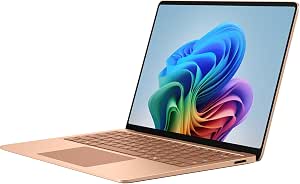 | Best Premium Compact Windows Pick | Processor: Qualcomm Snapdragon X2 Elite, 12-core | Memory: 16GB | Storage: 1TB SSD | VIEW LATEST PRICE | See Our Full Breakdown |
| developer laptop | Processor | Memory | Storage | Display |
|---|---|---|---|---|
| Lenovo ThinkPad E16 Gen 3 16-I | Intel Core Ultra 7 255H, 16 cores, up to 5.1GHz | 32GB DDR5-5600 | 1TB M.2 PCIe 4.0 x4 NVMe SSD | 16-inch WUXGA IPS, 1920 × 1200, anti-glare, 300 nits, 60Hz |
| Surface Laptop Ultra 15-Inch | NVIDIA RTX Spark N1X, up to 20-core Grace CPU | 32GB LPDDR5X, maximum 32GB | 1TB SSD | 15-inch LED touchscreen, 3270 × 2180, glossy |
| Lenovo ThinkPad T14 Gen 6 14-i | Intel Core Ultra 7 255U, 12 cores, up to 5.2GHz | 32GB DDR5 RAM | 1TB PCIe NVMe SSD | 14-inch WUXGA IPS, 1920 × 1200, 16:10, anti-glare, 60Hz |
| Apple MacBook Pro 14-inch | Apple M1 Pro, 8-core CPU | 32GB unified memory | 512GB SSD | 14.2-inch Liquid Retina XDR, 3024 × 1964, up to 120Hz ProMotion |
| Lenovo ThinkPad L16 Gen 2 16-i | Intel Core Ultra 7 255U, 12 cores, 14 threads, up to 5.2GHz | 32GB DDR5 | 1TB PCIe NVMe M.2 SSD | 16-inch WUXGA IPS, 1920 × 1200, 16:10, anti-glare, 400 nits, 60Hz |
| NIMO 15.6-Inch Laptop with AMD | AMD Ryzen 7 7735HS, 8 cores, up to 4.75 GHz | 16GB DDR5-4800; maximum 64GB | 256GB PCIe 4.0 SSD | 15.6-inch FHD |
| Dell Precision 7780 17.3-Inch | Intel Core i9-13950HX, 24 cores, 1.6–5.5 GHz | 128GB RAM | 2TB NVMe SSD | 17.3-inch FHD, 1920 x 1080, anti-glare |
| NIMO 17.3-Inch Laptop with AMD | AMD Ryzen 7 7735HS, 8 cores, 16 threads, up to 4.75 GHz | 32GB DDR5 | 1TB PCIe 4.0 SSD | 17.3-inch FHD, 1920 x 1080 |
| NIMO 15.6-Inch Laptop with AMD | AMD Ryzen 5 3501U, 4 cores/8 threads, up to 3.7 GHz | 16GB DDR4, expandable | 256GB PCIe SSD, expandable | 15.6-inch FHD IPS, 1920 x 1080, anti-glare |
| Lenovo V15 15.6-inch FHD Lapto | AMD Ryzen 5 5500U, 6 cores/12 threads, up to 4.0 GHz | 16GB RAM | 512GB PCIe NVMe M.2 SSD | 15.6-inch FHD, 1920 x 1080 |
| Dell Pro 16 Business Laptop | Intel Core Ultra 7 255U, 12 cores, 14 threads, up to 5.2 GHz | 32GB DDR5 | 1TB SSD | 16-inch WUXGA IPS LCD, 1920 x 1200, 300 nits, 45% NTSC, anti-glare |
| Acer Aspire 14 AI Copilot+ PC | Intel Core Ultra 5 226V | 16GB LPDDR5X | 1TB Gen 4 SSD | 14-inch WUXGA IPS LED touchscreen, 1920 x 1200, 60Hz |
| Dell Pro 16 PC16250 Business L | Intel Core 5 120U, 10 cores, 12 threads, up to 5.0 GHz | 16GB DDR5 | 512GB SSD | 16-inch FHD+ IPS LED, 1920 x 1200, 60Hz |
| Microsoft Surface Laptop 13.8- | Qualcomm Snapdragon X2 Elite, 12-core | 16GB | 1TB SSD | 13.8-inch capacitive LCD touchscreen, 2304 x 1536, up to 600 nits |
More Details on Our Top Picks
Lenovo ThinkPad E16 Gen 3 16-Inch Laptop, Intel Core Ultra 7 255H, 32GB RAM, 1TB SSD
The ThinkPad E16 Gen 3 is my most balanced Windows pick here: its Core Ultra 7 255H and 32GB of DDR5 memory give developers room for an IDE, browser tabs, containers, and background tools, while the 1TB SSD accommodates substantial project files. Its 16-inch, 16:10 screen offers more workspace than the 14-inch ThinkPad T14 Gen 6, and the E16 adds Thunderbolt 4, HDMI, and Ethernet for flexible desk setups. Windows 11 Pro and the privacy-shutter IR camera also suit work environments with managed software and frequent calls. The tradeoff is a 300-nit display that may feel limited in bright spaces, plus integrated graphics that are not aimed at GPU-heavy development. Choose the Dell Precision 7780 instead for dedicated workstation graphics and far more memory; it is a different, bulkier class of machine.
Pros:- Core Ultra 7 255H and 32GB DDR5 support demanding multitasking and development tools.
- 16-inch WUXGA anti-glare display provides a roomy 16:10 workspace.
- Thunderbolt 4, HDMI 2.1, USB-A, and Ethernet support varied desk and network setups.
- Windows Hello IR camera includes a privacy shutter.
Cons:- The 300-nit display may be less comfortable in bright environments.
- Integrated Intel Arc graphics are a weaker fit for GPU-intensive development than a workstation GPU.
Best for: Windows developers who want a large workspace, 32GB RAM, substantial local storage, and built-in Ethernet for office or home-desk use.
Not ideal for: Developers who need a dedicated GPU for local machine-learning or graphics workloads, or a brighter screen for sunlit workspaces.
- Processor:Intel Core Ultra 7 255H, 16 cores, up to 5.1GHz
- Memory:32GB DDR5-5600
- Storage:1TB M.2 PCIe 4.0 x4 NVMe SSD
- Display:16-inch WUXGA IPS, 1920 × 1200, anti-glare, 300 nits, 60Hz
- Graphics:Integrated Intel Arc 140T
- Operating system:Windows 11 Pro
- Ports:Thunderbolt 4, USB-C, 2 × USB-A, HDMI 2.1, RJ45 Ethernet, 3.5mm audio
- Wireless:Intel Wi-Fi 6E AX211, Bluetooth 5.3
Our verdict“I recommend the E16 Gen 3 to Windows developers seeking a well-connected 16-inch work machine, not a mobile workstation for GPU-heavy tasks.”
Surface Laptop Ultra 15-Inch, NVIDIA N1X 20-Core, 32GB RAM, 1TB SSD, Platinum
The Surface Laptop Ultra 15-inch is the specialist pick for developers whose work can use its Blackwell RTX GPU and 20-core Grace CPU, including AI experimentation and graphics-heavy builds. Its sharp 3270 × 2180 touchscreen offers considerably more pixel detail than the WUXGA panels on the ThinkPad E16 Gen 3 and L16 Gen 2, while the stated thermal design targets sustained workloads. The 1TB SSD and 32GB of LPDDR5X memory make it ready for substantial local projects, but memory is capped at 32GB in this configuration, limiting headroom for very large virtualized environments. The glossy display can also reflect bright surroundings. Compared with the Dell Precision 7780, the Surface offers a high-resolution touch display, while the Dell’s listed 128GB RAM and dedicated RTX 3500 Ada make it the more clearly specified choice for memory-heavy workstation tasks.
Pros:- Blackwell RTX graphics and a 20-core Grace CPU target demanding compute and creative workloads.
- 3270 × 2180 touchscreen provides substantially finer detail than the WUXGA ThinkPad displays.
- Thermal system is designed for sustained workloads.
- 1TB SSD provides space for projects and local assets.
Cons:- Memory is limited to 32GB in this configuration.
- Glossy screen can reflect overhead lights and windows.
- The provided specifications do not identify the individual USB port types.
Best for: Developers building or testing GPU-accelerated AI, graphics, or creative applications who want a high-resolution touchscreen.
Not ideal for: Developers who need more than 32GB RAM, a matte screen for bright offices, or clearly documented compatibility for a specific development toolchain.
- Processor:NVIDIA RTX Spark N1X, up to 20-core Grace CPU
- Graphics:Blackwell RTX GPU
- Memory:32GB LPDDR5X, maximum 32GB
- Storage:1TB SSD
- Display:15-inch LED touchscreen, 3270 × 2180, glossy
- Operating system:Windows 11 Pro
- Ports:4 USB ports
- Battery life:Up to 15 hours, as stated
Our verdict“I would choose this Surface for GPU-focused development and a high-resolution touch display, but not for workloads that need more than 32GB RAM.”
Lenovo ThinkPad T14 Gen 6 14-inch WUXGA Laptop, Intel Core Ultra 7 255U, 32GB RAM, 1TB SSD
For developers who carry a laptop between offices, this ThinkPad T14 Gen 6 pairs a 3.1-pound body with 32GB RAM and a 1TB SSD, avoiding the memory compromises of lighter configurations. Its 14-inch, 16:10 anti-glare screen is smaller than the ThinkPad E16 Gen 3’s 16-inch panel, but the more portable chassis is easier to take to meetings or work from a shared space. Two Thunderbolt 4 ports, Ethernet, a backlit keyboard, and a fingerprint reader make it a practical business machine. The Core Ultra 7 255U and integrated graphics suit general software development better than graphics-intensive local workloads. Buyers should also pay attention to the opened seal: the RAM and SSD were upgraded professionally, and their three-year seller warranty differs from the one-year coverage for other hardware. The E16 is a simpler fit if a larger display matters more than portability.
Pros:- Listed weight of 3.1 pounds makes it more portable than the 16-inch ThinkPads in this group.
- 32GB DDR5 and a 1TB NVMe SSD support substantial multitasking and project storage.
- Two Thunderbolt 4 ports and Ethernet give developers useful connection options.
- Anti-glare 16:10 display, backlit keyboard, and fingerprint reader suit mobile work.
Cons:- The original seal was opened for the RAM and SSD upgrade.
- Warranty coverage differs between upgraded components and the rest of the hardware.
- Integrated graphics are not intended for demanding GPU workloads.
Best for: Mobile Windows developers who want a relatively light 14-inch laptop with 32GB RAM, 1TB storage, and business-focused ports.
Not ideal for: Buyers who want factory-sealed hardware, uniform warranty coverage, a large coding screen, or dedicated graphics.
- Processor:Intel Core Ultra 7 255U, 12 cores, up to 5.2GHz
- Memory:32GB DDR5 RAM
- Storage:1TB PCIe NVMe SSD
- Display:14-inch WUXGA IPS, 1920 × 1200, 16:10, anti-glare, 60Hz
- Graphics:Integrated Intel graphics
- Weight:3.1 pounds
- Ports:2 × Thunderbolt 4, HDMI, Ethernet
- Warranty:3 years for upgraded RAM and SSD; 1 year for other hardware
Our verdict“I recommend the T14 Gen 6 to developers prioritizing portability and business connectivity, provided they are comfortable with the opened seal and split warranty.”
Apple MacBook Pro 14-inch (2021), M1 Pro 8-Core CPU, 14-Core GPU, 32GB RAM, 512GB SSD, QWERTY, Silver (Renewed)
The 2021 MacBook Pro 14-inch is the macOS choice for developers who want 32GB of unified memory, a capable M1 Pro chip, and a detailed display in a compact format. Its Liquid Retina XDR screen with up to 120Hz ProMotion has a higher resolution and refresh rate than the WUXGA ThinkPad panels, while HDMI, SDXC, MagSafe 3, and three Thunderbolt 4 ports reduce reliance on adapters. That makes it especially relevant for Apple-platform development and workflows that benefit from its integrated CPU and GPU. It is an older, renewed model, though, with just 512GB of storage and a stated 90-day limited warranty. Compared with the ThinkPad T14 Gen 6, it offers a stronger display and macOS, but the T14 has twice the listed SSD capacity and a much lower listed weight. Its 2.15kg weight is also substantial for a 14-inch laptop.
Pros:- M1 Pro with 32GB unified memory suits demanding macOS development and multitasking.
- Liquid Retina XDR display supports 3024 × 1964 resolution and up to 120Hz ProMotion.
- Three Thunderbolt 4 ports plus HDMI, SDXC, and MagSafe 3 provide flexible connectivity.
- 14.2-inch display offers a detailed workspace in a smaller format than 16-inch options.
Cons:- Renewed condition and a 90-day limited warranty may not suit buyers seeking new hardware.
- 512GB SSD is smaller than the 1TB storage in the ThinkPad options.
- Listed weight of 2.15kg is heavy for a 14-inch laptop.
Best for: macOS and Apple-platform developers who need 32GB unified memory, a high-quality built-in display, and a broad selection of ports.
Not ideal for: Developers who require Windows, more than 512GB of included storage, a new machine, or a longer stated warranty.
- Model:Apple MacBook Pro 14-inch, 2021, A2442
- Processor:Apple M1 Pro, 8-core CPU
- Graphics:14-core GPU; 16-core Neural Engine
- Memory:32GB unified memory
- Storage:512GB SSD
- Display:14.2-inch Liquid Retina XDR, 3024 × 1964, up to 120Hz ProMotion
- Ports:3 × Thunderbolt 4, HDMI, SDXC, MagSafe 3, 3.5mm headphone jack
- Condition and warranty:Renewed; 90-day limited warranty
Our verdict“I would pick this renewed MacBook Pro for macOS development and its display, but choose a ThinkPad if Windows or 1TB storage is the priority.”
Lenovo ThinkPad L16 Gen 2 16-inch Business Laptop, Intel Core Ultra 7 255U, 32GB DDR5 RAM, 1TB SSD, Windows 11 Pro, with 7-in-1 USB-C Hub
The ThinkPad L16 Gen 2 suits developers who want a big screen and useful desk connections without moving to the higher-powered Core Ultra 7 255H in the ThinkPad E16 Gen 3. Its Core Ultra 7 255U, 32GB DDR5, and 1TB SSD cover everyday coding, multitasking, and local project storage; the 16-inch 16:10 anti-glare panel also gives more vertical room than the 14-inch T14 Gen 6. A listed 400-nit brightness rating is a plus over the E16’s 300-nit panel. The Thunderbolt 4 ports, HDMI, Ethernet, and bundled 7-in-1 USB-C hub make it particularly handy for a desk with peripherals. Tradeoffs include integrated graphics and a listing that reports two different weights, 3.94 and 7 pounds. The original seal was opened for upgrades, and the display is listed as covering 45% NTSC.
Pros:- 16-inch 16:10 anti-glare display offers ample vertical workspace and is listed at 400 nits.
- 32GB DDR5 and a 1TB SSD support everyday development multitasking and local projects.
- Thunderbolt 4, USB-A, HDMI, Ethernet, and the included 7-in-1 hub support desk setups.
- Backlit keyboard, fingerprint reader, and MIL-STD-810H testing suit business use.
Cons:- The product information gives conflicting weights: 3.94 pounds in the specifications and 7 pounds elsewhere.
- The original seal was opened for upgrades, with separate one-year warranty terms stated for upgraded and remaining components.
- Integrated graphics and the listed 45% NTSC display coverage make it a poor fit for GPU-heavy or color-critical work.
Best for: Developers who mostly work at a desk and want a 16-inch anti-glare screen, Ethernet, multiple ports, and a bundled USB-C hub.
Not ideal for: Frequent travelers who need a reliably documented low weight, developers needing dedicated graphics, or buyers who prefer factory-sealed hardware.
- Processor:Intel Core Ultra 7 255U, 12 cores, 14 threads, up to 5.2GHz
- Memory:32GB DDR5
- Storage:1TB PCIe NVMe M.2 SSD
- Display:16-inch WUXGA IPS, 1920 × 1200, 16:10, anti-glare, 400 nits, 60Hz
- Graphics:Integrated Intel Graphics
- Ports:2 × USB-C Thunderbolt 4, 3 × USB-A, HDMI, RJ45 Ethernet, headphone/microphone combo
- Wireless:Wi-Fi 6E, Bluetooth
- Included bundle:7-in-1 USB-C hub
- Weight listing:3.94 pounds in specifications; 7 pounds elsewhere in product information
Our verdict“I recommend the L16 Gen 2 for desk-based developers who value screen area and connectivity, but not for buyers who need clear weight information or dedicated graphics.”
NIMO 15.6-Inch Laptop with AMD Ryzen 7 7735HS, 16GB DDR5 RAM, 256GB SSD, Radeon 680M Graphics, and Backlit Keyboard
The Ryzen 7 7735HS gives this 15.6-inch NIMO a stronger processor foundation than the older Ryzen 5 3501U in the other NIMO 15.6-inch model, making it better suited to compiling code and keeping several development tools open. Its 16GB DDR5 memory is a sensible starting point for general development, and the stated 64GB memory ceiling leaves room to grow. Dual USB-C ports and HDMI/DisplayPort output make adding an external monitor practical. The main compromise is its 256GB SSD, which can fill quickly with SDKs, containers, and project files. The Radeon 680M helps with display and light creative work, but it is not a substitute for the workstation-class RTX 3500 Ada in the Dell Precision 7780. I’d choose this for everyday coding, not demanding GPU compute.
Pros:- Ryzen 7 7735HS provides eight cores for parallel development tasks.
- 16GB DDR5 memory is suitable for mainstream coding and multitasking, with listed support up to 64GB.
- Dual USB-C plus HDMI and DisplayPort give flexible external-display options.
- Backlit keyboard, numeric keypad, and fingerprint reader add useful daily-work conveniences.
Cons:- 256GB SSD may require frequent cleanup or external storage for development tools and project files.
- Integrated Radeon 680M is not intended for demanding GPU compute or graphics workloads.
- The 15.6-inch FHD display offers less workspace than the 17.3-inch NIMO or Dell Precision.
Best for: Developers who want a capable eight-core processor for everyday coding, multitasking, and external-monitor work in a 15.6-inch Windows laptop.
Not ideal for: Developers keeping large local container images, virtual machines, or media projects, since the included 256GB SSD leaves limited storage headroom.
- Processor:AMD Ryzen 7 7735HS, 8 cores, up to 4.75 GHz
- Memory:16GB DDR5-4800; maximum 64GB
- Storage:256GB PCIe 4.0 SSD
- Graphics:Integrated AMD Radeon 680M
- Display:15.6-inch FHD
- Operating system:Windows 11
- Ports and video:Dual USB-C; HDMI and DisplayPort
- Weight:3.8 lbs
Our verdict“Choose this NIMO if you want a fast everyday coding processor and expandable memory, and can work around its small SSD.”
Dell Precision 7780 17.3-Inch FHD Mobile Workstation, Intel Core i9-13950HX, 128GB RAM, 2TB NVMe SSD, NVIDIA RTX 3500 Ada 12GB, Windows 11 Pro, Grey
The Dell Precision 7780 is the clear specialist in this group: its 24-core Core i9, 128GB RAM, 2TB NVMe drive, and RTX 3500 Ada GPU target large builds, multiple virtual machines, and GPU-accelerated professional tools. That headroom sets it apart from both NIMO laptops, whose integrated Radeon graphics and smaller memory configurations are aimed at lighter work. The 17.3-inch anti-glare screen and extensive ports, including Thunderbolt 4 and Ethernet, also suit a desk-based workstation setup. But the display is only 1920 x 1080, so it gives less pixel workspace than many developers may want at this size. At 4.99 kg, it is also far less convenient to carry than the 3.8-pound NIMO 15.6-inch models. I’d rank it first for specialized performance, not mobility or screen sharpness.
Pros:- 24-core Core i9-13950HX and 128GB RAM offer substantial capacity for demanding workloads.
- RTX 3500 Ada with 12GB GDDR6 supports professional GPU-accelerated applications.
- 2TB NVMe SSD provides room for sizable projects, tools, and local datasets.
- Thunderbolt 4, USB-C, HDMI, Ethernet, and Wi-Fi 6E support varied workstation setups.
Cons:- At 4.99 kg, it is exceptionally heavy for frequent travel.
- The 17.3-inch display has FHD resolution, limiting workspace sharpness compared with higher-resolution options.
- Its specialized workstation hardware is excessive for basic coding and web development.
Best for: Developers and technical professionals running memory-intensive virtual machines, GPU-accelerated workloads, or large professional projects who mainly work at a desk.
Not ideal for: Developers who commute with a laptop daily or want a high-resolution screen for dense code and multiple windows.
- Processor:Intel Core i9-13950HX, 24 cores, 1.6–5.5 GHz
- Memory:128GB RAM
- Storage:2TB NVMe SSD
- Graphics:NVIDIA RTX 3500 Ada Generation, 12GB GDDR6
- Display:17.3-inch FHD, 1920 x 1080, anti-glare
- Operating system:Windows 11 Pro
- Ports:HDMI, USB-A, USB-C, Thunderbolt 4, RJ-45, headphone jack
- Weight:4.99 kg
- Support:Dell ProSupport onsite repairs through March 2031
Our verdict“Pick the Precision 7780 for heavy professional and GPU-accelerated work when workstation performance matters more than portability or display resolution.”
NIMO 17.3-Inch Laptop with AMD Ryzen 7 7735HS, 32GB DDR5 RAM, and 1TB SSD
This NIMO pairs the same Ryzen 7 7735HS found in the smaller NIMO with twice the memory and four times the stated SSD capacity: 32GB DDR5 and 1TB. For developers who keep an IDE, browser, local services, and documentation open together, that combination offers more breathing room without stepping up to the heavyweight Dell Precision 7780. Its 17.3-inch FHD panel gives code and split windows more physical room than the 15.6-inch NIMO models, while a generous port selection and 100W USB-C PD charging fit a flexible desk setup. The tradeoff is portability: at 4.6 pounds, it is heavier and larger than those 15.6-inch alternatives. The integrated Radeon 680M also limits graphics-heavy work. This is the more practical pick for broad everyday development, not professional GPU tasks.
Pros:- 32GB DDR5 memory gives development tools and background services more room than the 16GB NIMO models.
- 1TB PCIe 4.0 SSD offers substantially more local project and application space than the 256GB NIMO options.
- 17.3-inch FHD display supports a more spacious coding and split-window layout.
- Includes two full-featured USB-C ports, HDMI, SD reader, three USB-A ports, and webcam privacy shutter.
Cons:- The 4.6-pound, 17.3-inch design is less convenient to carry than the 15.6-inch NIMO laptops.
- Integrated Radeon 680M is a limitation for GPU-intensive development and graphics work.
- FHD resolution on a large screen provides less pixel density than a higher-resolution display.
Best for: Developers who want a roomy screen, 32GB memory, and ample local storage for IDEs, browsers, and everyday multitasking without a workstation-class GPU.
Not ideal for: Frequent travelers and developers who need discrete graphics for GPU compute, 3D work, or other demanding graphics tasks.
- Processor:AMD Ryzen 7 7735HS, 8 cores, 16 threads, up to 4.75 GHz
- Memory:32GB DDR5
- Storage:1TB PCIe 4.0 SSD
- Graphics:Integrated AMD Radeon 680M
- Display:17.3-inch FHD, 1920 x 1080
- Ports:Two USB-C, HDMI, SD card reader, three USB-A, 3.5mm audio
- Battery and charging:58Wh battery; 100W USB-C PD charging
- Weight:4.6 pounds
- Warranty:2-year manufacturer warranty
Our verdict“Choose this NIMO for a large coding workspace and stronger memory and storage capacity, provided you do not need discrete graphics or a travel-friendly build.”
NIMO 15.6-Inch Laptop with AMD Ryzen 5, 16GB RAM, and 256GB SSD
This NIMO is the entry-level choice for lighter development: its Ryzen 5 3501U and 16GB DDR4 can handle coding fundamentals, browser-based tools, and routine office work, while the memory and SSD are listed as upgradeable. That upgrade path is its strongest distinction from the Lenovo V15, which includes a larger 512GB SSD but does not list upgrade options here. Compared with the newer Ryzen 7 NIMO 15.6-inch model, this processor is older and has four cores, so sustained builds and heavier multitasking are less suited to it. The 256GB SSD is also a tight starting point for local development environments. USB-C with power delivery and DisplayPort, an anti-glare FHD screen, and a backlit keyboard make it a useful basic setup, but its integrated graphics keep it away from GPU-focused tasks.
Pros:- Memory and SSD are listed as expandable, giving buyers a path to add capacity.
- 15.6-inch FHD IPS anti-glare display suits everyday coding and office work.
- USB-C supports power delivery, DisplayPort, and data.
- Backlit keyboard, numeric keypad, and fingerprint reader support regular use.
Cons:- Four-core Ryzen 5 3501U is older and less suited to heavy builds than the Ryzen 7 7735HS in the other NIMO models.
- 256GB SSD may quickly constrain development tools, project files, and local environments.
- Integrated AMD graphics are not suited to demanding GPU workloads.
Best for: Students and first-time developers learning to code, using lightweight editors and web tools, and willing to upgrade memory or storage later.
Not ideal for: Developers compiling large projects, running several virtual machines, or needing substantial out-of-box storage and stronger multicore performance.
- Processor:AMD Ryzen 5 3501U, 4 cores/8 threads, up to 3.7 GHz
- Memory:16GB DDR4, expandable
- Storage:256GB PCIe SSD, expandable
- Graphics:Integrated AMD graphics
- Display:15.6-inch FHD IPS, 1920 x 1080, anti-glare
- Operating system:Windows 11 Home
- Ports:USB-C with PD/DisplayPort/data, USB 3.2, HDMI 1.4, Micro SD
- Weight:3.8 pounds
- Warranty:2-year limited manufacturer warranty
Our verdict“Choose this model as an upgradeable starter for lightweight coding, but favor the Lenovo V15 for more included storage or the Ryzen 7 NIMO for stronger processing.”
Lenovo V15 15.6-inch FHD Laptop, Ryzen 5 5500U, 16GB RAM, 512GB SSD, Windows 11 Pro
The Lenovo V15 is a sensible work-focused choice for developers who need Windows 11 Pro, wired networking, and enough included storage for a basic toolchain. Its six-core Ryzen 5 5500U sits between the four-core Ryzen 5 3501U in the upgradeable NIMO and the eight-core Ryzen 7 7735HS models: a more balanced everyday processor, though not the strongest option here for sustained parallel work. The 512GB NVMe SSD doubles the capacity of either 256GB NIMO 15.6-inch model, reducing pressure to add storage right away. RJ45 Ethernet is handy for office networks and stable wired connections. On the other hand, the 16GB memory and integrated Radeon graphics make this a mainstream coding laptop rather than a high-end build or GPU machine. Its FHD screen and conventional 15.6-inch format keep the setup straightforward, not especially expansive.
Pros:- Six-core Ryzen 5 5500U offers a middle ground between the older Ryzen 5 NIMO and newer Ryzen 7 options.
- 512GB PCIe NVMe SSD provides more included storage than the 256GB NIMO 15.6-inch models.
- Windows 11 Pro and RJ45 Ethernet suit managed office and wired-network setups.
- Includes USB-C, HDMI, Wi-Fi 6, and a numeric keypad.
Cons:- 16GB RAM may constrain workloads with many virtual machines or memory-heavy services.
- Integrated Radeon graphics are not intended for demanding GPU development or graphics tasks.
- The 15.6-inch FHD display offers less workspace than the 17.3-inch NIMO and Dell Precision.
Best for: Windows developers who need Pro features, built-in Ethernet, and a practical 512GB SSD for office coding and everyday projects.
Not ideal for: Developers running many memory-heavy containers or virtual machines, or those needing discrete graphics and workstation-class compute.
- Processor:AMD Ryzen 5 5500U, 6 cores/12 threads, up to 4.0 GHz
- Memory:16GB RAM
- Storage:512GB PCIe NVMe M.2 SSD
- Graphics:Integrated AMD Radeon Graphics
- Display:15.6-inch FHD, 1920 x 1080
- Operating system:Windows 11 Pro
- Ports:USB-A, USB-C, HDMI, RJ45, headphone/microphone combo
- Wireless:Wi-Fi 6 and Bluetooth 5.3
- Weight:3.8 lbs
Our verdict“Pick the Lenovo V15 for Windows Pro, Ethernet, and more included storage in an everyday coding laptop, rather than for demanding compute.”
Dell Pro 16 Business Laptop, Intel Core Ultra 7 255U, 32GB RAM, 1TB SSD
I’d choose this Dell for developers who want a large, practical Windows workspace and enough memory to keep an IDE, browser tabs, and work tools open together. Its 32GB of DDR5 and 1TB SSD give it a stronger multitasking and storage baseline than the 16GB Dell Pro 16 with Core 5 120U. The Core Ultra 7 255U is suited to everyday coding and business workloads, but integrated graphics make this a less fitting option for GPU-heavy development or graphics-intensive builds than the roundup’s dedicated-GPU workstation. The 16-inch anti-glare screen and useful mix of HDMI, USB-C, and Ethernet favor desk and office use; the 300-nit, 45% NTSC panel is a clear compromise for color-sensitive work. At 4.27 pounds, it is also easier to carry than that six-pound Dell, but not as travel-friendly as the three-pound Acer Aspire 14 AI.
Pros:- 32GB DDR5 supports heavier IDE and browser multitasking than the 16GB Dell Pro 16 Core 5 model.
- 1TB SSD leaves room for repositories, build tools, and local project files.
- HDMI 2.1, USB-C with DisplayPort and Power Delivery, and RJ-45 support varied desk setups.
- Backlit keyboard with numeric keypad and fingerprint reader.
Cons:- Integrated Intel Graphics are a poor fit for GPU-dependent development workloads.
- The 300-nit, 45% NTSC display is limited for bright spaces and color-sensitive tasks.
- Its 4.27-pound weight is less convenient for frequent commuting than the Acer Aspire 14 AI.
Best for: Windows developers who want 32GB memory, a 1TB workspace, Ethernet, and a full-size keyboard for office or home-office work.
Not ideal for: Frequent travelers who prioritize low carry weight, or developers who need a dedicated GPU or a color-accurate display.
- Processor:Intel Core Ultra 7 255U, 12 cores, 14 threads, up to 5.2 GHz
- Memory:32GB DDR5
- Storage:1TB SSD
- Display:16-inch WUXGA IPS LCD, 1920 x 1200, 300 nits, 45% NTSC, anti-glare
- Graphics:Integrated Intel Graphics
- Operating system:Windows 11 Pro
- Wireless:Wi-Fi 6E and Bluetooth 5.3
- Ports:2 x USB-A, USB-C with Power Delivery and DisplayPort, HDMI 2.1, RJ-45, headset port
- Weight and battery:4.27 lbs; 55Wh battery, up to 8 hours of non-gaming use
Our verdict“Choose this Dell if you want a well-connected 16-inch Windows coding laptop with 32GB RAM, but skip it for GPU-heavy work or frequent travel.”
Acer Aspire 14 AI Copilot+ PC, 14-Inch WUXGA Touchscreen, Intel Core Ultra 5 226V, 16GB LPDDR5X RAM, 1TB SSD
The Aspire 14 AI is the most travel-oriented pick in this group: at 3 pounds, it is far easier to carry than either 16-inch Dell Pro. Its 14-inch touchscreen, aluminum chassis, and lie-flat hinge suit developers who move between desks or use touch input, while the 1TB SSD offers generous project storage for a compact laptop. The 16GB of LPDDR5X is a more modest memory allowance than the 32GB in the Dell Pro 16 Core Ultra 7, so I’d favor the Dell for larger workloads or extensive multitasking. Acer’s up-to-22-hour battery figure comes from specified video-playback tests, not a coding workload. Integrated Arc graphics and Windows 11 Home also make it less specialized for GPU work or managed business environments than the Dell models.
Pros:- Three-pound aluminum chassis is notably more portable than the 16-inch Dell Pro laptops.
- 14-inch WUXGA touchscreen and 180-degree hinge offer flexible positioning and touch input.
- 1TB Gen 4 SSD provides ample local project storage.
- 1080p FHD IR webcam and Wi-Fi 6E support modern calls and wireless connectivity.
Cons:- 16GB LPDDR5X is less headroom for virtual machines and heavy multitasking than the 32GB Dell Pro 16.
- Integrated Intel Arc 130V graphics are not a substitute for a dedicated GPU.
- The up-to-22-hour battery claim is based on specific video-playback conditions, not developer workloads.
Best for: Developers who prioritize a lightweight touchscreen laptop for coding on the move, web development, and everyday productivity.
Not ideal for: Developers running memory-intensive local environments, needing Windows Pro management features, or relying on dedicated graphics.
- Processor:Intel Core Ultra 5 226V
- NPU:Up to 40 TOPS
- Memory:16GB LPDDR5X
- Storage:1TB Gen 4 SSD
- Display:14-inch WUXGA IPS LED touchscreen, 1920 x 1200, 60Hz
- Graphics:Integrated Intel Arc 130V
- Operating system:Windows 11 Home
- Wireless:Wi-Fi 6E and Bluetooth 5.3
- Weight and battery:3 lbs; 65Wh battery, up to 22 hours under specified video-playback conditions
Our verdict“Pick the Acer if low weight and a touchscreen matter more than the 32GB memory and business-focused setup of the Dell Pro 16.”
Dell Pro 16 PC16250 Business Laptop, 16-Inch FHD+ Display, Intel Core 5 120U, 16GB DDR5 RAM, 512GB SSD, Windows 11 Pro
This Dell Pro 16 makes sense for developers whose work setup calls for Windows 11 Pro, Ethernet, and familiar business connections, rather than maximum memory or portability. Its 16-inch 16:10 display gives code and documentation more vertical room than a typical 16:9 screen, and the Thunderbolt 4, HDMI, USB-A, and RJ-45 ports can simplify a dock-free workstation. Compared with the Core Ultra 7 Dell Pro 16 in this roundup, this model has a Core 5 120U, 16GB RAM, and 512GB SSD, making it the more limited choice for larger projects and parallel workloads. The listed six-pound weight is also a substantial travel penalty. Battery capacity is inconsistent in the supplied details—55Wh in one place and 42Wh in another—so I would not rely on a precise runtime expectation.
Pros:- Windows 11 Pro suits business and managed-device environments.
- 16-inch 1920 x 1200 display provides a 16:10 workspace for code and documentation.
- Thunderbolt 4, HDMI 2.1, USB-A, and RJ-45 support varied peripherals and wired networks.
- FHD IR camera with privacy shutter and backlit numeric keypad.
Cons:- Six-pound listed weight makes it the least travel-friendly of these four options.
- 16GB RAM and 512GB SSD provide less headroom than the Core Ultra 7 Dell Pro 16.
- Battery capacity conflicts between the supplied description and product information.
Best for: Developers in Windows business environments who need Windows Pro, Ethernet, Thunderbolt 4, and a large 16:10 display.
Not ideal for: Developers who regularly carry a laptop or need more than 16GB RAM and 512GB of storage for local workloads.
- Processor:Intel Core 5 120U, 10 cores, 12 threads, up to 5.0 GHz
- Memory:16GB DDR5
- Storage:512GB SSD
- Display:16-inch FHD+ IPS LED, 1920 x 1200, 60Hz
- Graphics:Integrated Intel Graphics
- Operating system:Windows 11 Pro
- Ports:Thunderbolt 4, USB-C, 2 x USB-A, HDMI 2.1, RJ-45, headset jack
- Wireless:Wi-Fi 6E and Bluetooth
- Weight and battery:6 lbs; battery capacity listed as both 55Wh and 42Wh in supplied information
Our verdict“Choose this Dell for a Windows Pro office setup with broad connectivity, but favor the Core Ultra 7 Dell for more demanding multitasking or the Acer for portability.”
Microsoft Surface Laptop 13.8-Inch (2026), Snapdragon X2 Elite, 16GB RAM, 1TB SSD, Touchscreen, Windows 11, Dune
The Surface Laptop is the premium compact choice here, pairing a high-resolution 13.8-inch touchscreen with a Snapdragon X2 Elite processor and a portable aluminum-alloy chassis. Its 2304 x 1536 resolution and stated 600-nit maximum brightness offer a sharper, brighter-looking workspace on paper than the WUXGA displays in both Dell Pro 16 models. The 16GB of RAM matches the Acer Aspire 14 AI but falls short of the 32GB Dell Pro 16 for large local environments or intensive multitasking. Its two USB-C/USB4 ports keep the design streamlined, though developers who need USB-A, HDMI, or built-in Ethernet will need adapters. Because this is an Arm-based Windows laptop with integrated Adreno graphics, I’d check that essential development tools support the platform before choosing it over the Intel-based Acer or Dell options.
Pros:- 2304 x 1536 touchscreen has higher stated resolution than the WUXGA Dell and Acer displays.
- Snapdragon X2 Elite 12-core processor and 1TB SSD provide a modern compact configuration.
- Aluminum-alloy chassis and 13.8-inch form make it suited to portable work.
- Two USB-C/USB4 ports support charging, data, and display connections.
Cons:- 16GB RAM is less suited to memory-heavy workloads than the 32GB Dell Pro 16.
- Only two USB-C/USB4 ports are listed, so common peripherals may require adapters.
- Arm-based Windows compatibility should be checked for the developer’s specific tools.
Best for: Developers who want a compact, high-resolution touchscreen Windows laptop and have confirmed their tools work on its Snapdragon platform.
Not ideal for: Developers who depend on unverified x86-only tools, need multiple built-in port types, or want 32GB RAM for heavier local workloads.
- Processor:Qualcomm Snapdragon X2 Elite, 12-core
- Memory:16GB
- Storage:1TB SSD
- Display:13.8-inch capacitive LCD touchscreen, 2304 x 1536, up to 600 nits
- Graphics:Integrated Adreno
- Operating system:Windows 11 Home
- Ports:2 x USB-C/USB4
- Wireless:Bluetooth 5.4 and 802.11ax
- Battery and chassis:54.12Wh; claimed up to 20 hours; aluminum alloy
Our verdict“Choose the Surface for a sharp, portable touchscreen and a Snapdragon workflow you know is compatible; choose the Dell Pro 16 for more memory and built-in business ports.”

How We Picked
I ranked these developer laptops by their usefulness for real development workflows, not by processor branding alone. The main factors were memory and storage headroom for IDEs, browsers, containers, virtual machines, and project files; processor capability for builds and multitasking; and screen size, portability, and keyboard-oriented business design for day-to-day coding. I also weighed graphics capability where it could serve GPU development or other accelerated work, and considered how the listed configuration fits its likely buyer.
The order favors balanced, broadly useful configurations first, then laptops with a more specific advantage or limitation. That puts the ThinkPad E16 Gen 3 ahead as a strong general-purpose configuration, while the T14 and Dell Pro 16 Business offer alternatives for buyers prioritizing portability or a business-focused 16-inch system. The Precision 7780 ranks for specialized workloads rather than everyday value. Models with 16GB of RAM, smaller SSDs, or less clearly specified platform details sit lower because developers may face more constraints or need to verify compatibility before choosing.
| developer laptop | Operating system | Wireless |
|---|---|---|
| Lenovo ThinkPad E16 Gen 3 16-I | Windows 11 Pro | Intel Wi-Fi 6E AX211, Bluetooth 5.3 |
| Surface Laptop Ultra 15-Inch | Windows 11 Pro | — |
| Lenovo ThinkPad T14 Gen 6 14-i | — | — |
| Apple MacBook Pro 14-inch | — | — |
| Lenovo ThinkPad L16 Gen 2 16-i | — | Wi-Fi 6E, Bluetooth |
| NIMO 15.6-Inch Laptop with AMD | Windows 11 | — |
| Dell Precision 7780 17.3-Inch | Windows 11 Pro | — |
| NIMO 17.3-Inch Laptop with AMD | — | — |
| NIMO 15.6-Inch Laptop with AMD | Windows 11 Home | — |
| Lenovo V15 15.6-inch FHD Lapto | Windows 11 Pro | Wi-Fi 6 and Bluetooth 5.3 |
| Dell Pro 16 Business Laptop | Windows 11 Pro | Wi-Fi 6E and Bluetooth 5.3 |
| Acer Aspire 14 AI Copilot+ PC | Windows 11 Home | Wi-Fi 6E and Bluetooth 5.3 |
| Dell Pro 16 PC16250 Business L | Windows 11 Pro | Wi-Fi 6E and Bluetooth |
| Microsoft Surface Laptop 13.8- | Windows 11 Home | Bluetooth 5.4 and 802.11ax |
Factors to Consider When Choosing Developer Laptops
Choosing a laptop for development is less about finding the biggest specification and more about avoiding the bottleneck your own workflow will expose. I’d start with the software you need to run, then balance memory, storage, screen, portability, and platform support against it.
Match Memory to Your Workflow
Memory affects how much you can keep open at once, including an IDE, browser tabs, local services, containers, and virtual machines. 16GB can suit lighter coding and coursework, but it leaves less room when projects and tools grow. For frequent container use, mobile development, or several local environments, 32GB is a more comfortable starting point. Do not assume every laptop allows a later memory upgrade; thin systems may use soldered memory, so check the exact configuration before buying. A common mistake is prioritizing a faster processor while accepting too little RAM for the way you actually work. If your workload is mainly remote development, you may need less local memory than someone running several services on the laptop.
Choose Storage for Projects, Images, and Environments
SSD capacity can disappear quickly once you add source trees, SDKs, virtual machine images, containers, and offline datasets. 1TB gives more breathing room than 256GB or 512GB, especially if you keep multiple projects locally. Capacity matters more when your work involves large media assets, machine-learning datasets, or several development environments. Check whether the drive can be replaced or expanded, and whether doing so affects warranty coverage. External storage can help with archives, but keeping active builds and frequently used tools on the internal drive is often more convenient. Avoid choosing solely by advertised drive speed if the real issue is running out of space.
Check Platform and Tool Compatibility Before Comparing Chips
Development tools do not behave identically across Windows on Intel or AMD, macOS on Apple silicon, and Windows on Arm. Confirm compatibility with your required IDEs, SDKs, drivers, and containers before settling on a platform. This is particularly relevant for specialist hardware tools, older applications, and workflows that rely on specific virtualization features. If your team standardizes on one operating system, matching that setup can reduce friction and make troubleshooting easier. Processor benchmarks are less helpful when a required compiler or device tool has limited support on the platform. For a personal project with flexible tooling, platform choice can instead reflect your preferred terminal, operating system, and existing devices.
Balance Screen Area Against Carrying Weight
A larger display makes side-by-side code, documentation, and terminal windows easier to manage, but a 16- or 17.3-inch laptop takes up more space in a bag and on a desk. Choose screen size around where you work most: a compact laptop can be a better daily companion if you regularly dock at a monitor, while a larger panel helps when you code away from a desk. Screen resolution and aspect ratio also affect usable workspace, so do not judge a display by diagonal measurement alone. Touch capability may help with certain tasks, but it is rarely a substitute for a comfortable keyboard and a good external pointing device. If you travel often, consider the charger and accessories as part of the carrying load.
Pay for Graphics Only When Your Work Uses Them
Integrated graphics are sufficient for many web, backend, and general application development tasks. A dedicated GPU earns its place when your work involves GPU computing, graphics development, supported machine-learning tasks, or other accelerated workloads. A workstation GPU can also add capability for professional applications, but it may bring a larger chassis and a less travel-friendly setup. Before paying for graphics, check that your tools can use the specific GPU and that the workload benefits from local acceleration. If you mostly compile code and run browser-based tests, extra graphics power may contribute little to your day-to-day work. Cloud compute can be a better fit for occasional heavy GPU jobs than carrying workstation hardware every day.
Treat Ports, Keyboard, and Upgradeability as Workflow Features
Developer laptops often spend their lives connected to external monitors, storage, networks, and test devices, so port selection can save repeated adapter work. Check the actual ports and display outputs against your desk setup rather than assuming a USB-C hub will cover everything. Keyboard layout, key travel, and navigation keys matter more over long coding sessions than they do during a brief product comparison. Also look up whether memory, storage, and the battery can be serviced, since repairability affects how long a machine can keep pace with changing needs. A bundled hub is useful only if its ports fit your peripherals. When two configurations are otherwise close, I’d favor the one that better fits your everyday desk and maintenance habits.
Frequently Asked Questions
Is 16GB of RAM enough for a developer laptop?
It can be enough for learning programming, smaller projects, and development that relies on remote servers. The limitation appears when you combine an IDE with many browser tabs, containers, emulators, or virtual machines. In this roundup, several 16GB models also have smaller SSDs, so memory and storage can both become constraints as projects expand. If you expect to run multiple local services or mobile simulators, favor a 32GB configuration when your budget and platform options allow it. Also check whether the RAM is upgradeable before treating 16GB as a temporary starting point.
Should I choose a 14-inch or 16-inch laptop for coding?
A 14-inch laptop is easier to carry and works well for developers who move between home, office, and campus or regularly connect to an external monitor. A 16-inch screen gives more room for code and documentation side by side, which can help when working away from a desk. The larger chassis can also be less convenient for commuting and small work surfaces. Think about your usual setup rather than assuming a bigger screen is always better. If you spend most of the day docked, portability may matter more than the built-in display size.
Do I need a workstation GPU for software development?
Most web, backend, and general application developers do not need a workstation GPU to compile code or run an IDE. A powerful GPU matters when your projects specifically use local GPU computing, graphics workloads, or supported machine-learning tools. The Dell Precision 7780 is the clearest fit here for that kind of specialized demand, but its size and hardware may be unnecessary for lighter work. Check that your software supports the graphics hardware and that local acceleration will save time or enable work you cannot otherwise do. For occasional intensive jobs, remote compute may be more practical.
Can I use a MacBook or Snapdragon laptop for all my development tools?
Many common development workflows work well on Apple silicon and Windows on Arm, but no platform is a safe match for every tool. Check requirements for your IDE, compilers, emulators, drivers, virtualization setup, and any software supplied by your employer or school. Compatibility matters most when projects depend on older binaries or specialized hardware. If your team uses a fixed environment, matching its operating system and architecture can make setup and support easier. When your tools are platform-flexible, choose based on workflow preference and the laptop features that matter most to you.
Is a 256GB SSD practical for programming?
A 256GB SSD can work for introductory coding or a narrowly scoped workflow, especially if you store most files remotely. It offers less room for SDKs, container images, virtual machines, cached build files, and multiple projects than a 1TB drive. Low free space can also make routine maintenance more frequent, so think beyond the size of your current source code. Check whether the laptop supports SSD replacement or expansion, and factor external storage into your routine if it does not. For a long-term primary development machine, a larger internal drive is usually the less restrictive choice.
Conclusion
For most developers seeking a balanced Windows laptop, I’d choose the Lenovo ThinkPad E16 Gen 3 as best overall: its 32GB of RAM, 1TB SSD, and 16-inch screen make a strong combination for everyday coding and multitasking. My best value recommendation is the Lenovo V15 for buyers with more modest workloads who can work within 16GB of RAM and a 512GB SSD. For a premium, specialized workstation, the Dell Precision 7780 is the pick when its graphics and memory capacity match demanding local workloads. Beginners should look first at the ThinkPad E16 Gen 3 for its useful memory and storage headroom, or the Acer Aspire 14 AI if portability and a touchscreen matter more than having 32GB of RAM. For a compact business laptop, choose the ThinkPad T14 Gen 6; for Apple development, consider the MacBook Pro after checking its renewed condition and tool compatibility. Match the platform and configuration to your actual projects, and you can avoid paying for power you will not use or buying into limits you will soon outgrow.