
📊 Full opportunity report: Quiet GPUs for Local AI: Acoustic and Thermal Roundup on ThorstenMeyerAI.com — validation score, market gap, and execution plan.

Get business pricing on monitors, keyboards and dev gear
- Business-only prices and quantity discounts
- Tax-exempt purchasing
- Multiple users, one account, clear invoices
TL;DR
This article evaluates the quietest GPUs suitable for local AI workloads in 2026, emphasizing cooling, noise levels, and performance. Key picks include the RTX 5090 and RTX 4090, with tips on undervolting and cooling for quieter operation.
In 2026, the most notable development for local AI enthusiasts is the emergence of GPUs optimized for low noise and thermal performance, with the RTX 5090 leading the pack when paired with proper cooling and undervolting. This shift addresses the longstanding challenge: balancing high inference performance with manageable acoustics and heat.
The RTX 5090, with 32GB of GDDR7 memory and a 575W TDP, remains the top choice for a high-performance, single-GPU local AI setup, provided it is paired with a high-quality cooler and power capping. When undervolted and cooled effectively, it can operate quietly under sustained load, despite its high power draw.
For more budget-conscious builders, the RTX 4090 and used RTX 3090 continue to offer solid VRAM and performance at lower power levels, which makes them more manageable thermally and acoustically. The RTX 5080 and RTX 4060 Ti 16GB are highlighted as efficient mid-tier options for smaller models, emphasizing lower heat and noise.
Professional-grade options like the RTX PRO 6000 Blackwell with 96GB VRAM are also available, targeting dense model workloads with advanced cooling solutions. Overall, the key to quiet operation is undervolting and choosing partner cards with large, well-designed cooling systems.
Quiet GPUs
for local AI.
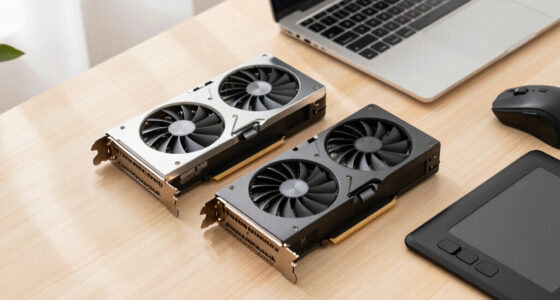
The GPU makes ~70% of your heat and most of your noise. But here’s the secret: the chip doesn’t decide how loud your card is — the cooler design and your power settings do. Match your VRAM tier in Part 2, then make it quiet.
Capping to 70–80% sheds a huge amount of heat for almost no inference loss — because inference is memory-bound. A capped 5090 is dramatically cooler & quieter than stock. Do this first.
Within one GPU model, partner cards differ enormously. For a single card, a large triple-fan open-air with zero-RPM idle runs slow & quiet. For multi-GPU, the calculus flips →
With room to breathe, a large triple-fan open-air cooler spreads heat across a big fin stack and runs its fans slowly. The quietest choice — what most people should buy.
Why Quiet GPUs Matter for Local AI Setups
For users running local AI models, noise and heat are critical factors impacting usability. A GPU that sounds like a leaf blower or produces excessive heat can make dedicated AI workstations impractical for long hours or shared environments. The ability to operate GPUs quietly extends the feasibility of local inference, reduces energy costs, and improves overall comfort, especially in office or home settings.
As an affiliate, we earn on qualifying purchases.
2026 GPU Landscape and Cooling Strategies
The 2026 GPU market continues to prioritize VRAM capacity, with tiers ranging from 16GB to 96GB, accommodating models from 7B to 100B+ parameters. Historically, high-performance GPUs have been loud and hot, but recent innovations in cooler design and power management—such as undervolting—have allowed manufacturers to significantly reduce noise levels.
Key models like the RTX 5090 and RTX 4090 have demonstrated that with proper cooling and power capping, high-end GPUs can operate quietly. This marks a shift from the noisy, heat-intensive setups of previous years towards more manageable, quieter configurations for local AI inference.
"Undervolting and high-quality cooling are game-changers for making high-power GPUs suitable for quiet, long-term AI workloads."
— Thorsten Meyer, AI hardware expert
high performance low noise graphics card
As an affiliate, we earn on qualifying purchases.
As an affiliate, we earn on qualifying purchases.
Remaining Questions About GPU Quietness
While many models can be made quiet through undervolting and cooling, the actual noise levels depend heavily on partner implementations. Long-term reliability of undervolting under continuous load also remains to be fully verified. Additionally, the impact of future model updates or new GPU releases on noise and thermals is still uncertain.
As an affiliate, we earn on qualifying purchases.
Future Developments in Quiet GPU Technology
Manufacturers are expected to continue refining cooling solutions and power management features, potentially integrating more advanced thermal designs and software controls. Upcoming GPU releases may further optimize for low noise and heat, making high-performance local AI more accessible and practical for everyday use. Monitoring these innovations will be key for builders seeking quiet, efficient AI workstations.
As an affiliate, we earn on qualifying purchases.
Key Questions
Can I run a high-end GPU quietly without sacrificing performance?
Yes, by undervolting the GPU and choosing partner cards with large, efficient coolers, you can significantly reduce noise while maintaining near-maximum inference performance.
What is the most effective way to keep a GPU quiet during long inference sessions?
Power-capping the GPU to 70–80% and using a high-quality, large cooling solution with features like zero-RPM modes are the most effective strategies.
Are used GPUs like the RTX 3090 still viable for quiet, local AI setups?
Yes, the RTX 3090 offers good VRAM and can be thermally managed with proper cooling and power settings, making it a cost-effective option for quieter operation.
Will future GPU models be significantly quieter?
Likely yes, as manufacturers continue to innovate cooling and power management technologies aimed at reducing noise and heat for dedicated AI workloads.
Source: ThorstenMeyerAI.com
Fall Picks
fall essentials
As an affiliate, we earn on qualifying purchases.