
TL;DR
The most effective way to reduce noise from a high-performance rig isn’t just soundproofing — it’s moving it out of earshot. Placing it in a closet with proper ventilation and using targeted dampening materials can cut noise and heat, giving you a quiet, cool workspace.
Ever get annoyed by the jet engine roar of your gaming or AI rig? You’re not alone. Many enthusiasts discover that the biggest noise issues come not from the components themselves, but from where you put them.
What if you could *dramatically* cut noise just by moving your machine into a closet or another room? It’s a game-changer — and it costs less than fancy noise-canceling headphones. This article reveals the secret sauce: placement, dampening, and the unexpected hero — the ‘rig in the closet’.
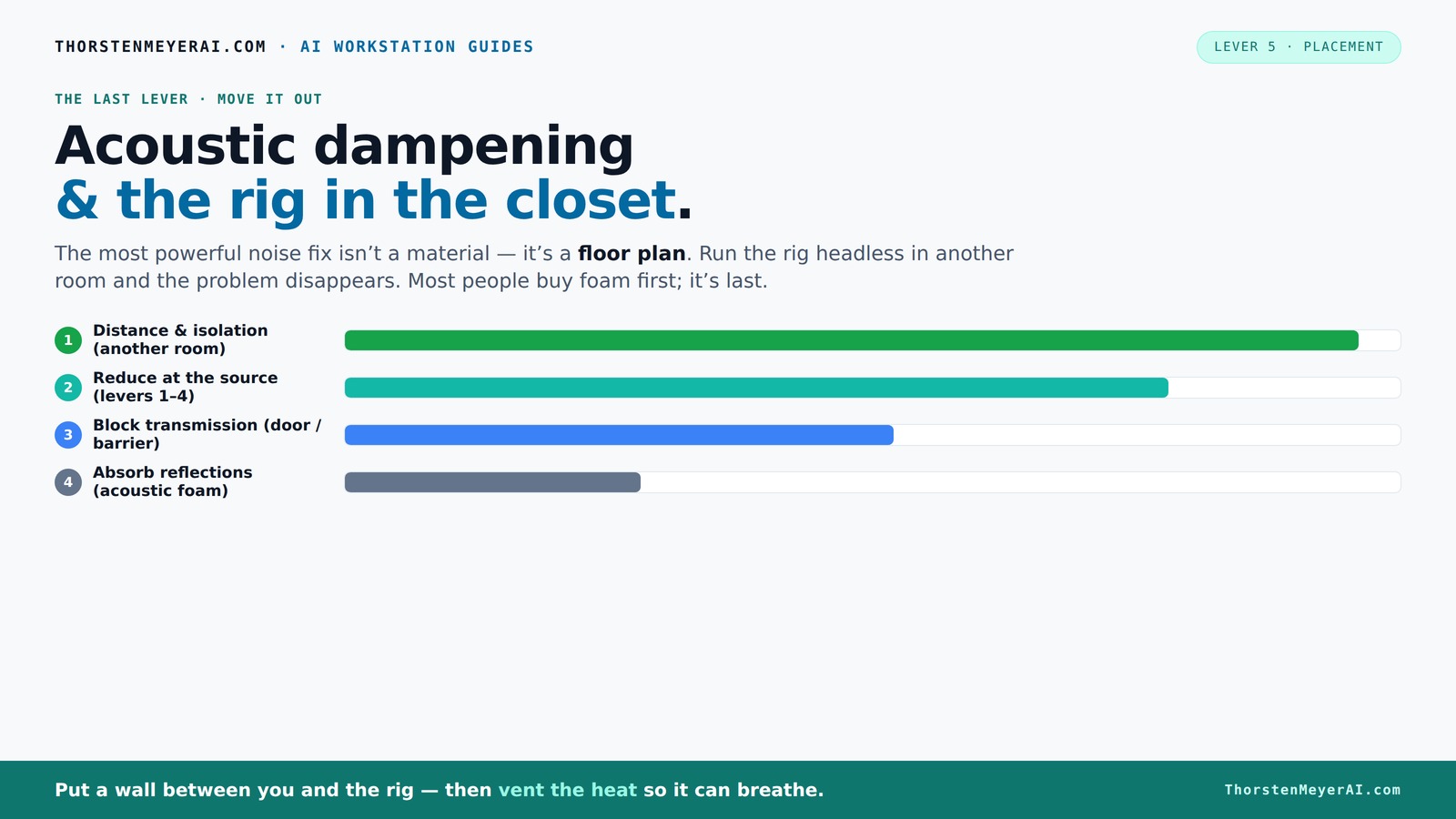
Acoustic dampening
& the rig in the closet.
The most powerful noise fix isn’t a material — it’s a floor plan. A rig you can’t hear because it’s in another room beats any amount of foam. Tap the approaches in Part 1 to see what actually works.
(another room)
(levers 1–4)
(door / barrier)
(acoustic foam)
Contain the noise, not the heat
Key Takeaways
- Moving your rig into another room or closet drastically reduces noise and heat, often more than acoustic foam treatments.
- Proper ventilation is non-negotiable — sealed closets trap heat, causing throttling and noise spikes.
- Use a combination of acoustic dampening inside the space and barriers to block sound leakage.
- A DIY setup with ventilation and dampening can outperform expensive soundproof cabinets if done right.
- Always monitor temperature and airflow to keep your hardware cool and quiet during long runs.
soundproof computer closet enclosure
As an affiliate, we earn on qualifying purchases.
As an affiliate, we earn on qualifying purchases.
Why Moving Your Rig Beats Soundproofing Every Time
The best way to quiet your rig isn’t more foam or acoustic panels. It’s distance. When your machine is far away, noise drops off exponentially. Imagine your PC in a closet or basement, while you work at your desk. The noise becomes a distant hum, almost inaudible.
For example, I set up my AI workstation in a spare closet. The noise was so faint I barely noticed it from my desk — even during intensive training runs that hit 700W of heat. Practical? Absolutely. Cost-effective? More than you think.
Understanding why distance works so well involves physics: sound intensity diminishes with the square of the distance. So, moving your rig even a few meters away can drastically reduce perceived noise. But there are important tradeoffs: increased distance can complicate cable management and airflow. If not addressed, poor ventilation can lead to overheating, which in turn can cause your hardware to throttle performance or fail prematurely. The key is to find a balance—using distance to your advantage while ensuring proper airflow and accessibility. This means designing your setup with strategic vents and cable routing to maintain cooling efficiency and ease of maintenance, which can be the difference between a quiet, cool system and one that overheats or becomes a maintenance nightmare.
quiet PC case with ventilation
As an affiliate, we earn on qualifying purchases.
As an affiliate, we earn on qualifying purchases.
Mastering the 'Rig in the Closet' Setup — What You Need to Know
Putting a high-powered machine in a closet sounds simple, but there’s a catch: heat. A sealed, unventilated closet traps hot air, causing your rig to overheat and throttle. This not only reduces performance but can also shorten hardware lifespan. The key is to implement effective heat management strategies that allow cool air to enter and hot air to escape, maintaining optimal operating temperatures.
Here's what to do:
- Install passive vents or a quiet exhaust fan. Passive vents rely on natural convection — hot air rises and escapes, drawing in cooler air from below. Fans actively move hot air out, which is often necessary during intense workloads. Proper placement of vents ensures hot air exits at the highest point, where it naturally rises, preventing heat buildup inside the enclosure.
- Use a thermostat-controlled fan for automatic regulation. This ensures airflow adapts to your system's needs, preventing unnecessary noise from over-fan operation or overheating due to under-cooling. It provides a balance between silence and thermal safety.
- Consider a purpose-built soundproof cabinet with ducting and cooling—these specialized enclosures are designed to handle kilowatts of heat while keeping noise contained. They often incorporate insulated panels, sound-dampening materials, and integrated cooling systems, which work together to strike a balance: thermal management without sacrificing acoustic isolation. The tradeoff here is complexity and cost, but the payoff is a system that remains both quiet and cool under load.
Failing to address heat can lead to thermal throttling, where the CPU or GPU reduces its clock speed to prevent overheating. This throttling not only impacts performance but also causes fans to spin faster to compensate, increasing noise. Proper ventilation ensures your system remains cool, quiet, and performing at its best. For detailed strategies, check out the comprehensive guide on cooling and noise reduction.
acoustic dampening foam panels for PC
As an affiliate, we earn on qualifying purchases.
As an affiliate, we earn on qualifying purchases.
How to Use Acoustic Dampening to Minimize Echo & Reflections
Acoustic dampening materials like foam panels and bass traps are great for reducing echo inside a space, but they won't block sound from leaving. Think of them as softening the room, not sealing it off.
For your closet rig, focus on:
- Placing foam panels on the walls and door to absorb internal reflections. This reduces internal echo, making internal noise less harsh and more contained. Proper placement is crucial—position panels where sound bounces most to maximize absorption.
- Using bass traps in corners to tame low-frequency boom, which often carries further and is more difficult to dampen with standard foam. Low frequencies tend to resonate and travel beyond the room, so trapping them reduces both internal muddiness and external leakage.
- Adding diffusers to prevent sound from bouncing back and forth, which keeps the space from sounding muffled or boxy. Proper placement of diffusers can improve internal sound quality without increasing leakage. They scatter sound waves, reducing standing waves and echo, which enhances clarity inside the enclosure.
Remember, these treatments improve internal sound quality but won’t stop noise from leaking out unless combined with barriers. To truly minimize leakage, pair dampening with sealed doors, gaskets, or soundproof panels designed to block sound transmission, ensuring your noise stays contained within the closet. The effectiveness of these measures depends on proper installation and understanding that internal acoustics and external noise containment are related but distinct goals—balancing both is key for a quiet, controlled environment.
high-performance rig noise reduction
As an affiliate, we earn on qualifying purchases.
As an affiliate, we earn on qualifying purchases.
Comparing Placement Strategies — Which Fits Your Needs?
| Strategy | Cost | Ease of Setup | Best For |
|---|---|---|---|
| Move rig to another room/closet | Low to moderate (depends on ventilation needs) | Easy if space available | Maximum noise and heat reduction |
| Use a soundproof cabinet | High (specialized units) | Moderate (installation required) | Quiet, cool setup in a confined space |
| Install acoustic panels inside a room | Varies (DIY to professional) | Easy to moderate | Internal sound quality, not heat or noise from outside |
Quick Tips for Getting the Most from Your 'Rig in the Closet'
- Use a dedicated exhaust fan to keep air moving — don’t just seal the space. Proper airflow is crucial to prevent heat buildup, which can cause thermal throttling and hardware damage. Even a small, quiet fan can make a significant difference in maintaining safe temperatures.
- Place foam and diffusers strategically to balance internal sound quality and leakage. Internal dampening improves your experience when working inside the space, while barriers prevent sound from escaping, maintaining a quiet environment outside.
- Connect your rig via wired Ethernet to avoid adding noise through wireless adapters. Wireless signals require additional hardware and can introduce electrical noise, which might subtly affect sensitive audio or measurement equipment.
- Monitor temperature regularly — a simple thermometer probe can save your hardware. Keeping an eye on thermal metrics helps you adjust ventilation or cooling before issues arise, ensuring longevity and consistent performance.
- Consider a liquid cooling system with exhaust radiators to move heat outside more efficiently. External radiators remove heat directly from the system, reducing internal temperatures and minimizing fan noise, especially during demanding workloads.
What You Should Know Before Turning Your Closet into a Studio
Closets are tempting because they're small and sound-isolated. But they’re not magic. Limited space, overheating risk, and difficulty in full soundproofing can trip you up.
Plan ahead:
- Ensure good airflow with vents or fans. Without proper ventilation, heat can quickly accumulate, risking hardware damage and thermal throttling. It’s essential to design a system that balances soundproofing with effective cooling.
- Use high-quality dampening materials without overdoing it to avoid muffling your audio. Excessive dampening can also trap heat, so choose materials that provide sound absorption without significantly impeding airflow.
- Test your setup with real workloads to see if temperatures stay safe. Monitoring temperature and noise during actual use helps identify weak points in your design, allowing for adjustments before hardware or performance issues occur.
Remember, a well-ventilated closet with proper treatment can outperform a dedicated but poorly ventilated room, provided you carefully manage heat and sound.
Frequently Asked Questions
Can I put my gaming PC in a closet without overheating?
Yes, but it requires careful planning. Install active ventilation, use exhaust fans, and consider liquid cooling with external radiators. Regularly check temperatures with a simple sensor to ensure your PC stays safe.Will acoustic foam stop my PC noise from leaking into the room?
Acoustic foam absorbs internal reflections but doesn’t block sound from escaping. To prevent noise leakage, combine foam with barriers like sealed doors or soundproof panels.How much does a custom soundproof closet or cabinet cost?
Prices vary widely. DIY solutions with foam and ventilation parts can cost a few hundred dollars, while professional soundproof cabinets can run into thousands. It depends on your size, materials, and cooling needs.Is it worth putting a PC in a closet if I care about noise and heat?
Absolutely, if you set up proper ventilation and use targeted dampening. It’s often the most effective way to keep noise and heat away from your workspace.What’s the biggest mistake people make with closet setups?
Sealing the space without providing airflow leads to overheating. Always include ventilation — passive vents or exhaust fans — to keep your rig cool and quiet.Conclusion
Sometimes, the simplest solution is the most effective. Moving your high-performance rig into a closet or another room can make your workspace peaceful, even during intense workloads. Pair that with smart ventilation and targeted dampening, and you've got a recipe for a quiet, cool, and efficient setup.
Remember: distance beats everything. Your future quiet workspace is just a door away.