

🔍 Read the full analysis: 8 Drawing Tablets For Different Digital Art Workflows In 2027 on ThorstenMeyerAI.com

Get business pricing on monitors, keyboards and dev gear
- Business-only prices and quantity discounts
- Tax-exempt purchasing
- Multiple users, one account, clear invoices
TL;DR
This is a buying guide, not a report of a new product launch: it compares eight drawing-tablet options for different digital-art setups. The source names the HUION Kamvas 13 (Gen 3) as its overall pick, but buyers should verify compatibility, exact product versions, and app support before choosing.
ThorstenMeyerAI.com’s 2027 guide compares eight drawing tablets for different digital-art workflows, naming the HUION Kamvas 13 (Gen 3) its overall choice for artists seeking a display and dial controls. The comparison’s central point is that buyers should match the device to their setup—computer-connected display, screenless pen tablet, or standalone tablet—rather than choose by pen specifications alone.
The guide’s lineup spans screen tablets, which show the image under the pen; screenless pen tablets, which require a computer display; and standalone devices intended to run supported drawing apps without a computer. Each category involves a different balance of portability, workspace, software flexibility, and setup requirements.
The guide identifies the HUION Inspiroy H1060P as a value option for users who already have a computer and want a larger screenless drawing area. It contrasts that model with the more compact HUION Inspiroy H640P and Wacom Intuos Small, which may be easier to carry but can feel restrictive for broad hand movements or larger gestures.
For standalone use, the source includes the Frunsi RubensTab T11 Pro and PicassoTab A10. It also lists two XP-Pen Artist 13.3 Pro V2 entries that appear closely related. The guide advises checking exact versions, included accessories, and specifications rather than assuming the names indicate a meaningful difference, a consideration also relevant when comparing drawing tablets for digital art.
The 8 picks
- 1
 HUION Kamvas 13 (Gen 3) 13.3-Inch Drawing Pen Display with Dual Dial and StandView on Amazon →
- 2
 PicassoTab 10" Standalone Drawing Tablet (A10)View on Amazon →
- 3
 XP-Pen Artist 13.3 Pro V2 Drawing Tablet with Screen, 16K Pressure Levels, Re…View on Amazon →
- 4
 XPPen Artist 13.3 Pro V2 Drawing Tablet with ScreenView on Amazon →
- 5
 Frunsi RubensTab T11 Pro Standalone Drawing TabletView on Amazon →
- 6
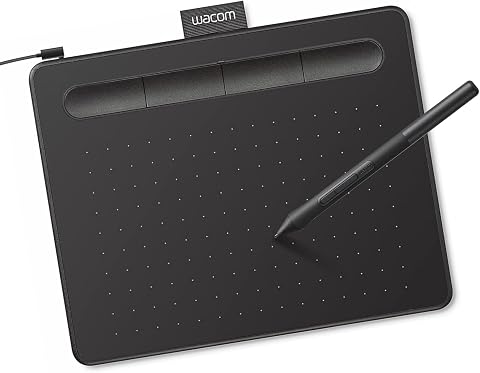 Wacom Intuos Small Wired Drawing Tablet with PenView on Amazon →
- 7
 HUION Inspiroy H1060P Graphics Drawing Tablet, 10 x 6.25 inView on Amazon →
- 8
 HUION Inspiroy H640P 6 × 4-Inch Drawing Tablet with Battery-Free StylusView on Amazon →
Choosing the Right Drawing Setup
The comparison is useful because these products are not interchangeable. A display tablet can make it more intuitive to place strokes directly on the image, but it still depends on a compatible computer and a suitable connection. A screenless tablet can cost less and work well for someone accustomed to drawing while looking at a separate monitor, though that hand-eye arrangement may take practice.
Standalone devices reduce dependence on a computer for supported tasks, but their app availability and workflow may differ from desktop setups. Workspace also matters: a compact model can suit travel or a small desk, while a larger active area may better support broad movements. The guide’s practical value lies in highlighting these tradeoffs before buyers commit to a device.
Controls such as shortcut keys and dials can speed up repeated actions, including zooming or changing brush size, if they can be mapped to commands the artist uses. Extra controls are not automatically an advantage if the user prefers keyboard shortcuts or finds them awkward to reach.
Popular right now

Dyson V15s Detect Submarine Wet and Dry Vacuum, Yellow/Nickel

Ninja SP151 Flip Toaster Oven & Air Fryer, Stainless Steel

De'Longhi Classic Signature Espresso Machine with Adjustable Milk Frother
As an affiliate, we earn on qualifying purchases.
Three Tablet Types Compared
The source says its ranking gives priority to workflow fit, workspace, controls, portability, stated pen features, and learning curve. It treats the Kamvas 13 (Gen 3) as the leading computer-connected screen option, followed by the H1060P as a larger screenless alternative. Compact pen tablets rank lower in the guide’s ordering because they provide less drawing area, while standalone devices address a different need.
The guide cautions readers to check the full setup, not just the tablet. Screen models need a compatible computer and display connection; pen tablets need a working computer, driver, and drawing application; standalone models need the desired apps to be available on the device. Pen pressure or tilt specifications do not settle those compatibility questions.
“The main tradeoff is between drawing directly on a display, using a more affordable pen tablet with a separate computer screen, or paying for a self-contained tablet.”
— ThorstenMeyerAI.com guide
Compatibility and Listing Details
The supplied material does not provide a publication date, prices, measured performance tests, or a full specification table for all eight products. It also does not identify the exact accessories or configuration associated with each XP-Pen listing. The guide’s rankings and product descriptions should therefore be read as its editorial assessment, not as independently verified test results.
Compatibility remains a buyer-specific question. The source does not detail every supported operating system, drawing application, connection arrangement, or standalone app. Readers should confirm those details with current product documentation before purchasing, especially where a screen tablet may require an adapter or more than one cable.
Checks Before You Buy
The next step for prospective buyers is to compare the exact model and package currently offered, then verify device, operating-system, driver, and app compatibility. For a display tablet, check the required computer and video connection; for a standalone model, confirm that the intended drawing apps are available.
Buyers should also match the active drawing area to their desk, posture, and typical hand movements, and consider whether they will use the shortcut controls. The source provides no announced product updates or follow-up testing schedule, so availability, prices, and listing details may need to be checked with retailers and manufacturers at the time of purchase.
Key Questions
Which tablet does the guide recommend overall?
The guide names the HUION Kamvas 13 (Gen 3) as its overall pick for artists who want a screen, dial controls, and room to grow. It remains dependent on a compatible computer and suitable connection.
Which option is aimed at buyers seeking value?
The source calls the HUION Inspiroy H1060P a strong value choice for people who already have a computer and prefer a larger screenless work area.
What is the difference between a screen tablet and a pen tablet?
A screen tablet lets users draw on a display showing the artwork. A screenless pen tablet records pen movement on its surface while the image appears on a separate computer monitor.
Are the two XP-Pen listings different products?
The source says the two Artist 13.3 Pro V2 listings appear closely related, but does not establish whether their specifications or packages differ. Check the exact version and included accessories.
What should buyers check before ordering?
Confirm computer or standalone-device compatibility, required connections, driver and drawing-app support, active drawing area, and the included accessories. For standalone tablets, verify that the specific apps you need are available.
Source: ThorstenMeyerAI.com