

For most programmers, I’d start with the Keychron V6: its full-size layout, wired connection, and knob make it a strong all-around choice for long coding sessions. The Keychron V5 Max adds wireless flexibility while keeping a number pad, while the compact Keychron K3 V2 suits desks where mouse space matters more than full-height keys. The main tradeoffs are layout size, wired versus wireless reliability, switch feel, and whether hot-swappable keys are worth prioritizing. A keyboard that fits your desk and typing habits can matter more than gaming features or extra lighting. Read on for the full breakdown of all 15 options and the buyer type each one suits.

Get business pricing on monitors, keyboards and dev gear
- Business-only prices and quantity discounts
- Tax-exempt purchasing
- Multiple users, one account, clear invoices
Key Takeaways
- The Keychron V6 is the most balanced coding pick: its full-size layout keeps the number pad and navigation keys close at hand, while the wired connection avoids battery management.
- Wireless does not have to mean giving up a number pad: the Keychron V5 Max and Keychron K4 V2 offer different ways to keep numeric input while reducing desk cable clutter.
- Compact layouts make a real desk-space trade: the K3 V2, AULA F75 Pro, and Keychron K8 give up some keys to free room for a mouse or notebook.
- Hot-swappable models offer more room to change your typing setup: the Redragon K671, Redragon K668, and several Keychron options let buyers replace compatible switches without replacing the whole keyboard.
- Features aimed at gaming or convenience are not automatic coding advantages: RGB effects, hybrid switches, smart displays, and wireless modes can be useful, but layout, switch feel, and connection choice should come first.
| Redragon K671 Wired Mechanical Gaming Keyboard with Hot-Swappable Red Switches |  | Best Value for Linear Switch Customization | Layout: 104-key QWERTY | Connectivity: Wired | Switches: Linear red; listed as Cherry MX Red | VIEW LATEST PRICE | See Our Full Breakdown |
| Logitech G413 SE Full-Size Mechanical Gaming Keyboard |  | Best for a Durable, No-Fuss Work Setup | Layout: Full-size QWERTY, 108 keys | Connectivity: USB 2.0 wired | Switches: Tactile mechanical | VIEW LATEST PRICE | See Our Full Breakdown |
| Keychron V6 Full-Size Wired Mechanical Keyboard with Knob and Brown Switches |  | Best for Programmable Layouts | Layout: Full-size QWERTY, 108 keys | Connectivity: Wired USB-C | Switches: Tactile Keychron K Pro Brown | VIEW LATEST PRICE | See Our Full Breakdown |
| AULA F99 Tri-Mode Wireless Mechanical Keyboard | 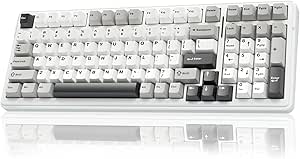 | Best for Multi-Device Wireless Work | Layout: 99-key, 96% compact layout | Connectivity: Bluetooth 5.0, 2.4 GHz wireless, and USB-C wired | Multi-device support: Up to five devices | VIEW LATEST PRICE | See Our Full Breakdown |
| Redragon K668 108-Key Hot-Swappable Wired RGB Gaming Keyboard |  | Best for Dedicated Coding Shortcuts | Layout: 108 keys, full-size | Connectivity: Wired USB-C | Switches: Linear red | VIEW LATEST PRICE | See Our Full Breakdown |
| Keychron K8 Tenkeyless Wireless Mechanical Keyboard with Brown Switches |  | Best Tenkeyless for Multi-Device Coding | Layout: Tenkeyless, 87-key QWERTY | Switches: Tactile brown | Connectivity: Bluetooth 5.1 and USB-C | VIEW LATEST PRICE | See Our Full Breakdown |
| Keychron V5 Max Wireless Mechanical Keyboard with Number Pad |  | Best for Programmers Who Need a Number Pad | Layout: 96%, QWERTY, 97 keys | Switches: Linear Gateron Jupiter Red | Connectivity: 2.4 GHz, Bluetooth 5.1, and USB-C | VIEW LATEST PRICE | See Our Full Breakdown |
| ProtoArc K310 Pro Full-Size Backlit Wireless Mechanical Keyboard |  | Best Full-Size Wireless Pick | Layout: Full-size QWERTY, 108 keys | Switches: Linear red | Connectivity: Bluetooth and 2.4 GHz USB receiver | VIEW LATEST PRICE | See Our Full Breakdown |
| SteelSeries Apex 5 Hybrid Mechanical Gaming Keyboard |  | Best for Tactile Feedback and Desk Controls | Layout: AZERTY, 104 keys | Switches: Hybrid Blue, tactile and clicky | Switch lifespan: 20 million keypresses | VIEW LATEST PRICE | See Our Full Breakdown |
| RK Royal Kludge S98 Wireless Mechanical Keyboard with Smart Display and Knob |  | Best for Custom Controls and Sound Dampening | Layout: QWERTY, 98 keys | Switches: Linear RK switches | Connectivity: Bluetooth 5.0, 2.4 GHz RF, and USB-C | VIEW LATEST PRICE | See Our Full Breakdown |
| Logitech MX Mechanical Wireless Illuminated Keyboard, Clicky |  | Best for Multi-Device Workstations | Layout: Full-size QWERTY, 104 keys | Switches: Low-profile clicky tactile mechanical | Connectivity: Bluetooth Low Energy, Logi Bolt receiver, USB-C charging | VIEW LATEST PRICE | See Our Full Breakdown |
| Keychron K4 Version 2 Wireless Mechanical Keyboard, 96% Layout, 100 Keys, Brown Switches, White LED Backlight |  | Best Compact Layout with a Number Pad | Layout: 96% QWERTY, 100 keys | Switches: Tactile Keychron Apex Brown | Connectivity: Bluetooth 5.1 and USB-C wired | VIEW LATEST PRICE | See Our Full Breakdown |
| Keychron C2 Full-Size Wired Mechanical Keyboard with Brown Switches, Retro Color, Non-Backlit |  | Best Straightforward Wired Pick | Layout: Full-size QWERTY, 104 keys | Switches: Tactile Keychron Brown | Connectivity: Wired USB-C | VIEW LATEST PRICE | See Our Full Breakdown |
| Keychron K3 Version 2 QMK 75% Wireless Low-Profile Mechanical Keyboard |  | Best for Programmers Who Remap Keys | Layout: 75% QWERTY, 84 keys | Switches: Tactile Brown | Connectivity: Bluetooth 5.1 and USB-C wired | VIEW LATEST PRICE | See Our Full Breakdown |
| AULA F75 Pro 75% Wireless Mechanical Keyboard |  | Best for Switch Customization | Layout: 75%, 81 keys | Switches: Linear LEOBOG Reaper | Connectivity: Bluetooth 5.0, 2.4 GHz wireless, USB-C | VIEW LATEST PRICE | See Our Full Breakdown |
| mechanical keyboards for programmer | Layout | Connectivity | Switches | Backlighting |
|---|---|---|---|---|
| Redragon K671 Wired Mechanical | 104-key QWERTY | Wired | Linear red; listed as Cherry MX Red | 11 modes; brightness and speed adjustable; color not changeable |
| Logitech G413 SE Full-Size Mec | Full-size QWERTY, 108 keys | USB 2.0 wired | Tactile mechanical | Single-color white LED |
| Keychron V6 Full-Size Wired Me | Full-size QWERTY, 108 keys | Wired USB-C | Tactile Keychron K Pro Brown | RGB |
| AULA F99 Tri-Mode Wireless Mec | 99-key, 96% compact layout | Bluetooth 5.0, 2.4 GHz wireless, and USB-C wired | Pre-lubed linear; hot-swappable 3-pin and 5-pin switches | RGB with 16 lighting effects |
| Redragon K668 108-Key Hot-Swap | 108 keys, full-size | Wired USB-C | Linear red | RGB with 19 preset modes |
| Keychron K8 Tenkeyless Wireles | Tenkeyless, 87-key QWERTY | Bluetooth 5.1 and USB-C | Tactile brown | White, single color |
| Keychron V5 Max Wireless Mecha | 96%, QWERTY, 97 keys | 2.4 GHz, Bluetooth 5.1, and USB-C | Linear Gateron Jupiter Red | RGB |
| ProtoArc K310 Pro Full-Size Ba | Full-size QWERTY, 108 keys | Bluetooth and 2.4 GHz USB receiver | Linear red | 10 effects with adjustable speed and brightness |
| SteelSeries Apex 5 Hybrid Mech | AZERTY, 104 keys | USB | Hybrid Blue, tactile and clicky | Per-key RGB |
| RK Royal Kludge S98 Wireless M | QWERTY, 98 keys | Bluetooth 5.0, 2.4 GHz RF, and USB-C | Linear RK switches | RGB |
| Logitech MX Mechanical Wireles | Full-size QWERTY, 104 keys | Bluetooth Low Energy, Logi Bolt receiver, USB-C charging | Low-profile clicky tactile mechanical | Smart illumination with automatic adjustment |
| Keychron K4 Version 2 Wireless | 96% QWERTY, 100 keys | Bluetooth 5.1 and USB-C wired | Tactile Keychron Apex Brown | Single-color white LED |
| Keychron C2 Full-Size Wired Me | Full-size QWERTY, 104 keys | Wired USB-C | Tactile Keychron Brown | None |
| Keychron K3 Version 2 QMK 75% | 75% QWERTY, 84 keys | Bluetooth 5.1 and USB-C wired | Tactile Brown | White LED |
| AULA F75 Pro 75% Wireless Mech | 75%, 81 keys | Bluetooth 5.0, 2.4 GHz wireless, USB-C | Linear LEOBOG Reaper | RGB, 16.8 million colors |
More Details on Our Top Picks
Redragon K671 Wired Mechanical Gaming Keyboard with Hot-Swappable Red Switches
The K671 suits programmers who want a full-size board with linear red switches and a straightforward path to changing them. Its hot-swap support lets you experiment with compatible switches without soldering, while full-key anti-ghosting helps when several keys are pressed at once. Compared with the Keychron V6, it offers fewer programming and lighting options: the K671 lists macro editing, but not QMK/VIA, and its backlight color is fixed. That makes it a simpler choice for someone who wants to adjust brightness and lighting speed without configuring a highly customizable setup. The 104-key layout keeps the number pad, but its wired-only connection and ABS enclosure are less suited to buyers seeking portability or the PBT keycaps found on the Logitech G413 SE.
Pros:- Hot-swappable linear red switches allow switch changes without soldering.
- Full-key anti-ghosting supports simultaneous key presses.
- Macro editing and 12 multimedia shortcuts add useful controls.
- Backlight brightness and speed can be adjusted.
Cons:- Wired-only connectivity limits flexible desk setups.
- Backlight color cannot be changed.
- ABS enclosure lacks the PBT keycaps listed for the Logitech G413 SE and Keychron V6.
Best for: Programmers who want an affordable-feeling full-size layout, linear switches, and the option to swap compatible switches without soldering.
Not ideal for: Buyers who need wireless use, adjustable backlight colors, or advanced QMK/VIA remapping; the Keychron V6 is a better fit for deeper layout customization.
- Layout:104-key QWERTY
- Connectivity:Wired
- Switches:Linear red; listed as Cherry MX Red
- Hot-swappable:Yes
- Backlighting:11 modes; brightness and speed adjustable; color not changeable
- Anti-ghosting:Full-key
- Controls:Macro editing and 12 multimedia shortcuts
- Enclosure:ABS
- Dimensions:17.13 × 4.88 × 1.42 in
Our verdict“Choose the K671 if you want a full-size wired board with linear, hot-swappable switches and can live with fixed-color lighting.”
Logitech G413 SE Full-Size Mechanical Gaming Keyboard
The G413 SE favors sturdy everyday typing over switch experimentation. Its PBT keycaps are designed to resist wear, and the aluminum-magnesium top case gives this full-size board a more substantial construction than the ABS-bodied Redragon K671. Tactile switches provide a noticeable response at the keypress, which may suit programmers who want feedback without choosing a linear switch. The tradeoff is less flexibility: it has six-key rollover, not the K671’s full-key anti-ghosting, and the listed features do not include hot-swappable switches or macro editing. White-only lighting keeps the presentation restrained but cannot be recolored like the RGB options on the Keychron V6 or Redragon K668. I’d shortlist it for a dependable wired desk rather than a highly configurable keyboard project.
Pros:- PBT keycaps are designed to resist heat and wear.
- Tactile switches offer distinct feedback while typing.
- Aluminum-magnesium top case provides a sturdier construction than the K671’s ABS enclosure.
- Twelve function-key media controls and white LED backlighting.
Cons:- Wired USB connection does not support wireless use.
- Single-color white lighting cannot be customized to other colors.
- Six-key rollover is more limited than the K671’s full-key anti-ghosting.
Best for: Programmers who prefer tactile feedback, full-size keys, durable PBT keycaps, and a restrained white-backlit wired setup.
Not ideal for: People who want wireless freedom, hot-swappable switches, RGB color choices, or full-key rollover; the Keychron V6 offers broader customization.
- Layout:Full-size QWERTY, 108 keys
- Connectivity:USB 2.0 wired
- Switches:Tactile mechanical
- Keycaps:PBT
- Top case:Aluminum-magnesium alloy
- Backlighting:Single-color white LED
- Anti-ghosting:Six-key rollover
- Media controls:12 function-key controls
- Compatibility:Windows and macOS
Our verdict“Pick the G413 SE for durable keycaps and tactile typing in a simple full-size wired keyboard, not for switch or lighting customization.”
Keychron V6 Full-Size Wired Mechanical Keyboard with Knob and Brown Switches
For programmers who want to shape the keyboard around their workflow, the V6 is the most capable wired pick in this group. QMK/VIA programmability supports key remapping and layout customization, while hot-swappable brown switches let you change the typing feel without soldering. Its 108-key layout preserves the number pad, and the double-shot PBT keycaps and screw-in stabilizers are aimed at a durable, steady typing experience. Compared with the Redragon K671, the V6 offers much deeper key customization and RGB lighting, but it is still wired and its brown switches are tactile rather than linear. The AULA F99 is a better match for someone who needs wireless connections across devices; the V6 makes more sense for a fixed workstation, though its lack of water resistance calls for care around drinks.
Pros:- QMK/VIA supports extensive key remapping and layout customization.
- Hot-swap support accommodates many 3-pin and 5-pin MX switches.
- Double-shot PBT keycaps and screw-in stabilizers support a durable, stable typing setup.
- Compatible with macOS, Windows, and Linux.
Cons:- Wired USB-C connection limits use away from a fixed workstation.
- Not water resistant.
- Tactile brown switches may not suit programmers who specifically prefer linear switches like those in the Redragon K668.
Best for: Programmers who want a full-size keyboard for custom layouts, macros, and key remapping across macOS, Windows, or Linux.
Not ideal for: People who need wireless connectivity or water resistance; the AULA F99 offers multiple connection modes, while the V6 is wired and not water resistant.
- Layout:Full-size QWERTY, 108 keys
- Connectivity:Wired USB-C
- Switches:Tactile Keychron K Pro Brown
- Hot-swappable:Yes
- Programmability:QMK/VIA
- Backlighting:RGB
- Keycaps:Double-shot PBT, OSA profile
- Compatibility:macOS, Windows, and Linux
- Water resistance:Not water resistant
Our verdict“Choose the V6 if programmable layouts and cross-platform support matter more than wireless convenience.”
AULA F99 Tri-Mode Wireless Mechanical Keyboard
The F99 is the lineup’s clearest choice for programmers who move between a work computer, personal laptop, and other devices. It connects through Bluetooth 5.0, 2.4 GHz, or USB-C and supports up to five devices, unlike the wired-only Keychron V6 and Redragon K668. The 99-key, 96% layout keeps a number section while taking a more compact approach than a conventional full-size board. Hot-swappable pre-lubed linear switches, double-shot PBT keycaps, and layered sound-dampening construction round out a feature-rich setup. That breadth comes with caveats: the supplied description identifies an AZERTY layout, which may frustrate QWERTY typists, and the stated water protection is only “water repellent.” Its listed operating-system compatibility is Windows, so cross-platform programmers should check fit before choosing it over the V6.
Pros:- Bluetooth, 2.4 GHz wireless, and USB-C wired modes support flexible setups.
- Can connect with up to five devices.
- Hot-swappable switches support 3-pin and 5-pin options.
- Compact 99-key layout combines RGB, programmable keys, and a large rechargeable battery.
Cons:- AZERTY layout may not suit programmers accustomed to QWERTY.
- Water protection is described only as water repellent.
- Listed operating-system compatibility is limited to Windows, unlike the V6’s stated support for macOS, Windows, and Linux.
Best for: Windows programmers who work across several devices and want a compact layout with wireless and wired connection options.
Not ideal for: QWERTY-first typists or programmers seeking confirmed macOS/Linux compatibility; the listing describes an AZERTY layout and names Windows as the compatible operating system.
- Layout:99-key, 96% compact layout
- Connectivity:Bluetooth 5.0, 2.4 GHz wireless, and USB-C wired
- Multi-device support:Up to five devices
- Switches:Pre-lubed linear; hot-swappable 3-pin and 5-pin switches
- Backlighting:RGB with 16 lighting effects
- Keycaps:Double-shot PBT
- Battery:8000 mAh rechargeable
- Features:Macro customization, N-key rollover, gasket structure, and five layers of filling material
- Compatibility:Windows; listing describes AZERTY layout
Our verdict“Choose the F99 for multi-device wireless flexibility if its AZERTY layout and Windows-focused compatibility suit your workflow.”
Redragon K668 108-Key Hot-Swappable Wired RGB Gaming Keyboard
The K668 gives programmers more ready-to-hand controls than the K671: its four dedicated shortcut keys cover mute, calculator, screen lock, and desktop, with programmable macros adding room for custom actions. It keeps a conventional 108-key layout, linear red switches, and hot-swap support for 3-pin and 5-pin options, so the typing feel can be changed without soldering. Compared with the Keychron V6, this Redragon emphasizes preset utility keys and RGB presets rather than QMK/VIA layout programming and named Linux support. The dual keycap sets and adjustable feet add some setup flexibility, but the board remains wired, and its full-size footprint takes desk space. Buyers wanting a smaller wireless workstation should look at the AULA F99 instead; those wanting deeper remapping should favor the V6.
Pros:- Four dedicated shortcut keys provide quick access to mute, calculator, screen lock, and desktop.
- Hot-swappable switches support 3-pin and 5-pin options without soldering.
- Programmable macros and customizable RGB lighting offer setup flexibility.
- Includes two keycap sets and adjustable feet.
Cons:- Wired USB-C connectivity does not support wireless use.
- Full-size layout takes more desk space than the 99-key AULA F99.
- The listed feature set does not match the Keychron V6’s explicit QMK/VIA programmability.
Best for: Programmers who want a full-size wired board with dedicated desktop shortcuts, macro support, and hot-swappable linear switches.
Not ideal for: People with limited desk space, wireless needs, or a preference for deep QMK/VIA customization; the AULA F99 is more flexible for wireless use and the Keychron V6 for layout programming.
- Layout:108 keys, full-size
- Connectivity:Wired USB-C
- Switches:Linear red
- Hot-swappable:Supports 3-pin and 5-pin switches
- Dedicated shortcuts:Four: mute, calculator, screen lock, and desktop
- Backlighting:RGB with 19 preset modes
- Keycaps:Two keycap sets included
- Weight:880 g
- Warranty:1 year
Our verdict“Pick the K668 if dedicated shortcut keys and a full-size layout matter more than wireless use or advanced firmware remapping.”
Keychron K8 Tenkeyless Wireless Mechanical Keyboard with Brown Switches
The Keychron K8 keeps a dedicated navigation cluster while dropping the number pad, freeing desk space for a mouse without forcing programmers to learn a compact layout. Its tactile brown switches give keystrokes a noticeable bump without the sharp click of the SteelSeries Apex 5’s hybrid switches, making the K8 a more restrained fit for shared offices. Bluetooth connects up to three devices, while USB-C offers a wired option; the included Mac and Windows keycaps also make switching operating systems less awkward. Compared with the number-pad-equipped Keychron V5 Max, the K8 is the better choice when a narrower footprint matters more than spreadsheet entry or extensive key remapping. Its tradeoffs are no water resistance and 6-key rollover over wireless, so it is less suited to spill-prone desks or demanding multi-key input.
Pros:- Tenkeyless layout retains dedicated navigation keys while reducing width compared with full-size boards.
- Bluetooth supports connections to up to three devices, with USB-C available for wired use.
- Mac and Windows keycaps support users who move between operating systems.
- Battery capacity is 4,000 mAh, with up to 200 hours of use when backlighting is off.
Cons:- Wireless mode is limited to 6-key rollover rather than NKRO.
- The keyboard is not water resistant.
- Single-color white backlighting offers fewer lighting choices than the RGB Keychron V5 Max.
Best for: Programmers who want a navigation cluster, a smaller desk footprint, and easy switching among up to three computers or mobile devices.
Not ideal for: Developers who frequently enter numbers, need wireless NKRO, or want spill protection for a busy desk.
- Layout:Tenkeyless, 87-key QWERTY
- Switches:Tactile brown
- Connectivity:Bluetooth 5.1 and USB-C
- Bluetooth device capacity:Up to 3 devices
- Backlighting:White, single color
- Battery:4,000 mAh; up to 200 hours with backlight off
- Rollover:NKRO wired; 6KRO wireless
- Compatibility:macOS and Windows
Our verdict“Choose the K8 if you want tactile typing, a compact-but-familiar layout, and convenient multi-device pairing without a number pad.”
Keychron V5 Max Wireless Mechanical Keyboard with Number Pad
The Keychron V5 Max packs a number pad into a 96% layout, keeping numeric entry close at hand while taking less room than a conventional full-size board. That makes it a stronger fit for developers who work with data or spreadsheets than the tenkeyless Keychron K8, though the compressed arrangement may take time to learn if you rely on familiar full-size spacing. Its hot-swappable sockets let you change compatible switches without soldering, and QMK-based Keychron Launcher programming supports custom keys and macros for coding workflows. Three connection options—2.4 GHz, Bluetooth, and USB-C—give it more flexibility than the wired-only SteelSeries Apex 5. The main compromises are its plastic enclosure and linear Gateron Jupiter Red switches, which may feel too smooth for typists who want the tactile bump of the K8’s brown switches.
Pros:- 96% layout retains a number pad in a more compact footprint than a standard full-size board.
- Hot-swappable sockets accept compatible 3-pin and 5-pin MX-style switches.
- QMK-based Keychron Launcher supports programmable keys and macros.
- Offers 2.4 GHz, Bluetooth 5.1, and USB-C connectivity across macOS, Windows, and Linux.
Cons:- The compressed 96% arrangement can require an adjustment period for full-size keyboard users.
- Plastic enclosure lacks the solidity of the aluminum-topped ProtoArc K310 Pro.
- Linear switches may not provide the tactile feedback some programmers prefer.
Best for: Developers who regularly enter numeric data, want programmable keys, and may want to change switches without soldering.
Not ideal for: Programmers who need a traditional full-size key arrangement, prefer tactile switches out of the box, or prioritize a metal enclosure.
- Layout:96%, QWERTY, 97 keys
- Switches:Linear Gateron Jupiter Red
- Connectivity:2.4 GHz, Bluetooth 5.1, and USB-C
- Hot-swappable:Yes; compatible with 3-pin and 5-pin MX-style switches
- Keycaps:Double-shot PBT, OSA profile
- Backlighting:RGB
- Programmability:QMK-based Keychron Launcher
- Compatibility:macOS, Windows, and Linux
Our verdict“Pick the V5 Max if you want a programmable, switch-customizable board with a number pad and several ways to connect.”
ProtoArc K310 Pro Full-Size Backlit Wireless Mechanical Keyboard
The ProtoArc K310 Pro suits programmers who want a complete 108-key layout, including a number pad, and prefer not to keep the keyboard tethered to a computer. Its linear red switches are described as quiet and smooth, a better fit for shared workspaces than the clicky SteelSeries Apex 5, although they offer less tactile feedback than the Keychron K8’s brown switches. Bluetooth and a 2.4 GHz receiver support up to three devices, and adjustable backlighting plus programmable macros add flexibility for routine tasks. The aluminum top case gives it a more substantial construction detail than the plastic-bodied Keychron V5 Max, while its full-size footprint takes up more desk space than either compact Keychron. Macro setup has a notable catch: it requires a 2.4 GHz connection, and Safari is not supported for customization.
Pros:- Full-size 108-key layout includes a number pad for data entry.
- Quiet linear red switches are a more restrained choice for shared offices than clicky switches.
- Bluetooth and 2.4 GHz receiver support connection to up to three devices.
- Aluminum top case, adjustable backlighting, programmable macros, and USB-C recharging add useful workplace features.
Cons:- Full-size dimensions occupy more desk space than the tenkeyless Keychron K8.
- Macro customization requires a 2.4 GHz USB connection and does not support Safari.
- Linear switches may feel less informative to typists who prefer a tactile bump.
Best for: Programmers who need a full-size number pad, want quieter linear typing, and switch among multiple computers or mobile devices.
Not ideal for: Desk-space-limited developers, users who prefer pronounced tactile feedback, or Mac users who expect to configure macros through Safari.
- Layout:Full-size QWERTY, 108 keys
- Switches:Linear red
- Connectivity:Bluetooth and 2.4 GHz USB receiver
- Multi-device support:Up to 3 devices
- Backlighting:10 effects with adjustable speed and brightness
- Top case:Aluminum
- Battery:USB-C rechargeable; up to 150 days standby
- Dimensions:17.64 × 6.1 × 1.77 in
Our verdict“Choose the K310 Pro if a full-size layout and multi-device wireless use matter more than a compact footprint or tactile switches.”
SteelSeries Apex 5 Hybrid Mechanical Gaming Keyboard
The SteelSeries Apex 5 is the specialist choice here for programmers who like a pronounced, clicky keystroke and want information or controls visible on the board itself. Its hybrid blue switches, per-key RGB, and OLED smart display set it apart from the more work-focused Keychron K8, whose quieter brown switches and wireless connections suit shared desks better. The aluminum frame, magnetic wrist rest, and IP32 water resistance add practical desk features, but the Apex 5 is USB-only, so it cannot move between devices as easily as the Keychron V5 Max or ProtoArc K310 Pro. Its listed AZERTY layout is also a major fit issue for programmers who expect QWERTY: shortcuts and key positions may not match their habits. Clicky switches can carry across a room, making this a poor choice for quiet offices.
Pros:- Tactile, clicky hybrid switches provide distinct feedback while typing.
- OLED display and per-key RGB allow on-board information and lighting customization.
- Aluminum alloy frame and magnetic wrist rest suit a fixed desk setup.
- IP32 water resistance provides more spill protection than the non-resistant Keychron K8.
Cons:- AZERTY layout may not suit programmers accustomed to QWERTY.
- Clicky switches can be disruptive in shared offices or quiet rooms.
- USB-only connectivity lacks the wireless flexibility of the Keychron V5 Max.
Best for: Programmers who use an AZERTY layout, work at a fixed desktop, and value clicky feedback, per-key lighting, and an on-keyboard display.
Not ideal for: QWERTY users, people working in quiet shared spaces, or developers who need wireless multi-device connections.
- Layout:AZERTY, 104 keys
- Switches:Hybrid Blue, tactile and clicky
- Switch lifespan:20 million keypresses
- Connectivity:USB
- Backlighting:Per-key RGB
- Display:OLED smart display
- Frame:Aluminum alloy
- Water resistance:IP32
Our verdict“Choose the Apex 5 only if its AZERTY layout, clicky feel, and OLED controls fit your fixed-desktop workflow.”
RK Royal Kludge S98 Wireless Mechanical Keyboard with Smart Display and Knob
The RK Royal Kludge S98 combines a compact 98-key layout with a customizable display and multifunction knob, giving programmers quick access to controls without giving up a number pad. Its Bluetooth 5.0, 2.4 GHz, and USB-C modes make it more connection-flexible than the wired SteelSeries Apex 5, while the hot-swappable sockets offer an easier path to changing switches than a fixed-switch board. Double-shot PBT keycaps and layered sound dampening are appealing for long coding sessions, though the linear RK switches may not provide the feedback of the Keychron K8’s brown switches. The S98 also weighs three pounds, so it is less appealing for frequent travel. Product information does not specify battery life, leaving an important planning detail unclear for anyone who expects to rely on wireless use for long stretches.
Pros:- Three connection modes support wired use and two forms of wireless connection.
- Hot-swappable sockets accept 3-pin and 5-pin switches, allowing switch changes without soldering.
- Customizable display and multifunction knob add accessible desk controls.
- Double-shot PBT keycaps and layered sound dampening support a more considered typing setup.
Cons:- Linear RK switches may not suit programmers who want a tactile bump or click.
- Battery life is not specified, making wireless runtime difficult to plan around.
- At 3 pounds, it is less convenient to carry than a lighter compact keyboard.
Best for: Programmers who want a number pad, programmable desk controls, quieter-feeling construction, and the option to change switches later.
Not ideal for: Tactile-switch fans, frequent travelers seeking a lighter board, or wireless-first buyers who need a stated battery-life estimate.
- Layout:QWERTY, 98 keys
- Switches:Linear RK switches
- Connectivity:Bluetooth 5.0, 2.4 GHz RF, and USB-C
- Hot-swappable:Supports 3-pin and 5-pin switches
- Backlighting:RGB
- Keycaps:Double-shot PBT
- Controls:Customizable smart display and multifunction knob
- Weight:3 pounds
Our verdict“Pick the S98 if you want a compact number-pad layout with a knob, display, and switch customization, and can accept unspecified battery life.”
Logitech MX Mechanical Wireless Illuminated Keyboard, Clicky
The Logitech MX Mechanical suits programmers who split their day among a desktop, laptop, and tablet: it can pair with up to three devices and switch between them without requiring separate keyboards. Its full-size layout keeps the number pad and navigation keys close at hand, while the low-profile clicky switches offer audible confirmation on each press. Smart backlighting adjusts to surrounding light, a practical aid for late sessions that the non-backlit Keychron C2 lacks. The tradeoff is sound: these switches are a poor match for quiet offices or shared calls. It also gives less scope for hands-on key customization than the QMK-based Keychron K3. Choose it for convenient device switching and a familiar full-size layout, not for silent typing or extensive remapping.
Pros:- Pairs with up to three devices over Bluetooth or the Logi Bolt receiver.
- Full-size 104-key layout includes a number pad and navigation keys.
- Smart backlighting adjusts automatically to ambient conditions.
- USB-C charging and broad operating-system compatibility support mixed-device setups.
Cons:- Clicky switches create audible typing noise that can bother coworkers or callers.
- Some customization features require Logi Options+ software.
- Battery life is shorter with backlighting enabled than with it turned off.
Best for: Programmers who regularly switch between a work computer, personal computer, and mobile device and want a full-size layout.
Not ideal for: People in shared offices or on frequent calls who need quiet keystrokes, and programmers who want extensive firmware-level remapping.
- Layout:Full-size QWERTY, 104 keys
- Switches:Low-profile clicky tactile mechanical
- Connectivity:Bluetooth Low Energy, Logi Bolt receiver, USB-C charging
- Device pairing:Up to 3 devices
- Backlighting:Smart illumination with automatic adjustment
- Battery life:Up to 15 days with backlighting; up to 10 months with backlighting off
- Weight:828 g
- Compatibility:Windows, macOS, Linux, Chrome OS, iOS, iPadOS, Android
Our verdict“Choose the MX Mechanical if multi-device switching and a backlit full-size layout matter more than quiet typing or deep key remapping.”
Keychron K4 Version 2 Wireless Mechanical Keyboard, 96% Layout, 100 Keys, Brown Switches, White LED Backlight
The Keychron K4 Version 2 is a strong fit for programmers who need a number pad but want to reclaim desk space. Its 96% layout packs 100 keys into a more compact footprint than the full-size Keychron C2, keeping numeric entry available without dedicating as much width to the keyboard. Tactile Brown switches provide a perceptible press without the MX Mechanical’s louder click, making the K4 a more considerate option for shared workspaces. Bluetooth pairing with up to three devices and USB-C wired use add flexibility, though wireless rollover is limited to 6-key rollover, unlike NKRO in wired mode. The white backlight is single-color, and the board has no water resistance. Pick it when number-pad access matters more than a spacious, widely separated key layout.
Pros:- Compact 96% footprint retains a dedicated number pad.
- Pairs with up to three devices over Bluetooth 5.1.
- Supports both Bluetooth and USB-C wired connections.
- Includes Mac and Windows keycaps for switching between operating systems.
Cons:- Wireless mode supports 6-key rollover rather than NKRO.
- No water resistance is specified.
- Backlighting is limited to a single white color.
Best for: Programmers who enter numbers often, work at a narrow desk, and want Bluetooth pairing across several devices.
Not ideal for: People who require wireless NKRO, spill protection, or a standard full-size layout with more space between key groups.
- Layout:96% QWERTY, 100 keys
- Switches:Tactile Keychron Apex Brown
- Connectivity:Bluetooth 5.1 and USB-C wired
- Device pairing:Up to 3 devices
- Backlighting:Single-color white LED
- Battery:4000 mAh; up to 240 hours with backlight off
- Key rollover:NKRO wired; 6KRO wireless
- Compatibility:Mac and Windows
Our verdict“Choose the K4 if you need a number pad in less desk space and can accept reduced wireless rollover and basic backlighting.”
Keychron C2 Full-Size Wired Mechanical Keyboard with Brown Switches, Retro Color, Non-Backlit
The Keychron C2 keeps the programming setup simple: a full-size 104-key layout, tactile Brown switches, and a direct USB-C wired connection. That makes it a sensible choice for a fixed desk where battery charging and wireless pairing would add little value. Its included Mac and Windows keycaps also make it easier to keep familiar modifier positions when moving between systems. Compared with the wireless Keychron K4, the C2 takes up more space and cannot move between devices wirelessly, but it avoids wireless rollover limits and pairing management. Its non-backlit design is a real compromise for dim rooms, and the ABS keycaps and lack of water resistance call for ordinary care. Choose it for reliable, tactile typing over lighting or portability.
Pros:- Full-size 104-key layout includes a dedicated number pad.
- USB-C wired connection avoids battery charging and wireless pairing.
- Mac and Windows keycaps support familiar modifier layouts on either system.
- Brown switches are rated for up to 50 million keystrokes.
Cons:- Non-backlit keys are harder to see in dim work areas.
- Wired-only use limits portability and multi-device switching.
- Not water resistant, and its ABS keycaps require care against wear.
Best for: Programmers with a fixed desk who want a full-size wired keyboard, tactile switches, and Mac/Windows keycap options.
Not ideal for: People who need wireless device switching, backlighting for dim workspaces, or spill protection.
- Layout:Full-size QWERTY, 104 keys
- Switches:Tactile Keychron Brown
- Connectivity:Wired USB-C
- Backlighting:None
- Compatibility:macOS and Windows; extra keycaps for both
- Keycap material:ABS
- Switch lifespan:Up to 50 million keystrokes
- Adjustable feet:Two angles: 6° and 9°
Our verdict“Choose the C2 for a fixed workstation where tactile full-size typing matters more than wireless convenience or backlighting.”
Keychron K3 Version 2 QMK 75% Wireless Low-Profile Mechanical Keyboard
For programmers who want a compact keyboard they can tailor to their workflow, the Keychron K3 Version 2 pairs an 84-key, 75% layout with QMK customization. Remapping can put frequently used shortcuts closer to hand without taking up more desk space. Its low-profile build is lighter and shorter than the full-size Keychron C2, while Bluetooth supports up to three devices and USB-C provides a wired alternative. Tactile Brown switches offer feedback without the MX Mechanical’s clicky sound, though neither option promises silence. The K3 gives up a number pad, and its white LED backlight is simpler than the RGB lighting on the AULA F75 Pro. Bluetooth can also face signal interference, so this is a better match for a tidy, compact setup than a wireless environment crowded with competing signals.
Pros:- QMK firmware supports key remapping and macros.
- Compact 84-key layout saves desk space while retaining a function row.
- Bluetooth pairs with up to three devices, with USB-C wired support as an alternative.
- Low-profile design weighs 500 g and includes Mac and Windows compatibility.
Cons:- No dedicated number pad.
- Bluetooth performance may be affected by signal interference.
- White LED backlighting offers fewer lighting options than the AULA F75 Pro’s RGB.
Best for: Programmers who use custom shortcuts, want a low-profile compact board, and switch between Mac and Windows devices.
Not ideal for: People who depend on a number pad, need RGB lighting, or work in a wireless environment where signal interference is a concern.
- Layout:75% QWERTY, 84 keys
- Switches:Tactile Brown
- Connectivity:Bluetooth 5.1 and USB-C wired
- Customization:QMK firmware for key remapping and macros
- Backlighting:White LED
- Materials:Aluminum body and plate with plastic bottom frame
- Dimensions:12.05 × 4.57 × 0.87 in
- Weight:500 g
Our verdict“Choose the K3 if programmable key layouts and a lightweight 75% form factor matter more than a number pad or elaborate lighting.”
AULA F75 Pro 75% Wireless Mechanical Keyboard
The AULA F75 Pro is the most adaptable wireless option in this group for programmers who like to change their setup: it supports hot-swappable 3-pin and 5-pin switches, programmable keys, and connections over Bluetooth, 2.4 GHz, or USB-C. Support for up to five devices goes beyond the three-device limits of the Logitech MX Mechanical and Keychron K3, which can help when a desk setup includes several computers and mobile devices. Its 75% layout keeps arrow keys but drops the number pad, and its linear Reaper switches feel different from the tactile Browns on the Keychron K4 and C2. RGB lighting and a multifunction knob add controls, but the Windows-focused compatibility is narrower than those Keychron options. Choose it for switch swapping and connection variety, not macOS support or numeric entry.
Pros:- Bluetooth, 2.4 GHz, and USB-C provide three connection options.
- Supports up to five paired devices.
- Hot-swappable sockets accept 3-pin and 5-pin switches.
- 75% layout retains arrow keys and adds RGB lighting and a multifunction knob.
Cons:- No dedicated number pad, unlike the full-size C2 or compact Keychron K4.
- Listed operating-system compatibility is Windows 7 or later.
- Water repellent does not mean fully water resistant.
Best for: Windows-based programmers who want to swap switches, use several connection types, and pair a compact board with up to five devices.
Not ideal for: Mac-first programmers, frequent number-pad users, and anyone who needs a keyboard with full spill protection.
- Layout:75%, 81 keys
- Switches:Linear LEOBOG Reaper
- Connectivity:Bluetooth 5.0, 2.4 GHz wireless, USB-C
- Multi-device support:Up to 5 devices
- Hot-swappable:Supports 3-pin and 5-pin switches
- Keycaps:Side-printed PBT
- Backlighting:RGB, 16.8 million colors
- Battery:4000 mAh rechargeable
- Operating system compatibility:Windows 7 or later
Our verdict“Choose the F75 Pro if you use Windows and value switch swapping and connection flexibility more than a number pad or broader OS support.”

How We Picked
I ranked these mechanical keyboards for programmers by how well their layouts support common coding and office tasks, including frequent use of brackets, function keys, navigation controls, and number entry. I also weighed wired and wireless behavior, hot-swap flexibility, build and maintenance considerations, and whether extra features are useful during a workday rather than merely attractive on a spec sheet. The ranking favors practical typing setups over gaming-first extras when those extras do not clearly help programming work.
The Keychron V6 leads because it combines a familiar full-size layout with a wired connection and a useful knob. Other positions reflect distinct priorities: wireless flexibility, compactness, value, or beginner-friendly simplicity. No single layout suits everyone, so products that make meaningful compromises can still rank well for the people those compromises serve; I also account for drawbacks such as reduced key access, limited customization, or dependence on charging.
Factors to Consider When Choosing Mechanical Keyboards For Programmers
Before choosing among these keyboards, I’d start with the way you work rather than the feature list. A programmer who uses a number pad for data entry may find a compact layout frustrating, while someone who moves between a laptop and desktop may value wireless connectivity more than a dedicated numpad. These broader tradeoffs help narrow the field before you compare individual models.
Choose a layout around the keys you reach for
Think through a normal work session: do you use a number pad, arrow keys, function row, and navigation cluster, or mostly type and rely on shortcuts? Full-size boards preserve the most familiar key access but take up more desk width. Tenkeyless and 75% layouts reclaim space, though some place navigation keys closer together or reduce dedicated controls. Compact layouts can be a poor fit if your code editor workflow relies on keys that have been moved or accessed through layers. Before buying, compare the physical layout image with your current keyboard and check that the keys you use often remain easy to reach.
Pick switches for your room and typing habits
Switch labels such as red, brown, or clicky give a useful starting point, but they do not tell the whole story about sound or typing feel. A clicky switch can be distracting in a shared office or on a call, while a quieter tactile or linear option may suit those spaces better. Also check whether the keyboard’s switch type is fixed or whether compatible switches can be swapped later. Hot-swap support gives you room to adjust after you learn what you like, but it does not make every switch compatible with every board. If you are unsure, prioritize a layout and connection you can live with; switch preferences can be refined later when the board allows it.
Decide whether wireless freedom is worth upkeep
Wireless keyboards reduce cable clutter and can move between a work computer and other devices, but they add charging and connection management to your routine. A wired board is simpler for a permanent desk and never needs a battery check, which can be appealing for long coding sessions. Tri-mode connectivity can add flexibility, but it is only useful if you actually switch devices or connection types. Look for clear information about the available connection methods and how the keyboard pairs with your devices. Avoid treating wireless as automatically more convenient: a stable cable may be the better choice for a single workstation.
Treat hot-swapping as flexibility, not a required upgrade
Hot-swappable switches can let you change the feel of a keyboard without replacing the entire board, which helps if your preferences evolve or a switch needs replacement. That flexibility matters most to people who enjoy adjusting their setup or want an easier repair path. It may add little value if you already know your preferred switch feel and do not plan to modify the keyboard. Check the board’s compatibility details before buying replacement switches, since hot-swap support does not promise universal fit. Consider whether the extra choice solves a real problem for you instead of paying attention to it simply because it appears on a feature list.
Separate workday value from gaming extras
Backlighting can help in a dim room, while elaborate RGB effects are mainly a matter of preference. A knob or smart display may provide convenient controls, but it will not improve typing unless it fits a task you already perform, such as adjusting volume. Hybrid gaming features can be less relevant than clear key access, comfortable spacing, and a connection that suits your workstation. When comparing boards, write down the two or three features you would use every day and treat the rest as secondary. This prevents a striking spec sheet from outweighing a better layout or more practical typing setup.
Check operating-system fit and maintenance needs
Programmers often switch between operating systems, so check the keycap legends and modifier-key arrangement before settling on a board. Some models offer system-specific keycaps or configuration options, while others may need you to remap keys in software. Also think about how easily you can clean the board: a removable keycap set and a layout with accessible spaces can make routine dust removal less of a chore. Wireless boards add battery upkeep; boards with more customization may ask for extra setup time. A keyboard that fits your existing workflow with little configuration can be a better work tool than one with more features but more maintenance.
Frequently Asked Questions
Is a full-size keyboard better for programming?
Not for every programmer. A full-size layout keeps the number pad and full navigation cluster available, which helps with numeric entry and workflows that use those keys often. It also takes up more desk width, potentially leaving less room for a mouse or notes. If you rarely use the number pad, a tenkeyless or 75% board may feel more practical. Choose based on the keys you use routinely, not on the assumption that a larger layout is inherently more capable.
Should I choose a wired or wireless keyboard for coding?
For one permanent workstation, wired is often the simpler option: there is no battery to charge and no need to manage a wireless link. Wireless makes more sense if you move between devices, prefer a cleaner desk, or need to reposition the keyboard regularly. Tri-mode models offer more connection choices, but those extras can go unused if you work at one desk. Think about whether charging would interrupt your routine and whether you genuinely need device switching. The best connection is the one that fits your work habits, not a blanket preference for wireless or wired.
Are hot-swappable switches worth it if I have never changed a keyboard switch?
They can be useful even for a first-time buyer, but only if you value future adjustment or easier switch replacement. Hot-swapping allows compatible switches to be changed without soldering, which can help if you later want a different feel or need to replace a faulty switch. It does not mean every switch will fit, and experimenting can involve extra parts and setup. If you already know what you prefer and want a straightforward keyboard, fixed switches may be enough. Treat hot-swap support as flexibility rather than a must-have feature.
Will a compact keyboard make coding harder?
It depends on how often you use the keys that compact layouts move, combine, or omit. A smaller board can free valuable space for a mouse and may suit a laptop-centered desk, but you may need to use function layers for some commands. That can slow down work if you rely on dedicated navigation or function keys throughout the day. Check the layout carefully and compare it with the keyboard shortcuts you use most. If frequent key access matters more than desk space, a larger or less compact layout may be the more comfortable choice.
Which features should I prioritize for a shared office?
Start with switch noise and the physical sound of typing, since either can bother nearby colleagues even when a keyboard is not advertised as clicky. A quieter switch style is usually a safer starting point than a clicky one, though desk surfaces and typing force also affect noise. Backlighting is a personal convenience and does not address sound. Consider whether the board’s layout keeps your commonly used keys accessible without forcing repeated shortcuts or extra key presses. If possible, choose based on the switch feel and noise level you can tolerate throughout a workday, rather than assuming all mechanical keyboards sound alike.
Conclusion
For a dependable all-around programming setup, I recommend the Keychron V6: its full-size wired layout and knob make it the most balanced pick in this group. The Redragon K671 is my value choice for buyers who want a wired board with hot-swappable red switches, while the Logitech MX Mechanical is the premium-leaning option for those who prioritize a wireless illuminated keyboard and clicky typing. Beginners who want a straightforward, familiar layout can start with the Keychron C2, especially if they prefer a wired board without backlighting. For specific needs, choose the Keychron K3 V2 when compact, low-profile typing matters, or the Keychron V5 Max if you want wireless flexibility without giving up a number pad. Match the keyboard to your layout and work environment first; the rest of the feature list comes after that.