
Smart locks offer a modern way to secure your home without traditional keys, combining convenience with advanced technology. The Yale WiFi Smart Lock stands out as the best overall choice for its reliable performance and user-friendly app. For a budget-friendly option, the Tapo Smart Wi-Fi Deadbolt delivers solid features at a lower price, while the ULTRALOQ Bolt SE excels with its compatibility with Matter over Thread, making it future-proof. However, tradeoffs include varying levels of installation complexity, connectivity options, and compatibility with smart home systems. Keep reading for a detailed breakdown to help you find the perfect smart lock for your needs.

Get business pricing on monitors, keyboards and dev gear
- Business-only prices and quantity discounts
- Tax-exempt purchasing
- Multiple users, one account, clear invoices
Key Takeaways
- Top picks vary based on connectivity: Wi-Fi, Bluetooth, or Thread compatibility influences setup and smart home integration.
- The best overall smart lock balances ease of installation, reliable performance, and app control, as exemplified by the Yale WiFi model.
- Price doesn’t always equate to features; some budget options like Tapo offer excellent value, but may lack advanced integrations.
- Build quality and security features, such as anti-tamper sensors and sturdy materials, are critical for long-term durability.
- Compatibility with existing smart home ecosystems and future-proof standards like Matter significantly impact long-term satisfaction.
| Yale WiFi Smart Lock Deadbolt with Keypad, Keyless Entry, Black Suede |  | Best Overall Smart Lock for Versatile Access and Durability | Connectivity: Wi-Fi (2.4 or 5 GHz) | Control: Smartphone, Apple Watch, Keypad, Backup key | Certification: Grade 2 BHMA | VIEW ON AMAZON | See Our Full Breakdown |
| Philips Wi-Fi Smart Deadbolt Lock, Keyless Entry Door Lock |  | Best for Flexible Unlocking with Voice and App Control | Connectivity: Wi-Fi 2.4GHz | Power: AA alkaline batteries | Supported door thickness: 1-3/8″ to 2″ | VIEW ON AMAZON | See Our Full Breakdown |
| Schlage Encode Smart WiFi Deadbolt Lock with Century Trim, Matte Black |  | Best for Security and Voice Assistant Integration | Compatibility: WiFi, Alexa, Google Home | Finish: Matte Black | Battery: 4 AA batteries | VIEW ON AMAZON | See Our Full Breakdown |
| Philips Wi-Fi Smart Deadbolt Lock, Keyless Entry Door Lock |  | Best for Rapid Access with Multiple Methods and Security Alerts | Unlocking Methods: Fingerprint, Passcode, Key, Voice, Remote App | Connectivity: WiFi | Fingerprint Recognition Speed: 0.3 seconds | VIEW ON AMAZON | See Our Full Breakdown |
| TEEHO TE001 Keyless Entry Deadbolt with Keypad for Front Door, Matte Black |  | Best for Budget-Friendly Keyless Convenience | Material: Aluminum alloy | Battery: 4 AA batteries (not included) | Battery Life: Up to 365 days | VIEW ON AMAZON | See Our Full Breakdown |
| Philips WiFi Keypad Deadbolt with Handle, Built-in WiFi, App Remote Control |  | Best for Ease of DIY Installation and Multi-Method Access | WiFi Compatibility: 2.4GHz WiFi, no hub needed | Auto-Lock: Yes, customizable from 0-180 seconds | Battery Life: Up to 6 months | VIEW ON AMAZON | See Our Full Breakdown |
| eufy Security Smart Lock C220, Fingerprint Keyless Entry Door Lock |  | Best for Multi-Method Unlocking and AI Recognition | Unlock Methods: Fingerprint, app, keypad, voice, physical key | Battery Life: 8 months | Batteries: 8 AA batteries | VIEW ON AMAZON | See Our Full Breakdown |
| Tapo Smart Wi-Fi Deadbolt Door Lock, Keyless Tactile Buttons, DL100 |  | Best for Weatherproof Durability and Easy Setup | Power: 4xAA batteries (included) | Battery Life: Up to 200 days in Wi-Fi mode, 300 days in Bluetooth | Weatherproof Rating: IP54 | VIEW ON AMAZON | See Our Full Breakdown |
| Teeho TE001 Keyless Entry Deadbolt with Keypad for Front Door, Satin Nickel |  | Best for Long Battery Life and Simple Keyless Security | Material: Aluminum alloy | Battery: 4 AA batteries (not included) | Weather Resistance: IP54 | VIEW ON AMAZON | See Our Full Breakdown |
| ULTRALOQ Bolt SE Wi-Fi Smart Lock with Matter Over Thread | 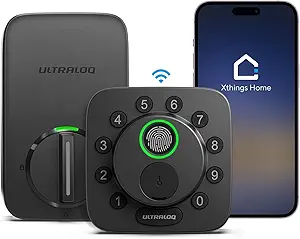 | Best for Versatility and Future-Proof Connectivity | Recommended Uses: front door, back door, garage, rentals | Included Components: 2 Emergency Keys, Installation Kit | Model Number: ULTRALOQ BOLT SE | VIEW ON AMAZON | See Our Full Breakdown |
| Schlage Encode Smart WiFi Deadbolt Lock with Century Trim, Satin Nickel |  | Best Overall Smart Lock for Security and Convenience | Connectivity: WiFi | Control: Schlage Home app, Key by Amazon app | Battery: 4 AA batteries (included) | VIEW ON AMAZON | See Our Full Breakdown |
| smart lock | Battery Life |
|---|---|
| Yale WiFi Smart Lock Deadbolt | — |
| Philips Wi-Fi Smart Deadbolt L | — |
| Schlage Encode Smart WiFi Dead | Up to 6 months |
| Philips Wi-Fi Smart Deadbolt L | — |
| TEEHO TE001 Keyless Entry Dead | Up to 365 days |
| Philips WiFi Keypad Deadbolt w | Up to 6 months |
| eufy Security Smart Lock C220 | 8 months |
| Tapo Smart Wi-Fi Deadbolt Door | Up to 200 days in Wi-Fi mode, 300 days in Bluetooth |
| Teeho TE001 Keyless Entry Dead | — |
| ULTRALOQ Bolt SE Wi-Fi Smart L | Up to 18 months |
| Schlage Encode Smart WiFi Dead | Up to 6 months |
More Details on Our Top Picks
Yale WiFi Smart Lock Deadbolt with Keypad, Keyless Entry, Black Suede
This Yale model earns its place as the best overall by combining multiple access options—keypad, smartphone, Apple Watch—and robust weather resistance, making it suitable for a variety of users. Unlike the Schlage Encode, which focuses heavily on security and voice control, Yale offers automatic unlocking and door sensing, adding convenience. The main tradeoff is the reliance on Wi-Fi, which can complicate setup and limits app control to US and Canada. Its durable construction and customizable codes make it ideal for households needing reliable, all-weather operation—though some may find the setup process complex.
Pros:- Keyless entry with multiple access options including keypad and smartphone
- Remote control and real-time alerts via app
- Weather-resistant for all seasons
- Customizable access codes for multiple users
Cons:- Requires Wi-Fi connection for remote features
- Limited app control to US & Canada
- Setup can be complex for some users
Best for: Homeowners seeking a durable, all-season lock with multiple access methods and remote control capabilities
Not ideal for: Users outside the US or Canada who want straightforward setup without Wi-Fi dependency
- Connectivity:Wi-Fi (2.4 or 5 GHz)
- Control:Smartphone, Apple Watch, Keypad, Backup key
- Certification:Grade 2 BHMA
- Temperature Range:-22°F to 140°F
- Battery Alerts:Low-power notifications
Our verdict“This lock is best for those who prioritize versatility, durability, and remote management in a single package.”
Philips Wi-Fi Smart Deadbolt Lock, Keyless Entry Door Lock
Compared with the Yale, the Philips Wi-Fi Smart Deadbolt emphasizes voice control and multiple unlocking methods, including fingerprint, passcode, and app access, making it highly flexible. Its remote control range of 65 feet and real-time notifications boost security without requiring physical keys. However, it only supports 2.4GHz Wi-Fi, which can limit performance if your network is congested. The use of AA batteries means ongoing replacement, which could be inconvenient over time. This lock is well-suited for tech-savvy users wanting varied access modes but might not satisfy those seeking longer battery life or broader network compatibility.
Pros:- Multiple unlocking methods: app, passcode, fingerprint, voice
- Remote access with real-time notifications
- Easy DIY installation on most doors
- Supports up to 100 passcodes
Cons:- Requires AA batteries (not included)
- Supports only 2.4GHz Wi-Fi networks
- Potential setup complexity for beginners
Best for: Tech-oriented households wanting multiple unlocking options, including voice commands and fingerprint recognition
Not ideal for: Users with limited Wi-Fi bandwidth or those preferring hardwired solutions for consistent power
- Connectivity:Wi-Fi 2.4GHz
- Power:AA alkaline batteries
- Supported door thickness:1-3/8″ to 2″
- Remote control range:65 ft
Our verdict“Ideal for users who want versatile, remote-controlled unlocking with voice and biometric options, accepting some network limitations.”
Schlage Encode Smart WiFi Deadbolt Lock with Century Trim, Matte Black
The Schlage Encode stands out for its security features, including encryption, alarms, and easy integration with Alexa and Google for hands-free control. Unlike the Yale or Philips, it emphasizes high security with longer battery life—up to six months—and straightforward installation, especially for those who prefer a hardwired or non-battery-based setup. Its main drawback is the potential for frequent battery replacements with heavy use. It’s a strong choice for those who want a balance of security, convenience, and ease of use in a modern home environment but may be less appealing to users who prioritize remote control features over all else.
Pros:- Remote management via app
- Works seamlessly with voice assistants for hands-free control
- Easy to install without hardwiring
- High security with encryption and alarms
Cons:- Battery life may require frequent replacement with heavy use
- Requires Wi-Fi for full functionality
- Price point not specified, potentially higher
Best for: Homeowners prioritizing security, voice control, and straightforward installation
Not ideal for: Those seeking advanced biometric options or extended battery life without frequent replacements
- Compatibility:WiFi, Alexa, Google Home
- Finish:Matte Black
- Battery:4 AA batteries
- Battery Life:Up to 6 months
- Door Thickness:1-3/8 in to 1-3/4 in
Our verdict“This lock is perfect for security-conscious users who want voice control and simple installation, accepting moderate battery maintenance.”
Philips Wi-Fi Smart Deadbolt Lock, Keyless Entry Door Lock
Compared to the Yale, the Philips Wi-Fi Smart Deadbolt offers rapid fingerprint recognition (0.3 seconds) alongside multiple unlocking options, including passcodes and voice commands. Its ability to support up to 100 passcodes and provide real-time alerts enhances security, especially for busy households. However, it depends heavily on Wi-Fi, and its setup might be complex for less tech-savvy users. The battery life and frequent need for replacements are tradeoffs for the convenience of rapid biometric access and extensive passcode management. This lock fits households that value speed and multiple access types but require attention to network and power management.
Pros:- Fast fingerprint recognition (0.3 seconds)
- Supports up to 100 passcodes
- Remote access with real-time alerts
- Auto lock and tamper alarms
Cons:- Requires Wi-Fi connection
- Batteries need frequent replacement
- Setup can be complex
Best for: Families seeking quick, reliable biometric access plus extensive passcode options
Not ideal for: Users who prefer simpler, battery-free solutions or have limited Wi-Fi stability
- Unlocking Methods:Fingerprint, Passcode, Key, Voice, Remote App
- Connectivity:WiFi
- Fingerprint Recognition Speed:0.3 seconds
- Number of Passcodes:Up to 100
- Auto Lock:Yes
Our verdict“Designed for fast, multi-method access with security alerts, suitable for tech-savvy households willing to manage power needs.”
TEEHO TE001 Keyless Entry Deadbolt with Keypad for Front Door, Matte Black
The TEEHO TE001 offers a straightforward, keypad-based approach, supporting 20 access codes including a one-time guest code, making it a solid choice for those on a budget. Its weather-resistant design and automatic locking add to daily convenience and security. Unlike the more advanced Philips or Yale models, it relies solely on keypad entry and lacks remote control or app integration, which might limit flexibility. The need to reset before first use and batteries not included are minor inconveniences, but overall, it delivers reliable security at an accessible price point for basic home use.
Pros:- Supports multiple access codes including guest codes
- Automatic locking and low battery indicator
- Weather-resistant construction
- Easy installation with minimal tools
Cons:- Batteries not included
- Not compatible with 38mm door holes
- Requires reset before first use
Best for: Budget-conscious homeowners or renters seeking simple, keyless entry without app dependence
Not ideal for: Tech enthusiasts or users needing remote management and advanced features
- Material:Aluminum alloy
- Battery:4 AA batteries (not included)
- Battery Life:Up to 365 days
- Weather Resistance:IP54
- Door Hole Size Compatibility:2-1/8″ (54mm)
Our verdict“A practical choice for those seeking simple, reliable keypad access without extra bells and whistles.”
Philips WiFi Keypad Deadbolt with Handle, Built-in WiFi, App Remote Control
This Philips model stands out for its straightforward DIY installation, especially with the included handle set, making it accessible for homeowners wary of complex setups. Its built-in WiFi allows for immediate remote control via the app, similar to the ULTRALOQ Bolt SE, but without the need for additional hubs. The support for biometric access, PINs, and voice commands offers versatility, though auto-lock requires manual activation in the app, which could be a minor inconvenience. Compared to the eufy C220, this lock emphasizes ease of use and fast biometric entry, but its battery life of approximately 6 months means frequent replacements, and it is primarily designed for right-opening doors. Overall, this pick is ideal for users seeking a hassle-free, multi-access solution that can be installed quickly without extra hardware.Pros:- Easy DIY installation with included handle set
- Supports multiple access methods: PIN, fingerprint, app, voice
- Remote control and real-time access management via app
Cons:- Batteries not included; need standard alkaline batteries
- Auto-lock feature requires manual activation in the app
- Designed primarily for right-opening doors
Best for: DIY homeowners who want flexible access options and easy installation
Not ideal for: High-security environments or those requiring long-term battery life without frequent replacements
- WiFi Compatibility:2.4GHz WiFi, no hub needed
- Auto-Lock:Yes, customizable from 0-180 seconds
- Battery Life:Up to 6 months
- Battery Type:Standard 1.5V alkaline batteries (not included)
- Installation Thickness:1-3/8″ to 1-3/4″ (38mm to 50mm)
- Fingerprint Speed:0.3 seconds
Our verdict“This lock makes the most sense for users prioritizing simple installation and versatile access methods in a home setting.”
eufy Security Smart Lock C220, Fingerprint Keyless Entry Door Lock
The eufy C220 is distinguished by its comprehensive access options, combining fingerprint, keypad, app, voice, and physical key, making it ideal for households with varied user preferences. Its AI self-learning recognition enhances fingerprint accuracy over time, setting it apart from the ULTRALOQ Bolt SE’s simpler recognition system. Built-in Wi-Fi allows for remote control, and installation is quick—around 15 minutes—similar to the Tapo DL100. However, with a BHMA Grade 3 certification and a waterproof rating of IP53, it offers reliable security but isn’t suited for high-security needs or extreme weather conditions like those faced by the Tapo lock. Battery life can fluctuate with usage, and it’s best for those seeking a well-rounded, durable smart lock for moderate security needs.Pros:- Multiple unlocking options including fingerprint, keypad, app, voice, and key
- Self-learning AI improves fingerprint recognition over time
- Remote control via Wi-Fi without additional hub
Cons:- Battery life may vary significantly with usage
- Limited to BHMA Grade 3 security level
- Requires standard deadbolt compatibility
Best for: Families or small businesses desiring multi-approach access and AI-enhanced recognition
Not ideal for: High-security applications or environments with extreme weather, due to Grade 3 certification and IP53 rating
- Unlock Methods:Fingerprint, app, keypad, voice, physical key
- Battery Life:8 months
- Batteries:8 AA batteries
- Compatibility:Most standard deadbolts, bores under 54mm
- Operating Temperature:-22℉ to 158℉ (-30℃ to 70℃)
- Waterproof Rating:IP53
Our verdict“This lock suits users wanting flexible, multi-mode access with AI features for everyday home or small business use.”
Tapo Smart Wi-Fi Deadbolt Door Lock, Keyless Tactile Buttons, DL100
The Tapo DL100 excels as a weather-resistant, straightforward smart deadbolt, especially suited for users who prefer tactile keypad entry. Its IP54 rating and durable construction make it more resilient in outdoor conditions than some indoor-focused locks like the ULTRALOQ Bolt SE. The multiple unlocking options—keypad, Bluetooth, and app—offer flexibility, but some users may find its app setup a bit complex, and the lock’s security level (BHMA Grade 3) might not satisfy those seeking high-security standards. Installation is simple, fitting standard door holes without extra drilling, and long battery life up to a year minimizes maintenance. Still, it’s better suited for residential use rather than high-security or high-traffic commercial settings.Pros:- Easy installation on standard door holes without drilling
- Long battery life up to 365 days
- Weather-resistant with IP54 rating
Cons:- Requires 4 AA batteries (not included)
- Not compatible with non-standard door sizes
- Reset needed before first use
Best for: Homeowners seeking a weatherproof, easy-to-install keypad lock with basic but reliable security
Not ideal for: Commercial or high-security applications requiring Grade 1 or 2 certification
- Power:4xAA batteries (included)
- Battery Life:Up to 200 days in Wi-Fi mode, 300 days in Bluetooth
- Weatherproof Rating:IP54
- Certification:BHMA Grade 3
- Dimensions (Outdoor):5.88 x 2.65 x 2.2 inches
- Dimensions (Indoor):10.51 x 2.84 x 1.81 inches
Our verdict“This lock is ideal for users wanting durable outdoor keyless entry without complex setup procedures.”
Teeho TE001 Keyless Entry Deadbolt with Keypad for Front Door, Satin Nickel
The Teeho TE001 offers a practical solution for those seeking a straightforward keypad deadbolt with long battery life—up to a year—and weather resistance. Its 20 access codes, including a one-time guest code, make it suitable for family or rental use, and installation is minimal with compatibility for common door sizes. While it lacks smart features like remote app control, it compensates with reliability and simplicity. Compared to the ULTRALOQ Bolt SE, it doesn’t support smartphone access but benefits from a dedicated keypad for quick, keyless entry. However, it requires 4 AA batteries (not included), and resetting is necessary before first use, making it less convenient for tech-savvy users expecting integrated smart features.Pros:- Easy to install with minimal tools
- Long battery life up to 365 days
- 20 user codes, including guest access
Cons:- Requires 4 AA batteries (not included)
- No remote or app control features
- Reset needed before first use
Best for: Rental property owners or families wanting long-lasting, simple keypad security
Not ideal for: Tech enthusiasts seeking remote control or app integration for their locks
- Material:Aluminum alloy
- Battery:4 AA batteries (not included)
- Weather Resistance:IP54
- Number of Access Codes:20
- Compatibility:Suitable for 2-1/8″ (54mm) door holes
- Warranty:2 years
Our verdict“This deadbolt suits users prioritizing long-term, reliable keypad security over smart connectivity.”
ULTRALOQ Bolt SE Wi-Fi Smart Lock with Matter Over Thread
The ULTRALOQ Bolt SE delivers a broad array of access methods, including fingerprint, passcodes, smartphone app, web portal, and voice control, making it one of the most adaptable locks in this lineup. Its ability to support Matter over Thread enhances future compatibility, a key advantage compared to the others which rely solely on Wi-Fi or Bluetooth. Installation is designed to be straightforward, taking about 10 minutes, and its long battery life of up to 18 months reduces maintenance. However, it requires a compatible Matter over Thread hub for remote management, and its lack of a door sensor limits activity monitoring. It’s especially suited for users who want a flexible, future-ready smart lock that can be integrated into a variety of smart home ecosystems.Pros:- Supports multiple access methods including fingerprint, passcodes, app, and voice
- Easy DIY installation in about 10 minutes
- Supports Matter over Thread for future compatibility
Cons:- Requires a compatible Thread hub for remote management
- Door sensor not included, activity monitoring limited
- Limited to 2.4 GHz Wi-Fi network, which may affect connectivity
Best for: Tech-savvy homeowners seeking maximum flexibility with future-proof connectivity options
Not ideal for: Users without a Thread hub or those needing basic smart lock functions without extra setup
- Recommended Uses:front door, back door, garage, rentals
- Included Components:2 Emergency Keys, Installation Kit
- Model Number:ULTRALOQ BOLT SE
- Manufacturer Warranty:Lifetime mechanical, 18-month electronic
- Connectivity:Wi-Fi, supports Matter over Thread
- Battery Life:Up to 18 months
Our verdict“This lock is best for users wanting a highly versatile, future-proof solution that integrates seamlessly with various smart home protocols.”
Schlage Encode Smart WiFi Deadbolt Lock with Century Trim, Satin Nickel
The Schlage Encode stands out for its combination of robust security features and seamless remote access, making it the top pick for those prioritizing safety and ease of use. Unlike the Yale WiFi Lock, which offers keypad options, the Encode’s encrypted WiFi connection and advanced security rating provide a higher level of protection against hacking attempts. Its integration with Alexa and Google Home allows for effortless voice control, and the straightforward installation process accommodates most standard doors without hardwiring. However, its battery life can be a concern for heavy users, as replacing four AA batteries every six months might become frequent. The reliance on WiFi means that remote functionality is unavailable during internet outages, which may be a drawback for users seeking always-on control. Overall, this lock suits homeowners seeking a secure, easy-to-install solution with remote management capabilities, but less ideal for those with inconsistent WiFi or high battery consumption needs.
Pros:- Remote access and control via WiFi and mobile apps
- Compatibility with Alexa and Google Home for voice commands
- No hardwiring required, easy to install
Cons:- Battery life may require frequent replacements with heavy use
- Dependent on WiFi for remote features, limiting control during outages
- Limited to standard door sizes, which may not fit all doors
Best for: Homeowners who want a high-security, WiFi-enabled lock with easy installation and voice control integration.
Not ideal for: Users with unreliable WiFi or those who prefer battery life over frequent replacements; renters or those looking for an ultra-compact lock will find it too bulky.
- Connectivity:WiFi
- Control:Schlage Home app, Key by Amazon app
- Battery:4 AA batteries (included)
- Battery Life:Up to 6 months
- Material:Satin Nickel finish
- Security Rating:Highest BHMA rating
- Compatibility:Standard doors 1-3/8 in to 1-3/4 in thick, 2-3/8 in or 2-3/4 in backset
- Features:Auto-lock, customizable alarm, fingerprint-resistant touchscreen, low-battery indicator
Our verdict“This smart lock is ideal for security-conscious homeowners seeking reliable remote management and voice control, but it may fall short for those with spotty WiFi or high battery drain.”

How We Picked
These smart locks were evaluated based on performance reliability, ease of installation, build quality, and app functionality. We prioritized products that demonstrate consistent connectivity, user-friendly controls, and robust security features. Value was a key factor, but we also considered the longevity and compatibility of each lock with various smart home systems. The ranking reflects a balance between advanced features and practical usability, helping users find options suitable for different budgets and technical comfort levels.Factors to Consider When Choosing Smart Locks
Choosing the right smart lock involves understanding several key factors that impact usability, security, and integration. Beyond simple features, buyers should consider how the lock fits into their existing smart home setup, installation process, and long-term reliability. Making an informed decision means weighing tradeoffs like price versus advanced capabilities, as well as compatibility with your preferred automation ecosystem.Connectivity and Compatibility
Smart locks connect to your home network via Wi-Fi, Bluetooth, or newer standards like Thread and Zigbee. Wi-Fi-enabled locks tend to be the most versatile, offering remote access and integration with voice assistants. Compatibility with your existing smart home hub or ecosystem ensures seamless automation and control. Consider whether you want a lock that works with Alexa, Google Assistant, or Apple HomeKit, and verify that it supports your preferred connectivity standards for future-proofing.
Ease of Installation and Setup
Installing a smart lock can range from straightforward DIY projects to more complex setups requiring professional help. Some models fit standard deadbolt sizes and come with detailed instructions, while others may need additional adapters or modifications. Think about your comfort with tools and whether you prefer a lock that can be installed in minutes or one that might require more effort. Remember, easier installation often correlates with fewer setup frustrations and quicker deployment.
Security Features and Build Quality
Security should be a primary concern; look for locks with tamper alarms, auto-lock features, and high-grade materials like hardened steel. Some locks include biometric options such as fingerprint sensors, adding an extra layer of access control. The durability of the lock, resistance to forced entry, and quality of the keypad or biometric scanner directly influence long-term security. Cheaper models might compromise on these aspects, so balancing cost with security features is essential.
Battery Life and Power Options
Smart locks rely on batteries, making long battery life a vital aspect of ongoing convenience. Check the expected battery lifespan, and whether the lock provides alerts when power is low. Some models include backup power options, such as keypad override or physical keys, which are critical in case of power failure. A lock with frequent battery replacements or complex power management can become more of a hassle over time, so consider models with reliable, long-lasting batteries.
Price and Long-Term Value
Smart locks span a wide price range, from budget-friendly options to premium models with advanced features. While cheaper locks may provide basic keyless entry, they often lack extensive integrations or robust security. Investing in a higher-end lock might be worthwhile if you prioritize seamless smart home integration, better build quality, or future compatibility. Avoid choosing solely on price; instead, assess the features that align with your home security needs and long-term use expectations.
Frequently Asked Questions
Can I install a smart lock myself, or do I need professional help?
Many smart locks are designed for DIY installation and come with detailed instructions, making them accessible for most homeowners. However, if your door has unusual dimensions, existing hardware, or if you want to ensure maximum security, hiring a professional can be beneficial. Proper installation is vital for the lock’s effectiveness, so weigh your comfort level and the complexity of the model before deciding.
Will a smart lock work if the Wi-Fi goes out?
Most Wi-Fi smart locks rely on an internet connection for remote access, but many also support local control via Bluetooth or keypad entry. If your internet service is interrupted, you can often still operate the lock locally, assuming it has Bluetooth or keypad functionality. It’s wise to choose a model with backup entry options, like physical keys, to avoid being locked out during connectivity issues.
Are smart locks secure against hacking?
Smart locks incorporate encryption and security protocols to prevent unauthorized access, but no device is entirely invulnerable. Choosing a lock with strong encryption, frequent firmware updates, and reputable security features reduces risks. Additionally, maintaining your home network’s security—using strong Wi-Fi passwords and enabling two-factor authentication—further safeguards your smart lock from hacking attempts.
How do smart locks integrate with existing smart home systems?
Many smart locks support popular ecosystems like Alexa, Google Assistant, or Apple HomeKit, allowing voice control and automation routines. Compatibility varies among brands, so verify that your preferred system is supported before purchasing. Some locks also work with various hubs or bridges, which can enhance connectivity and integration options, especially if your home has a complex smart setup.
What should I consider regarding battery life and maintenance?
Battery life varies significantly among models, with some lasting months or even a year on a single charge. Features like low-battery alerts and backup power options are important for ongoing convenience. Regularly replacing batteries and monitoring alerts can prevent lockouts due to power failure. Investing in a model with long-lasting batteries and easy replacement features can save time and avoid security issues over time.
Conclusion
For most users seeking a reliable, easy-to-use smart lock, the Yale WiFi Smart Lock offers a compelling combination of performance, security, and compatibility, making it the best overall choice. Budget-conscious homeowners will appreciate the Tapo Smart Wi-Fi Deadbolt for its value, while those prioritizing future-proofing and advanced standards should consider the ULTRALOQ Bolt SE for its Matter support. Beginners or those installing for the first time will find straightforward models like the Schlage Encode particularly user-friendly. Ultimately, your ideal pick depends on your specific needs—security, price, ecosystem compatibility, or ease of installation.